mle2802
Staff
Staff
February 7, 2025

Troubleshooting tip: Error 'Entry not found in datasource' when adding/binding VLAN interface

  • February 7, 2025
  • 0 replies
  • 4617 views
Description This article describes how to troubleshoot and fix the error 'Entry not found in datasource' when adding/binding a VLAN interface. 
Scope FortiGate.
Solution

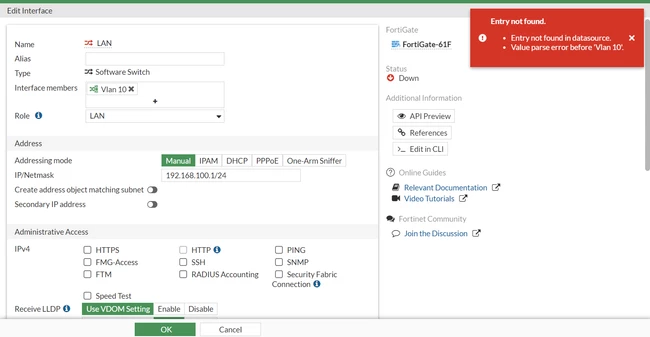
The error 'Entry not found in datasource' is observed when adding a VLAN interface as a member in a software switch.

Screenshot 2025-02-06 215506.png


Checking the software switch interface reveals that there is a VLAN or multiple VLANs binding to it.

Screenshot 2025-02-06 215720.png


Remove the VLAN interface binding to the software switch and try to re-add the other VLAN interface as a member.

Screenshot 2025-02-06 220016.png


Note:
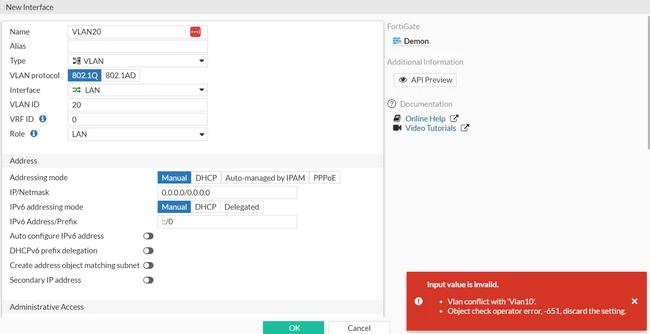
After successfully adding the VLAN as an interface member, when creating a new VLAN and binding it to the software switch, a conflict will occur and the new VLAN will not be possible to bind to the switch itself.

Screenshot 2025-02-07 095523.png


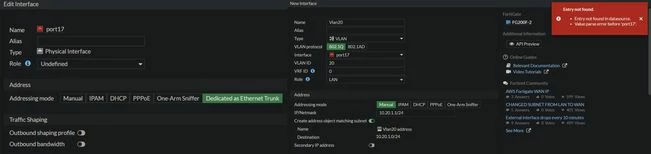
When binding a VLAN interface to a physical interface with the addressing mode set to 'Dedicated as Ethernet Trunk', the same error will be observed.


imgonline-com-ua-twotoone-1PBY7Wwn6WM6qa.jpg

Thought Leadership Security Summit. Outpace New Threats with AI - enhanced defense. Tuesday, Septmeber 15, 8:30 AM - 2:30 PM PT. The Golf Club at Newcastle, WA.
Virtual event | September 2026. SASE summit. The age of autonomous trust. Register here!