Troubleshooting Tip: Cannot Integrate WAN interface to a Zone
| Description | This article describes what to check if errors are received while integrating a WAN interface to a zone. |
| Scope | FortiGate. |
| Solution | Integrating a WAN (Wide Area Network) interface into a zone can occasionally result in errors, preventing successful integration. Below are key issues to check when encountering such errors:
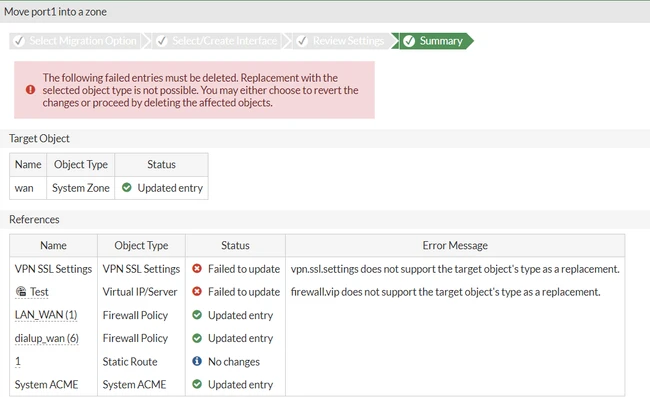
When integrating a WAN interface, ensure that no Virtual IPs (VIPs) are referencing the WAN interface. If VIPs are configured to use the WAN interface, errors may be encountered as shown in the screenshot. To resolve this, check the list of configured VIPs to ensure none are associated with the WAN interface.
Errors may also arise if SSL VPN is configured to use the WAN interface. This can conflict with the WAN integration process. To resolve this, remove the WAN interface from SSL VPN settings. Once the WAN interface is integrated to a Zone, put the Zone in the listening interface under SSL VPN settings.
Related document: Interface migration wizard - FortiGate administration guide. |