MichaelTorres
Staff
Staff
Feb 27, 2025 12:52 PM UTC

Troubleshooting Tip: Cannot explicitly define a source IP in FTP command

Description

This article describes a behavior where users try to run the command execute backup config ftp <filename> <ftp server>[:ftp port] <username> <password> from a remote FortiGate, but it is not possible to define a source IP for this traffic.

Scope Remote FTP Automations from Spoke FortiGates.
Solution

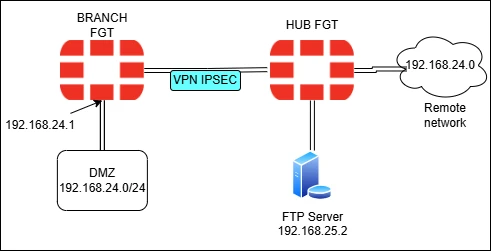
Users might have a topology similar to the following:


Diagram_VPN.png


When users try to execute the FTP command from Branch FortiGate, the instruction will take the IP of the DMZ network interface as a source IP.


In this case, it will take the IP 192.168.24.1.


diag sniffer packet any 'host 192.168.25.2 and port 21 or port 20' 4 0 l
interfaces=[any]
filters=[host 192.168.25.2 and port 21 or port 20]
2025-01-24 10:58:13.901755 VPN out 192.168.24.1.16778 -> 192.168.0.35.21: syn 27887929
2025-01-24 10:58:14.893032 VPN out 192.168.24.1.16778 -> 192.168.0.35.21: syn 27887929


However, the FortiGate HUB has a remote network configured using another path. This will cause the HUB FortiGate to block the traffic due to the RPF mechanism.


FGT_HUB# id=65308 trace_id=298 func=print_pkt_detail line=5802 msg="vd-root:0 received a packet(proto=6, 192.168.24.1:17972->192.168.25.2:21) tun_id=10.0.0.16 from VPN. flag [S], seq 2773337279, ack 0, win 65535"
id=65308 trace_id=298 func=init_ip_session_common line=5986 msg="allocate a new session-066a67ed"
id=65308 trace_id=298 func=ip_route_input_slow line=2267 msg="reverse path check fail, drop"
id=65308 trace_id=298 func=ip_session_handle_no_dst line=6072 msg="trace"


'reverse path check fail' error: Technical Tip: Details about FortiOS RPF (Reverse Path Forwarding), also called Anti-Spoofing


Workarounds:


  1. As explained in Technical Tip: Setting priority on static default routes to create a primary (preferred) and a secondary path, create a route in FortiGate HUB to the network 192.168.24.0/24 with same administrative distance but greater priority.


  1. If users prefer not creating multiple remote subnets to all FortiGate Spokes in FortiGate HUB, follow this steps:


Configure an IP in the VPN interface in both FortiGates:


config system interface

    edit vpn_int

        set ip 10.0.0.1/24

        set remote-ip 10.0.0.2/24

end


This configuration will automatically create a route directly connected in both FortiGates to avoid blocks due to the RPF mechanism.


  • Include the network defined in the interface as part of the selectors in VPN Phase2 configurations '10.0.0.0/24' or, alternatively, configure a general selector 0.0.0.0/0 in both sides of the VPN.


config vpn ipsec phase2-interface
    edit "vpn_selector"
        set phase1name "vpn"
        set proposal aes256-sha256
        set dhgrp 5

        set src-subnet 0.0.0.0 0.0.0.0
        set dst-subnet 0.0.0.0 0.0.0.0
next


  • Include the IP of the VPN in the Firewall policy in FortiGate HUB allowing the communication to the FTP Server.


New solution as of version 7.4:


Starting from version 7.4, a new feature has been deployed in the static route settings that makes it possible to change the Source IP of the local FTP Traffic.

See Direct FortiGate TFTP Traffic.

    Risk and Resilience in the Age of AI. An OT Thought Leadership Summit for Houston's Critical Infrastructure Leaders. Date: Thursday, December 3, 2026. Time: 8:30 am - 1:30 pm (CT). Location: The Westin Houston, Memorial City | 945 Gessner Road, Houston, TX 77024