Troubleshooting Tip: Automatically added entry in IP/MAC binding table
| Description | This article describes how to troubleshoot an issue where entries are automatically added in an IP/MAC binding table. |
| Scope | Fortigate |
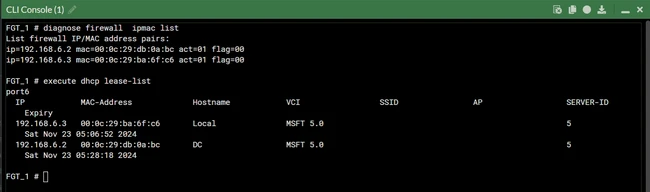
| Solution | Checking the IP/MAC table config, only one entry is configured FGT_1 # config firewall ipmacbinding table FGT_1 (table) # show edit 1 set ip 192.168.6.10 set mac 00:0c:29:ba:6f:c6 set status enable next
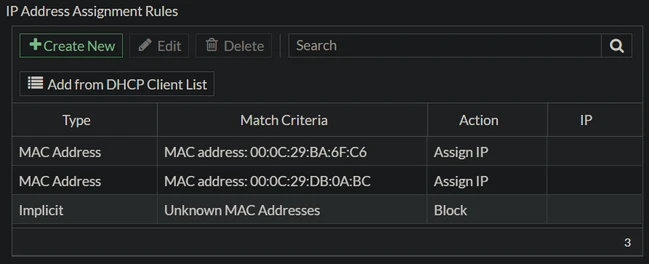
This is the behavior when the command 'set ipmac enable' is configured on the interface which has DHCP server enabled. All DHCP leases will be added in the IP/MAC database automatically. To avoid this behavior, 'IP Address Assignment Rules' can be used to block the DHCP request and assign an IP only for the trusted host. Verify the DHCP lease and the IP/MAC table again: |