


Technical Tip: VXLAN over IPsec for multiple VLANs using software switch
Description
This article describes how to configure VXLAN over IPsec for multiple VLANs.
Scope
FortiGate.
Solution
Virtual Extensible LAN (VXLAN) is a network virtualization technology used in large cloud computing deployments. It encapsulates OSI layer 2 Ethernet frames within layer 3 IP packets using standard destination port 4789.
WAN interface configuration.
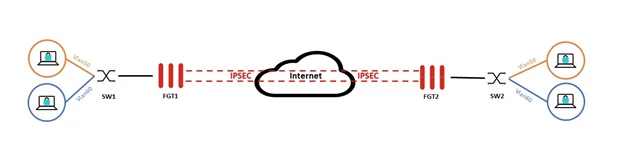
This configuration is focused on how to configure two or more VLANs, which can be used with VXLAN to extend the Layer2 connectivity across two different locations.
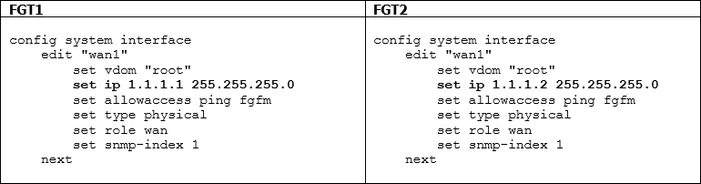
Make sure that connectivity between both FortiGates is working to bring the IPsec tunnel up.
Configuring an IPsec VPN tunnel:
Note: The 'set encapsulation vxlan' config in the IPsec tunnel has already been deprecated.
FGT1: | FGT2: |
Phase1 config:
Phase2 config:
Tunnel interface config:
| Phase1 config:
Phase2 config:
Tunnel interface config: |
This configuration will bring the IPsec tunnel up. Verify it as well.
It may be required to create a policy from the interface 'ipsec' to 'ipsec' so the tunnel can go up (tested in FortiOS v7.0.11).
config firewall policy
   edit 0
        set name "IPSECTUNNELPolicy"
        set srcintf "ipsec"
        set dstintf "ipsec"
        set action accept
        set srcaddr "all"
        set dstaddr "all"
        set schedule "always"
        set service "ALL"
    next
end
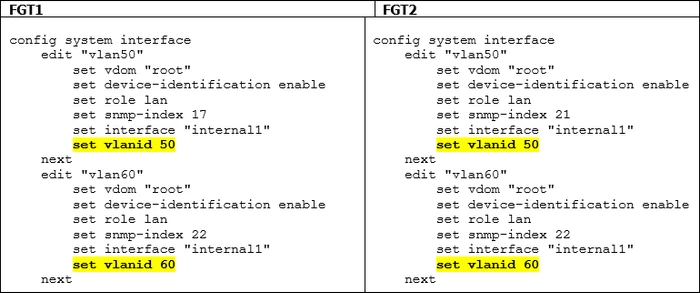
Configure VLAN interfaces.
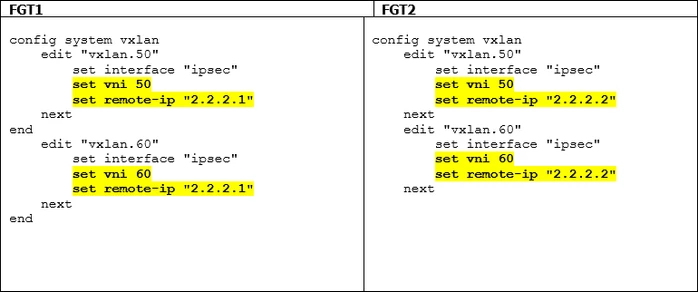
Configure VXLAN interfaces for both VLANs.
Configure the software switch interface:
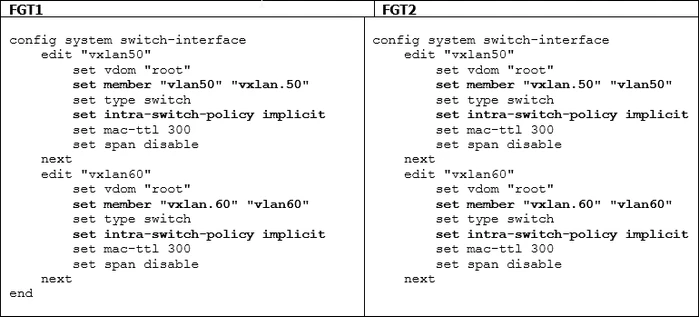
Note: If the VLAN and VXLAN members are not selectable when creating the software switch interface, ensure that the members are not referenced in any configuration.
Test the connectivity by pinging the client connected to VLAN50 on 'SW1' towards the client connected to VLAN50 on 'SW2'. Also, test the connectivity from the client connected to VLAN50 on 'SW2' towards the client connected to VLAN50 on 'SW1'.
Repeat the same test for the client in VLAN60.
In this setup, no firewall policies would be required. The reason for this is the option 'set intra-switch-policy implicit' configured under 'config system switch-interface' for both VLANs. With an intra-switch-policy implicit, some limitations are expected. More information can be found in Technical Tip: Software switch and intra-switch-policy.
If there is a requirement to use firewall policies, this option needs to be changed.
Do not configure VLAN1 in the FortiGate as it is not recommended, and FortiGate uses VLAN1 for internal communication between FortiGate and FortiSwitch.
Notes:
The following article discusses how to bridge two different LANs (not VLANs) using VXLAN over IPsec: VXLAN over IPSEC to link local LANs.
If both FortiGates are in an HA pair, change the HA group ID for one of the clusters. When FortiGates are in a cluster, they will use virtual MAC addresses. Switch interfaces on both sides can have the same virtual MAC address, which will result in connectivity issues.
The VLAN interface must be free of references and must not have any IP addresses added under the software switch.
The hosts must have a single gateway, or it will prevent inter-VXLAN traffic from working properly if hosts on Site A have the gateway of the software switch from Site A, while hosts on Site B have the gateway of the software switch from Site B.
DHCP cannot be provided directly by the VLAN once it is added to the software switch. If DHCP is still required from the FortiGate and no external DHCP server is available, configure the software switch on one side as the DHCP server for each VLAN pair.
DHCP must be enabled on only one side of the software switch (either Site A or Site B). Enabling DHCP on both sides will result in conflicts. Additionally, devices may lose their IP addresses if the IPsec tunnel goes down, as one site relies on DHCP over IPsec from the remote software switch.
Best Practice: Use dedicated DHCP servers. Configure the default gateway as the software switch IP for each VLAN on the respective software switch containing the VLAN and VXLAN interfaces.
If there are two VLANs, two software switches are required, each containing the VLAN and VXLAN interfaces with DHCP enabled.
The VXLAN Network Identifier (VNI) must match on both FortiGates, otherwise traffic will not flow through the intended overlay network.
Traffic Flow of VxLAN over IPSec:
For traffic within the same subnet, the firewall receives the traffic on the VLAN and forwards it into the VXLAN tunnel, where it is encapsulated using UDP port 4789. Since the destination IP of the VXLAN packet corresponds to the remote VTEP (overlay IP reachable via the IPsec tunnel), the VXLAN traffic is further encapsulated within ESP and transmitted over the IPsec tunnel to the remote site, where it is decapsulated.
If a client within a VLAN requires internet access, the firewall performs a routing lookup and forwards the traffic out through the WAN interface. This requires an appropriate firewall policy from the software switch to the WAN interface.
To verify that traffic is traversing the IPsec tunnel, capture packets on UDP port 4789 on the IPsec interface.
Related articles:

