


Technical Tip: Virtual wire pairs
Description
This article describes frequently asked questions about virtual wire pairs.
Scope
FortiGate.
Solution
Regarding Virtual Wire Pairs, refer first to the following section of the FortiOS Admin Guide: Virtual wire pair.
In a virtual wire pair, ARP traffic is forwarded between the two member interfaces without requiring a firewall policy.
The following CLI commands show how to configure a virtual wire pair:
config system virtual-wire-pair
    edit "virtualWP"
        set member "port2" "port3"
    next
end
Interfaces used in a virtual wire pair cannot be used to access the FortiGate. Configure a different interface for administrative access before creating the virtual wire pair.
Link Monitor (Failure Detection) on Virtual Wire Pairs:
Link monitoring can be enabled on interfaces that are part of a virtual wire pair.
To enable failure detection:
config system interface
    edit "port2"
        set vdom "root"
        set fail-detect enable
        set fail-alert-interfaces "port3"
        set type physical
    next
end
With this configuration:
If port2 goes down, FortiGate will automatically bring down port3 as well, and vice versa if configured symmetrically.
This ensures link failure propagation across the virtual wire pair.
diagnose sniffer packet any "host 10.1.1.8" 4 0 l
Using Original Sniffing Mode
interfaces=[any]
filters=[host 10.1.1.8]
2023-02-09 04:10:13.071607 port2 in arp who-has 10.1.1.5 (ff:ff:ff:ff:ff:ff) tell 10.1.1.8
2023-02-09 04:10:13.071621 port3 out arp who-has 10.1.1.5 (ff:ff:ff:ff:ff:ff) tell 10.1.1.8
2023-02-09 04:10:13.073460 port3 in arp reply 10.1.1.5 is-at 50:00:00:02:00:00
2023-02-09 04:10:13.073464 port2 out arp reply 10.1.1.5 is-at 50:00:00:02:00:00
To identify the traffic flowing through a virtual wire pair:
Use a flow filter to monitor packets passing through a virtual wire pair. If traffic is denied, the flow-debug output may include messages such as the following:
id=65308 trace_id=1 func=print_pkt_detail line=5895 msg="vd-root:0 received a packet(proto=1, 10.1.1.8:6116->10.1.1.5:2048) tun_id=0.0.0.0 from port2. type=8, code=0, id=6116, seq=1."
id=65308 trace_id=1 func=init_ip_session_common line=6076 msg="allocate a new session-000001f0, tun_id=0.0.0.0"
id=65308 trace_id=1 func=br_fw_forward_handler line=568 msg="Denied by forward policy check"
To check a virtual-wire-pair policy from the CLI:
The virtual-wire-pair policy can only be created under the firewall policy. The interface will not appear under the Select Entries options. Make sure to remove all references to the interfaces.
Adding a VLAN or IPsec interface to a virtual wire pair:
Physical, VLAN, redundant, and 802.3ad aggregate (LACP) interfaces can be added to a virtual wire pair. In FortiOS versions 7.6 and 8.0, interfaces configured with DHCP addressing cannot be added to a virtual wire pair.
Interfaces that are part of a switch, such as the default LAN/internal interface, cannot be added to a virtual wire pair.
To fix an issue where the virtual-wire-pair field is greyed out and cannot be edited:
Check whether a policy has already been created for a virtual wire pair. Go to Policy & Objects -> Firewall Virtual Wire Pair Policy:

Fixing a scenario where only one-way communication is happening in the virtual wire pair:
To allow traffic in both directions, select both directions in the virtual wire pair policy.
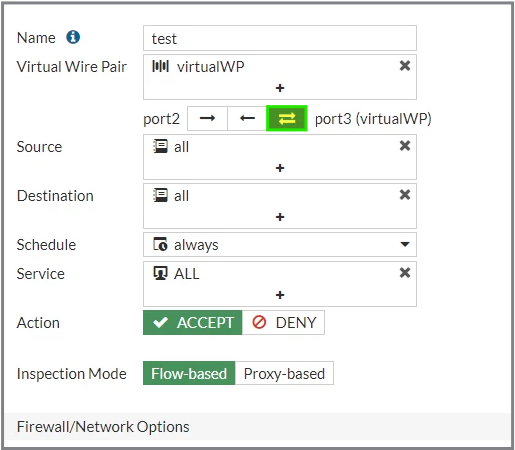
Forwarding the traffic from one virtual wire pair to another virtual wire pair:
This is not possible. A virtual wire pair consists of two interfaces that do not have IP addressing and are treated like a transparent mode VDOM. All traffic received by one interface in the virtual wire pair can only be forwarded to the other interface.
Multiple virtual wire pairs can be included in a single policy in NGFW profile-based and policy-based modes when Wildcard VLAN is enabled on the virtual wire pairs.
Adding more than two interfaces to a virtual wire pair:
This is not possible. A virtual wire pair can contain only two interfaces.
Why virtual wire pairs are used:
When a virtual wire pair is in use, FortiGate does not perform a reverse path check, use the routing table to select the egress interface, or maintain ARP entries for source or destination IP addresses.
Virtual wire pairs are useful in topologies where MAC address behavior does not follow the typical request-and-response pattern. For example, port pairing can be used in a Direct Server Return (DSR) topology, where the response MAC address pair may not match the request MAC address pair.
If a matching policy exists, ingress traffic is forwarded through the other member interface of the virtual wire pair.
FortiGate inspects traffic passing through a virtual wire pair.
FortiGate maintains sessions for the traffic and inspects the packets.
Applying NAT in a virtual wire pair:
NAT can be enabled in a virtual wire pair policy by using a Dynamic IP Pool. The 'Use Outgoing Interface Address' option is not available because virtual wire pairs do not have an IP address.
Connecting both wire pair interfaces on the same switch:
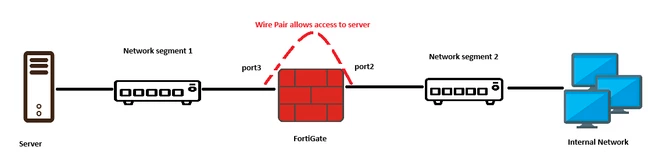
Do not connect both interfaces of a virtual wire pair to the same switch. This can create a Layer 2 loop and cause unexpected traffic behavior.
FortiGate operates as an internal segmentation firewall when the protected server is directly connected to the first virtual wire pair interface and the other interface is connected to a different network segment.
Related article:
Technical Tip: How to capture packets on a virtual wire pair (VWP) interface

