


Technical Tip: Using same the CSR on another FortiGate
Description
This article describes how to use the same CSR on another FortiGate.
Scope
FortiGate.
Solution
- Generate the CSR on the FortiGate, make sure to save the password correctly needed on another FortiGate as below.
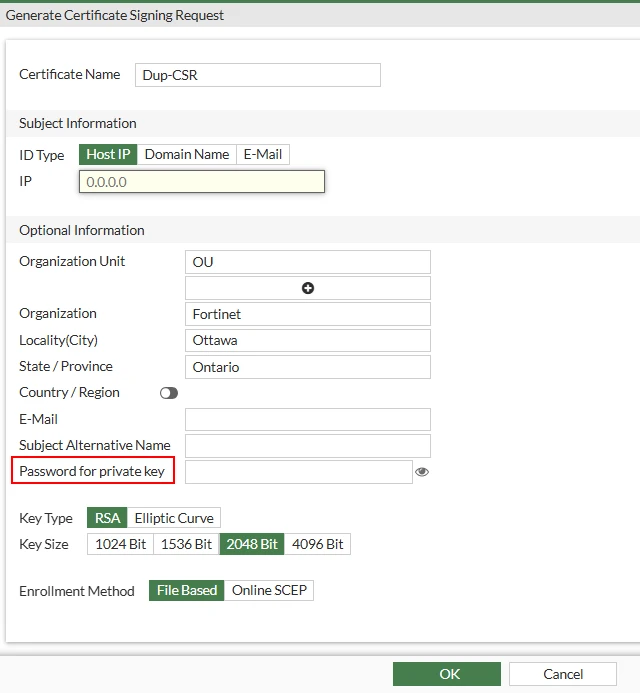
NOTE: If no password is provided, FortiGate will automatically generate a random password and use it to encrypt the private key to ensure its security. Fortinet does not provide assistance with private key password recovery.
- Here is how to generate a CSR on FortiGate as described in the Administration Guide: Generate a CSR | Fortinet Document Library.
- Below, it is possible to see the CSR generated named 'Dup-CSR' on LDAPS FortiGate:

- Open the CSR in the CLI using the following commands:
config vpn certificate local
edit Dup-CSR
show full - Copy everything except the password, range, and source as below and open another FortiGate.
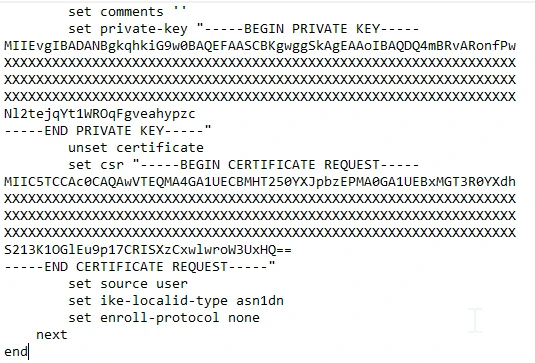
- Once done, open the CLI console and run the below commands to add the Dup-CSR entry on new FortiGate.
config vpn certificate local
edit Dup-CSR - After that run the below command and paste the configuration copied from another FortiGate:
set password <password> (Use the same password saved in step 1) - It is possible to see below the same CSR is generated on another FortiGate HUB:

- When everything is done, it is possible to get the certificate signed and import it to both the FortiGate as described on the Administration Guide: Procuring and importing a signed SSL certificate | Fortinet Document Library.
