



Technical Tip: Upgrading FSSO TS-Agent
Description
This article describes how to upgrade FSSO Terminal Server Agent.
Solution
To upgrade FSSO Terminal Agent installed in MS AD environment.
Upgrading TS Agent.
1) Download the installer from https://support.fortinet.com/Download/FirmwareImages.aspx by navigation to FSSO folder under FortiOS, which communicates with the Collector Agent(s).
It is possible to choose between TSAgent_Setup_5.0.0xxx.exe or TSAgent_Setup_5.0.0xxx.msi, depending on the requirements.
This article describes how to upgrade FSSO Terminal Server Agent.
Solution
To upgrade FSSO Terminal Agent installed in MS AD environment.
Upgrading TS Agent.
1) Download the installer from https://support.fortinet.com/Download/FirmwareImages.aspx by navigation to FSSO folder under FortiOS, which communicates with the Collector Agent(s).
It is possible to choose between TSAgent_Setup_5.0.0xxx.exe or TSAgent_Setup_5.0.0xxx.msi, depending on the requirements.
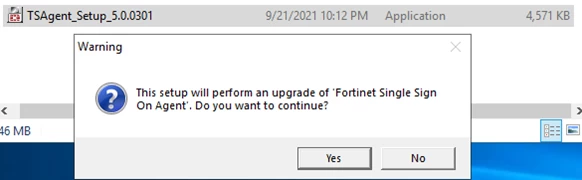
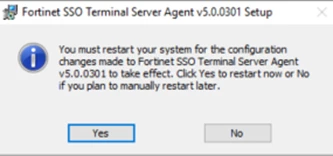
2) Confirm all steps after which the installation will finish. Upgrading TS Agent requires reboot.
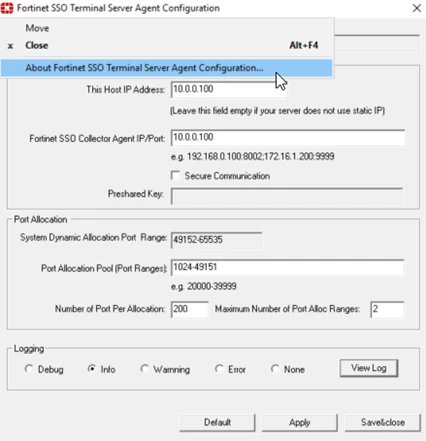
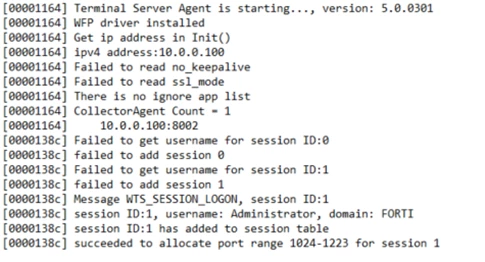
3) Check the new version by selecting Fortinet icon in the top corner of TS Agent GUI window or in the any of the log files:
Related Articles