Technical Tip: Unable to select the target interface while using the Integrate Interface feature
| Description | This article describes while integrating an interface to a target interface, the option for the target interface is not visible. |
| Scope | FortiGate. |
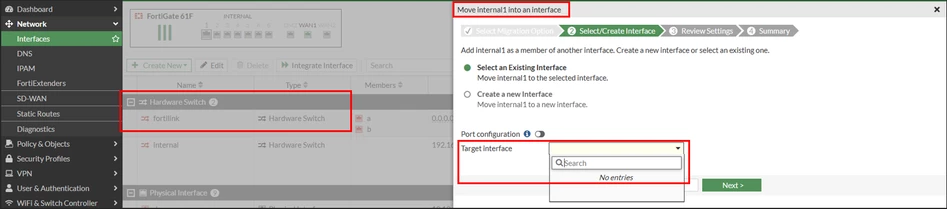
| Solution | For example, there can be a scenario where the user is not able to see FortiLink as an option while integrating an interface as shown below:
The user is trying to integrate the internal1 interface to FortiLink but FortiLink is not coming up in the target interface list:
The reason behind this is that FortiLink is configured as a Hardware switch. To integrate an interface to FortiLink , change the type of FortiLink interface to an aggregate interface.
To do that, refer to this article: Technical Tip: How to convert a Hardware Switch or Software Switch into an Aggregate without reconfiguration
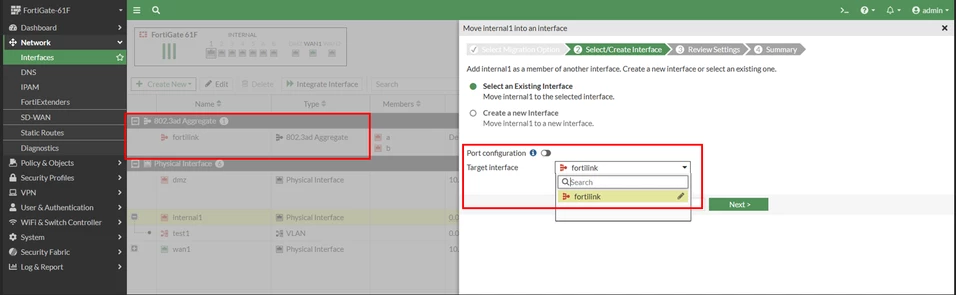
Once this is done, the option to integrate into FortiLink should be visible:
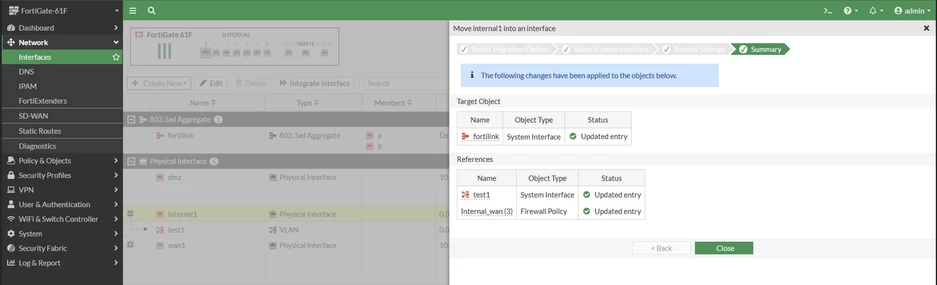
Policies and Vlans associated with the internal1 interface moved to FortiLink interface:
|