qyah
Staff
Staff
June 9, 2025

Technical Tip: Unable to Create Predefined Bookmarks for HTTP/HTTPS under SSL VPN Web Mode

  • June 9, 2025
  • 0 replies
  • 377 views
Description This article describes that the predefined HTTP/HTTPS bookmark is not showing on the user interface, despite having been created under the FortiGate GUI.
Scope FortiGate v7.2.X and v7.4.X.
Solution
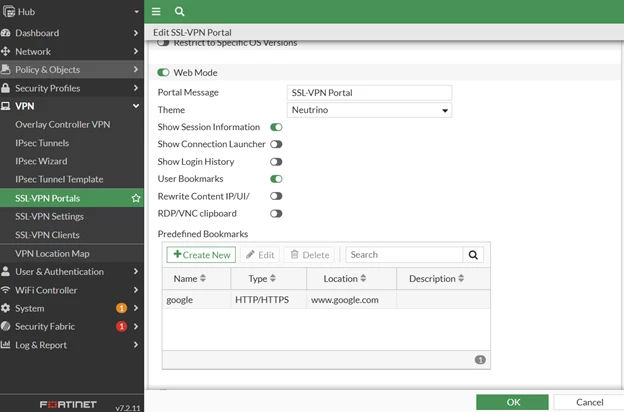
  1. The predefined bookmark has been created under the SSL-VPN portals with the web mode enabled, but when trying to log in, the HTTP/HTTPS bookmark is not being observed:


On the FortiGate GUI:


Picture1.png


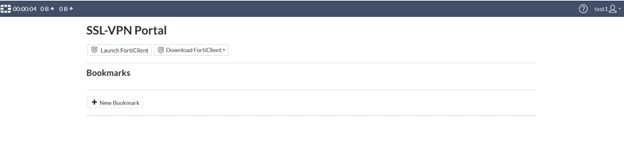
On the login page, the predefined HTTP/HTTPS bookmark is not being observed:


Picture2.png


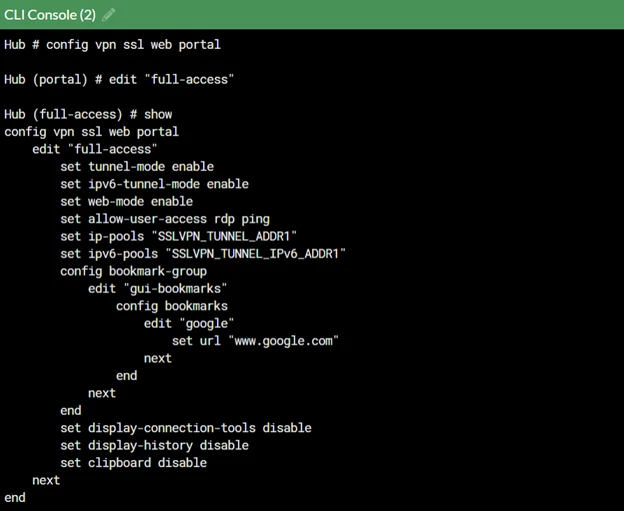
  1. This is due to the below settings under set allow-user-access web is not being allowed under the VPN SSL web portal, which is only able to change it under the CLI command:


Picture3.png


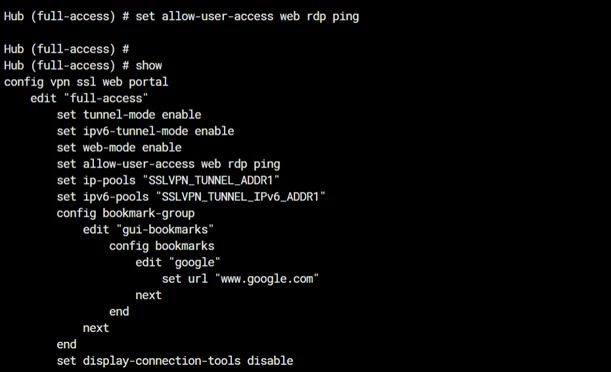
  1. To resolve this, add the web under the set allow access as below:


Picture4.png


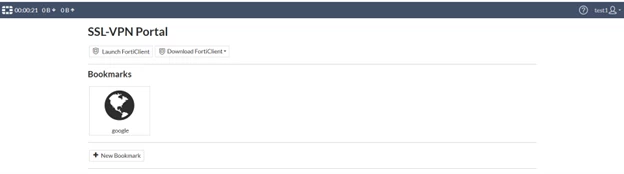
4. Once the command is configured, the bookmark will be able to be observed on the user interface:


Picture5.png