


Technical Tip: System events default dashboard
Description
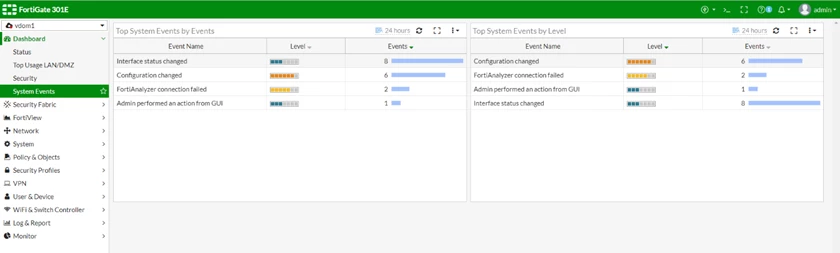
This article describes system events dashboard which contains two widgets by default:
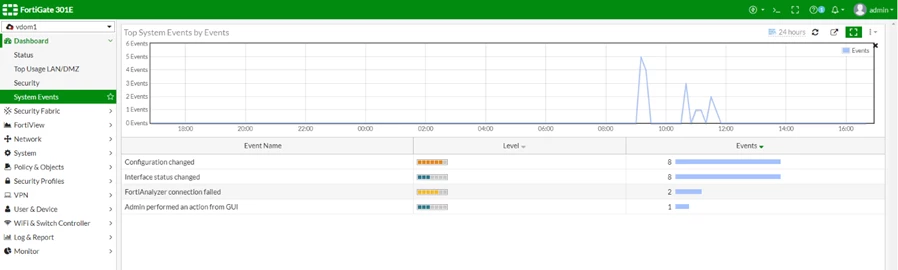
- Top system vvents by events (sorted by event count).
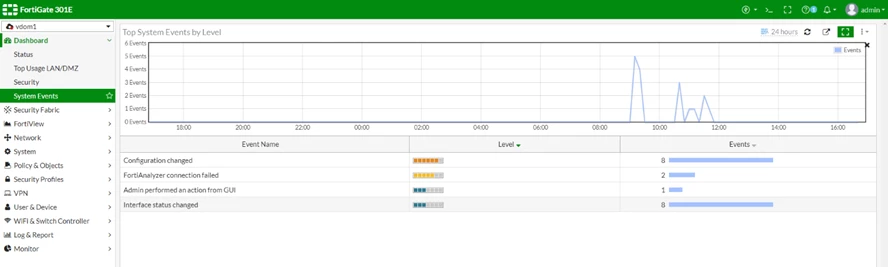
- Top System Events by Level (sorted by event severity).
Solution
1) Go to Dashboard -> System Events. The default dashboard appears.
This article describes system events dashboard which contains two widgets by default:
- Top system vvents by events (sorted by event count).
- Top System Events by Level (sorted by event severity).
Solution
To view the System Events dashboard from GUI.
2) Select the expand to full screen icon within a widget to view additional details, such as historical trending charts.
- Full screen view of Top System Events by Events widget:
- Full screen view of top system events by Level widget:
3) Select an event entry to view the specific event log.

