Technical Tip: SSL VPN certificate replacement
| Description | This article describes the process of replacing the old certificate with a new one in SSL VPN settings. |
| Scope | FortiGate v6.4 or above. |
| Solution | Changing the certificate while there are users connected will disconnect them. Consider making any certificate changes in a maintenance window or when there are no users connected. This is applicable for the intermediate CA cert as well, see: Technical Tip: Importing the intermediate CA certificate while the endpoints are connecting to the SSL VPN tunnel
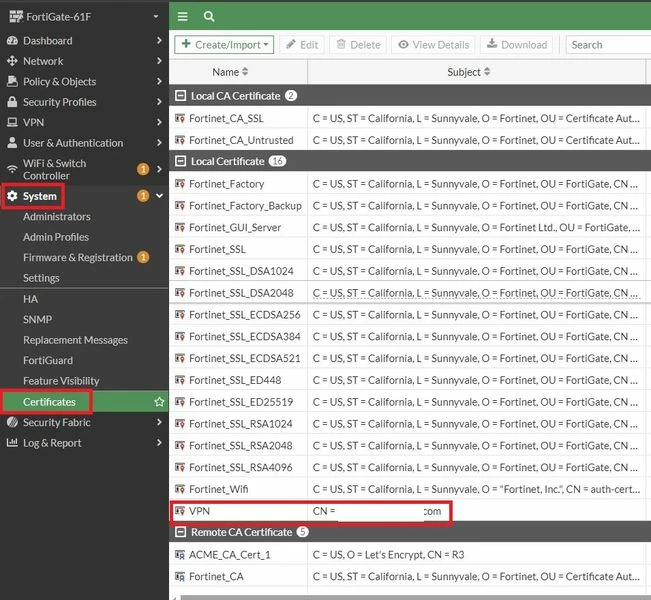
Make sure to have the SSL-VPN cert imported on the FortiGate. To import the SSL VPN certificate, refer to this article Technical Tip: FortiGate HTTPS/SSL Certificate Installation (PFX, PKCS12 and PEM)
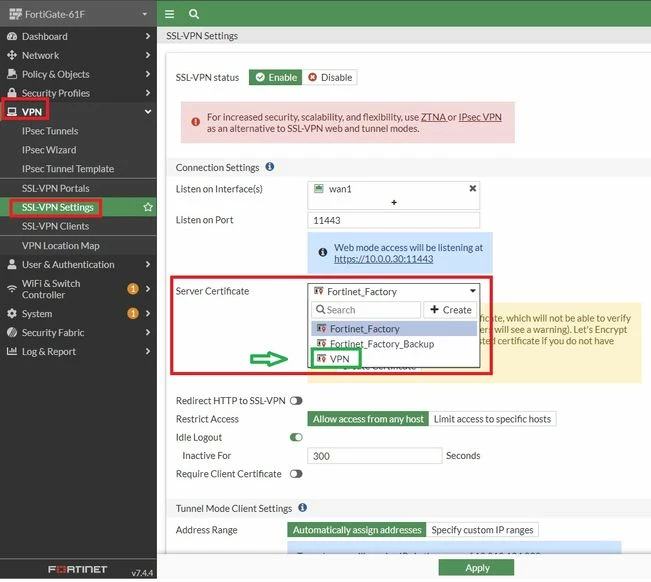
Once imported, there are two ways to accomplish this task of SSL VPN certificate replacement.
From GUI :
From CLI :
FortiGate-61F # config vpn ssl settings FortiGate-61F (settings) # show set banned-cipher SHA1 SHA256 SHA384 edit 2 set groups "SSL-VPN" set portal "full-access" end end FortiGate-61F (settings) # set servercert Fortinet_Factory local FortiGate-61F (settings) # set servercert VPN FortiGate-61F (settings) # end
To know how to procure and import a signed SSL certificate, refer to this document: Procuring and importing a signed SSL certificate
Note: After replacing the SSL VPN certificate, some clients may still observe the previous certificate due to WAD process caching. To ensure the new certificate is actively used:
Use with caution and consider performing wad process restart during a maintenance window. This action reloads WAD-related services and may impact:
- other proxy related traffic
Related articles: Technical Tip: FortiGate HTTPS/SSL Certificate Installation (PFX, PKCS12 and PEM) |