



Technical Tip: SLA Logging
Description
This article shows the new FortiOS 6.2 feature that keep a short, 10 minute history of SLA that can be viewed in the CLI.
Performance SLA results related to interface selection, session fail over, and other information, can be logged.
These logs can then be used for long-term monitoring of traffic issues at remote sites, and for reports and views in FortiAnalyzer.
The time intervals that Performance SLA fail and pass logs are generated in can be configured.
Solution
As the SD-WAN CLI syntax has changed in 6.4, please note the different syntax for FortiOS 6.2.
To configure the fail and pass logs' generation time interval:
For FortiOS 6.2:
For FortiOS 6.2.
SLA pass logs.
The FortiGate generates Performance SLA logs at the specified pass log interval (sla-pass-log-period) when SLA passes.
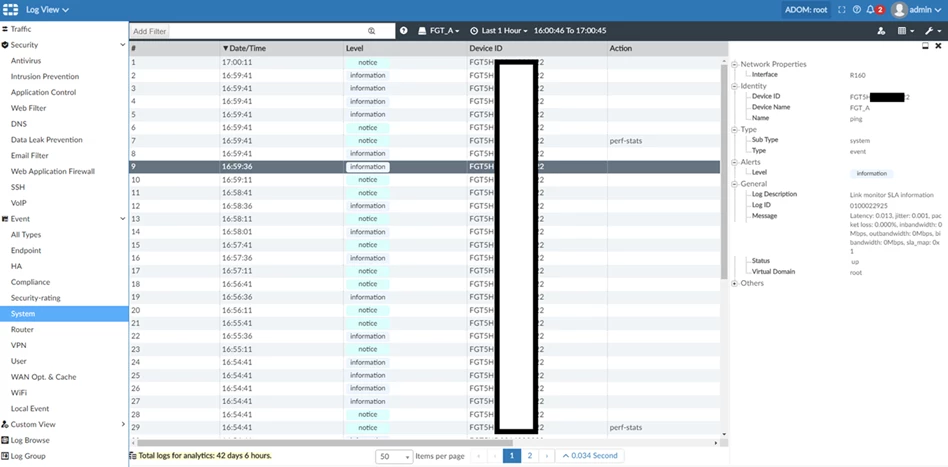
On FortiAnalyzer firmware branch 6.2 SLA logs were displayed under Event -> System.
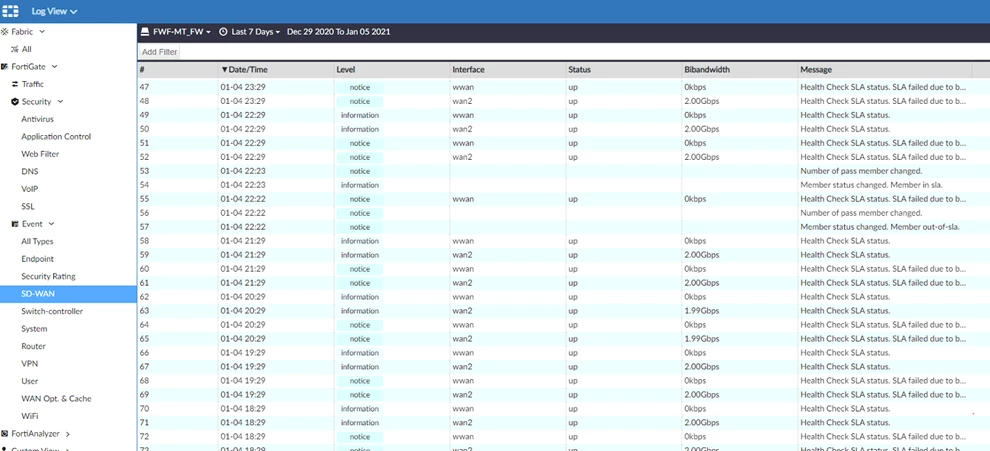
This was separated and changed in 6.4 to Event -> SD-WAN.
SLA logs displayed on FortiAnalyzer 6.2:
The FortiGate generates Performance SLA logs at the specified fail log interval (sla-fail-log-period) when SLA fails.
In the FortiAnalyzer GUI:
This article shows the new FortiOS 6.2 feature that keep a short, 10 minute history of SLA that can be viewed in the CLI.
Performance SLA results related to interface selection, session fail over, and other information, can be logged.
These logs can then be used for long-term monitoring of traffic issues at remote sites, and for reports and views in FortiAnalyzer.
The time intervals that Performance SLA fail and pass logs are generated in can be configured.
Solution
As the SD-WAN CLI syntax has changed in 6.4, please note the different syntax for FortiOS 6.2.
To configure the fail and pass logs' generation time interval:
For FortiOS 6.2:
# config system virtual-wan-linkFor FortiOS 6.4:
# config health-check
edit "ping"
set sla-fail-log-period 30
set sla-pass-log-period 60
next
end
end
# config system sdwanTo view the 10-minute Performance SLA link status history:
# config health-check
edit "ping"
set sla-fail-log-period 30
set sla-pass-log-period 60
next
end
end
For FortiOS 6.2.
# diagnose sys virtual-wan-link sla-log ping 1For FortiOS 6.4.
# diagnose sys sdwan sla-log ping 1
Timestamp: Thu Feb 28 10:58:24 2019, vdom root, health-check ping, interface: R150, status: up, latency: 0.000, jitter: 0.000, packet loss: 0.000%.
Timestamp: Thu Feb 28 10:58:24 2019, vdom root, health-check ping, interface: R150, status: up, latency: 0.097, jitter: 0.000, packet loss: 0.000%.
Timestamp: Thu Feb 28 10:58:25 2019, vdom root, health-check ping, interface: R150, status: up, latency: 0.058, jitter: 0.040, packet loss: 0.000%.
Timestamp: Thu Feb 28 10:58:25 2019, vdom root, health-check ping, interface: R150, status: up, latency: 0.044, jitter: 0.026, packet loss: 0.000%
SLA pass logs.
The FortiGate generates Performance SLA logs at the specified pass log interval (sla-pass-log-period) when SLA passes.
3: date=2019-02-28 time=11:53:26 logid="0100022925" type="event" subtype="system" level="information" vd="root" eventtime=1551383604 logdesc="Link monitor SLA information" name="ping" interface="R160" status="up" msg="Latency: 0.013, jitter: 0.001, packet loss: 0.000%, inbandwidth: 0Mbps, outbandwidth: 0Mbps, bibandwidth: 0Mbps, sla_map: 0x1"In the FortiAnalyzer GUI the location of the SLA logs can also differ.
7: date=2019-02-28 time=11:52:26 logid="0100022925" type="event" subtype="system" level="information" vd="root" eventtime=1551383545 logdesc="Link monitor SLA information" name="ping" interface="R160" status="up" msg="Latency: 0.013, jitter: 0.002, packet loss: 0.000%, inbandwidth: 0Mbps, outbandwidth: 0Mbps, bibandwidth: 0Mbps, sla_map: 0x1"
On FortiAnalyzer firmware branch 6.2 SLA logs were displayed under Event -> System.
This was separated and changed in 6.4 to Event -> SD-WAN.
SLA logs displayed on FortiAnalyzer 6.2:
SLA logs displayed on FortiAnalyzer 6.4:
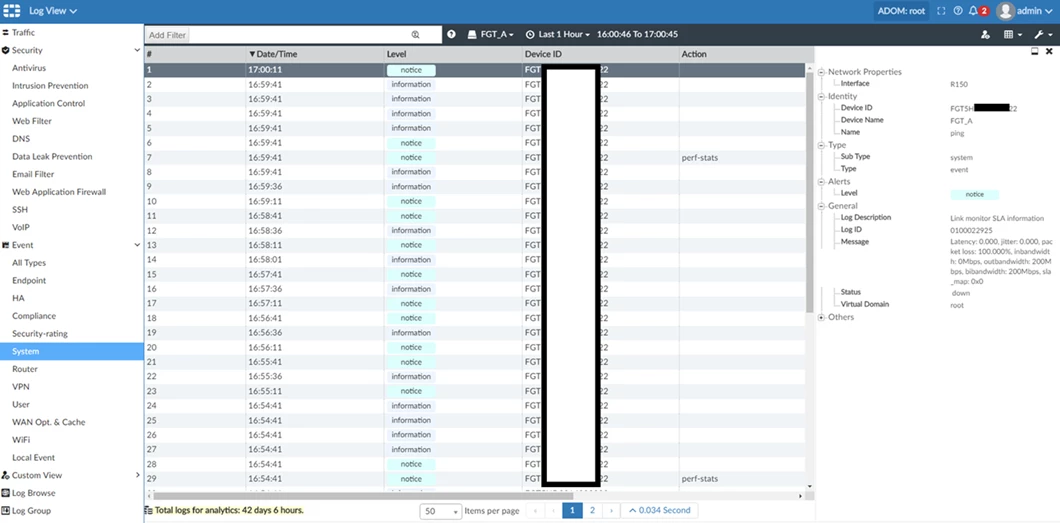
SLA fail logs.
The FortiGate generates Performance SLA logs at the specified fail log interval (sla-fail-log-period) when SLA fails.
6: date=2019-02-28 time=11:52:32 logid="0100022925" type="event" subtype="system" level="notice" vd="root" eventtime=1551383552 logdesc="Link monitor SLA information" name="ping" interface="R150" status="down" msg="Latency: 0.000, jitter: 0.000, packet loss: 100.000%, inbandwidth: 0Mbps, outbandwidth: 200Mbps, bibandwidth: 200Mbps, sla_map: 0x0"
8: date=2019-02-28 time=11:52:02 logid="0100022925" type="event" subtype="system" level="notice" vd="root" eventtime=1551383522 logdesc="Link monitor SLA information" name="ping" interface="R150" status="down" msg="Latency: 0.000, jitter: 0.000, packet loss: 100.000%, inbandwidth: 0Mbps, outbandwidth: 200Mbps, bibandwidth: 200Mbps, sla_map: 0x0"
In the FortiAnalyzer GUI:

