


Technical Tip: Simple OCVPN deployment
Description
This article demonstrates the deployment of OCVPN (Overlay Controller Virtual Private Network).
OCVPN is meant to be really fast and easy to configure because it will automatically create:
- Local and remote address groups.
- Routes.
- Policies.
- Phase 1 Configuration (+ tunnel interface).
- Phase 2 Configuration.
In this setup, there is the following:
- FortiGate VM01 with user Subnet 192.168.1.0/24 on port2.
- FortiGate VM02 with user subnet 192.168.2.0/24 on port2.
The aim is to be able to communicate between these 2 subnets by using an IPsec VPN.
Both FortiGates need to be registered on the support.fortinet.com portal (FortiCare).
Scope
FortiGate.
Solution
Go on the GUI under VPN -> Overlay Controller VPN of the first FortiGate VM01.
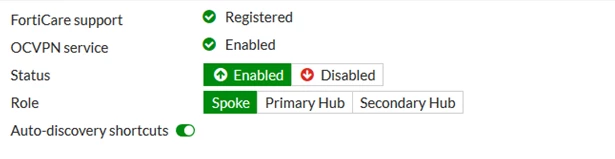
- Select 'Enabled' and role 'Spoke'.
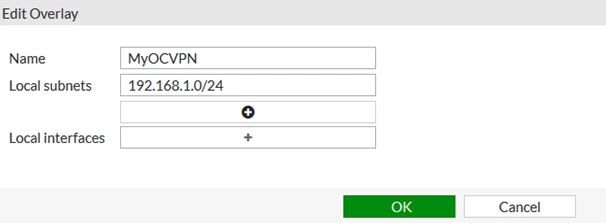
- After that, select 'Create New' under Overlays. Then enter the local subnet from VM01, which is in this case 192.168.1.0/24:
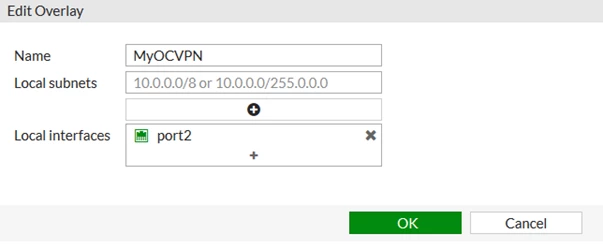
Configuring the local subnet as 192.168.2.0/24 via the menu will also work.
After setting this select 'Apply'.
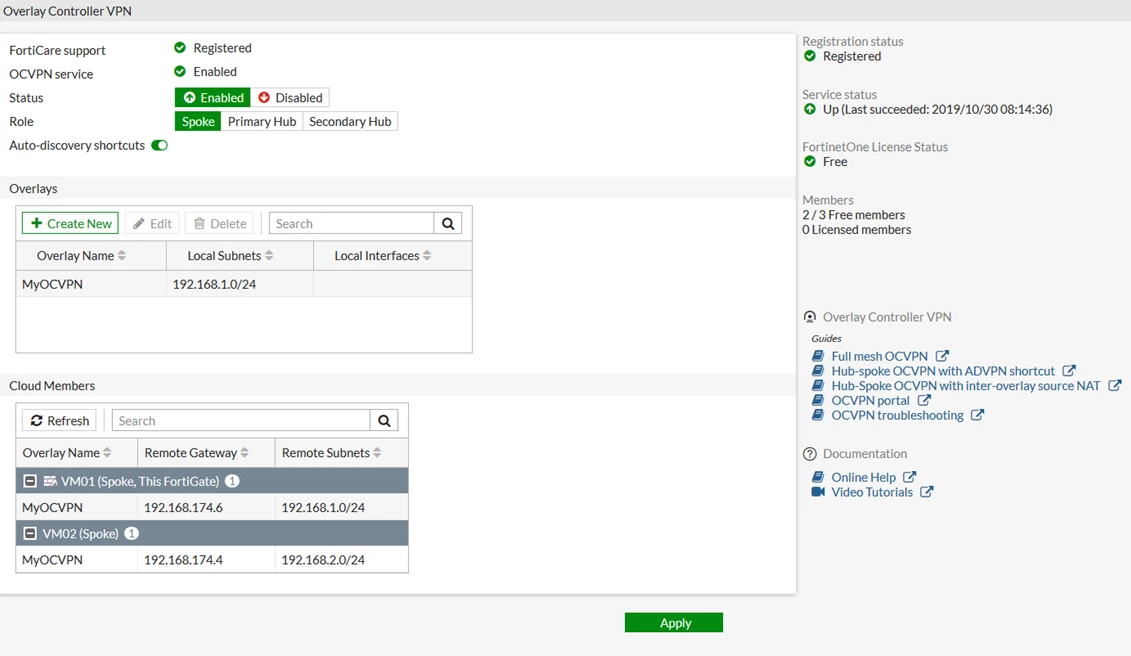
The overall configuration should look like this:

Note: The IPsec-based OCVPN service has been discontinued and licenses for it can no longer be purchased as of v7.4.0. GUI, CLI, and license verification support for OCVPN have been removed from FortiOS. Upon upgrade, all IPsec phase 1 and phase 2 configurations, firewall policies, and routing configurations previously generated by the OCVPN service will remain. Alternative solutions for OCVPN are the Fabric Overlay Orchestrator in v7.2.4 and later, the SD-WAN overlay templates in FortiManager v7.2.0 and later, and using the FortiCloud Overlay-as-a-Service (OaaS) which is supported in v7.4.4 and later.
This information has been included in FortiOS 7.4.4 release notes: Remove OCVPN support
Related articles:
Troubleshooting Tip: Troubleshooting IPsec Site-to-Site Tunnel Connectivity
Technical Tip: How to configure VPN Site to Site between FortiGates (Using VPN Setup Wizard)
Troubleshooting Tip: IPsec VPNs tunnels
Technical Tip: Setting multiple DNS server for IPSec dial-up VPN
Technical Tip: NAT-traversal comparison between site-to-site and dial-up” dynamic” tunnels
Technical Tip: FortiGate Hub with multiple IPSec Dial-up phase1 using IKEv2 and PSK authentication
Technical Tip : How to configure multiple VPN tunnels from the same ISP to the same remote peer ISP.
Technical Tip: IPSec dial-up full tunnel with FortiClient
Technical Tip: Differences between Aggressive and Main mode in IPSec VPN configurations
Technical Note: Dynamic routing (BGP) over IPsec tunnel
Technical Tip: OSPF with IPSec VPN for network redundancy
Technical Tip: Dynamic dial-up VPN with OSPF
Technical Tip: Fortinet Auto Discovery VPN (ADVPN)
Technical Tip: 'set net-device' new route-based IPsec logic
Technical Tip: SD-WAN integration with OCVPN
Technical Tip: Configure IPsec VPN with SD-WAN
Technical Tip: SD-WAN with DDNS type IPsec
Technical Tip: SD-WAN primary and backup ipsec tunnel Scenario
Troubleshooting Tip: IPsec VPN Phase 1 Process - Aggressive Mode
Technical Tip: How to configure IPsec VPN Tunnel using IKE v2

