On FortiGate, PORT 1 and PORT 2 will function as ISP providers, along with PORT 3, designated for LAN traffic. Here is the SD-WAN rule setup. 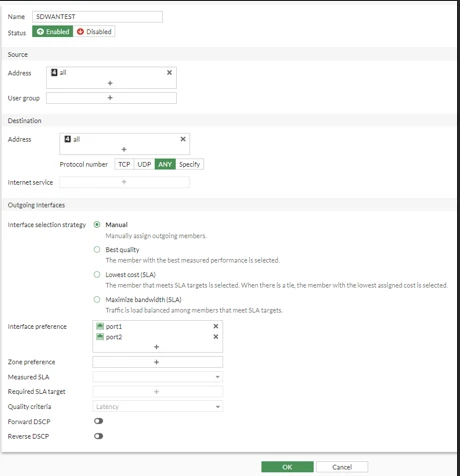
In the Manual strategy, FortiGate builds the oif (outgoing interface) list, which sorts the configured members based on the Interface Preference list configuration order.
Since PORT1 is ranked higher in interface preference than PORT2, the anticipated behavior is that the SD-WAN Rule, upon activation, will utilize PORT1 to route the traffic from 10.119.3.61 destined for the internet.

Now, if it were in the PORT 2 position, above PORT 1 in the interface preference of the SD-WAN Rule, the expected behavior would involve PORT 2 being employed to perform NAT for the outgoing internet traffic.
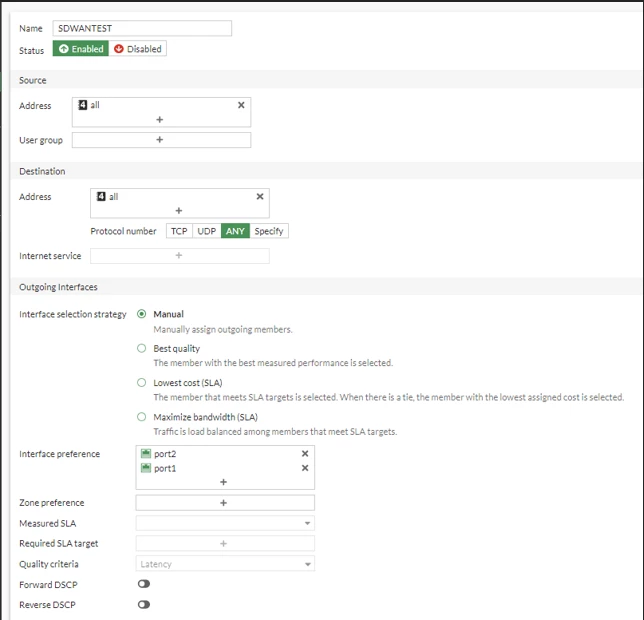 Here is the forward traffic log that would show that PORT 2 is used to translate the traffic going out.  Now, if port 2 goes down, despite its higher position relative to PORT 1, PORT 1 will be utilized to perform NAT for outgoing traffic.
To test this, PORT 2 has been disabled.  The following is a screenshot that will show PORT 1 IP is used for NAT traffic going out. 
Note: To confirm the interface preference order and which member the rule is actually using, check 'diagnose sys sdwan service' ('diagnose sys sdwan service4' or 'service6' on FortiOS v7.4.4 and later) and 'diagnose firewall proute list', which shows the OIF entries in the configured preference order. For example, 'oif=3(port1) oif=4(port2)'. See Technical Tip: Working of SD-WAN rule with outgoing interface selection strategy as manual for more details.
Additional information:
To include zone preference in addition to interface preference, the scenario unfolds as follows: Interface preference will supersede zone preference. The same underlying logic applies to zone preference, where the topmost interface is chosen for NAT-ing the traffic.
For example:
There are 3 interfaces: port1, port2, and port3.n An SD-WAN rule is created with Interface preference set to port3 and port1, and Zone preference set to Zone1.
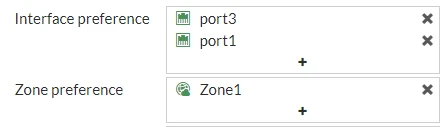
The SD-WAN rule prefers the interfaces in the following order:
port3. port1. port2.
FortiGate does not consider the performance of the member/s based on the SD-WAN Health Checks. However, if Health Checks are configured for the members included in the Manual strategy, the behavior when those Health Checks fail needs to be considered. Refer to the behavior in the following article: Technical Tip: SD-WAN Rule in Manual mode and Performance SLA.
Starting from FortiOS v7.4.1, it is now possible to load balance using a manual SD-WAN strategy along with the lowest cost SLA. Refer to Load balancing strategy (New).
When the Lowest Cost Interface selection method is used and the load balancing feature is enabled, traffic will be distributed across all interfaces that meet the minimum SLA thresholds defined in the SLA rules. In this case, lower cost values will not be taken into account in the path selection calculation. The same interface selection mechanism will also apply to ADVPN shortcuts.
ADVPN shortcuts can be tracked as shared below.
test (SDWAN) # diagnose sys sdwan advpn-session
Session head(test:1)
(1) Service ID(1), last access(49432082), remote health check info(1)
Selected path: local(hub_1, VLAN484) gw: 10.84.19.112  remote IP: 10.84.19.143(10.10.5.23)
Remote information:
1: latency: 0.345200 jitter: 0.038833 pktloss: 0.000000 mos: 4.404185 sla: 0x3f cost: 10 remote gw: hub_1 transport_group: 0 bandwidth up: 9999998 down: 9999998 bidirection: 19999996
ipv4: 10.84.19.143(100.100.5.23) ipv6 501a:c0da:fe7f::(501a:c0da:fe7f:0:8a00::)
Related documents:
|