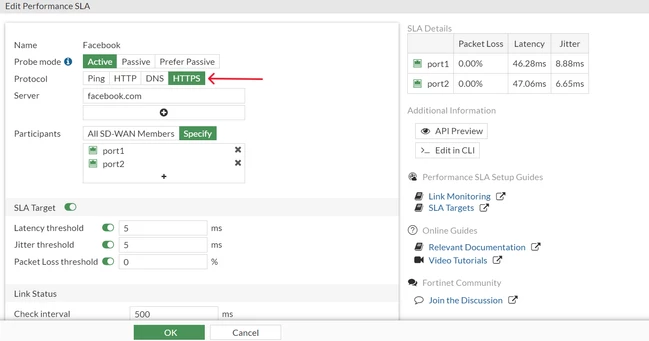
Technical Tip: SD-WAN performance SLA health check with HTTPS protocol
| Description | This article describes how to configure the HTTPS protocol in the SD-WAN performance SLA for the health check. |
| Scope | FortiGate v7.4.1. |
| Solution | Configuring HTTPS protocol in SD-WAN performance SLA uses HTTP-GET to test the link with the server.
All default HTTP-based health checks are updated to use HTTPS instead, starting v7.4.1.
This includes:
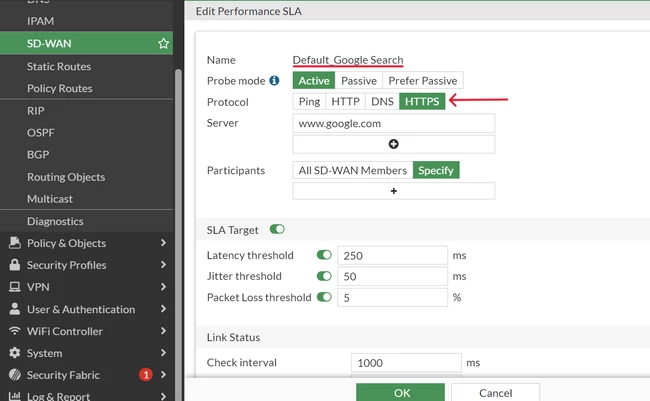
CLI Example (Output contains only important information):
sh full-configuration system sdwan config system sdwan config health-check edit "Default_Google Search" end
When creating a new performance SLA the most commonly used protocols (ping, HTTP, and DNS) can be configured in the GUI (Network -> SD-WAN -> Performance SLAs -> Create New).
However, the protocol HTTPS can be configured through CLI.
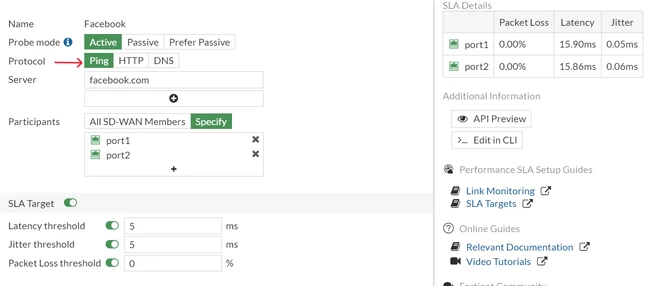
CLI Example (Output contains only important information):
config system sdwan config health-check set protocol ping -------> Default for new performance SLA.
To configure HTTPS protocol:
config health-check edit "Facebook" set protocol https <----------- end
The same can be verified from the GUI:
Related document: |