Technical Tip: SAML SP for VPN authentication
Description
When a FortiGate is configured as a service provider (SP), create an authentication profile that uses SAML for both firewall and SSL VPN web portal authentication is possible.
Once the firewall is authenticated, entering SAML credentials is not required for SSL VPN web portal authentication.
This article describes SAML SP for VPN authentication by configuring FortiGate as an SP and FortiAuthenticator as the IdP server.
Solution
The following example uses a FortiGate as an SP and FortiAuthenticator as the IdP server:
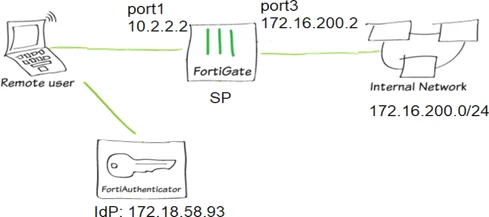
To configure firewall authentication.
Configure the FortiGate SP to be a SAML user.
# config user samlAdd the SAML user to the user group (optionally, you can configure group matching).
edit "fac-firewall"
set entity-id "http://10.2.2.2:1000/saml/metadata/"
set single-sign-on-url "https://10.2.2.2:1003/saml/login/"
set single-logout-url "https://10.2.2.2:1003/saml/logout/"
set idp-entity-id "http://172.18.58.93:443/saml-idp/bbbbbb/metadata/"
set idp-single-sign-on-url "https://172.18.58.93:443/saml-idp/bbbbbb/login/"
set idp-single-logout-url "https://172.18.58.93:443/saml-idp/bbbbbb/logout/"
set idp-cert "REMOTE_Cert_3"
set user-name "username"
set group-name "group"
next
end
# config user groupAdd the SAML user group to a firewall policy.
edit "saml_firewall"
set member "fac-firewall"
# config match
edit 1
set server-name "fac-firewall"
set group-name "user_group1"
next
end
next
end
# config firewall policyConfigure the FortiAuthenticator IdP as needed.
edit 2
set srcintf "port3"
set dstintf "port1"
set srcaddr "all"
set dstaddr "pc4"
set action accept
set schedule "always"
set service "ALL"
set logtraffic all
set fsso disable
set groups "saml_firewall" "group_local"
set users "first"
set nat enable
next
end
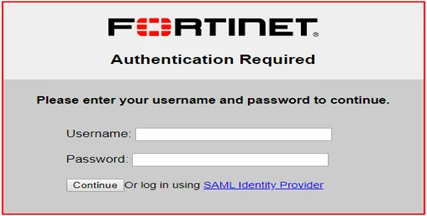
Run HTTP/HTTPS authentication for a remote user.
The SAML login page appears.
To configure SSL VPN web portal authentication.
Configure the FortiGate SP to be a SAML user.
# config user samlAdd the SAML user to the user group (group matching may also be configured).
edit "fac-sslvpn"
set entity-id "https://10.2.2.2:10443/remote/saml/metadata/"
set single-sign-on-url "https://10.2.2.2:10443/remote/saml/login/"
set single-logout-url "https://10.2.2.2:10443/remote/saml/logout/"
set idp-entity-id "http://172.18.58.93:443/saml-idp/ssssss/metadata/"
set idp-single-sign-on-url "https://172.18.58.93:443/saml-idp/ssssss/login/"
set idp-single-logout-url "https://172.18.58.93:443/saml-idp/ssssss/logout/"
set idp-cert "REMOTE_Cert_3"
set user-name "username"
next
end
# config user groupConfigure SSL VPN.
edit "saml_sslvpn"
set member "fac-sslvpn"
next
end
# config vpn ssl settingsAdd the SAML user group to a firewall policy.
set servercert "Fortinet_Factory"
set tunnel-ip-pools "SSLVPN_TUNNEL_ADDR1"
set tunnel-ipv6-pools "SSLVPN_TUNNEL_IPv6_ADDR1"
set source-interface "port3"
set source-address "all"
set source-address6 "all"
set default-portal "full-access"
# config authentication-rule
edit 1
set groups "saml_sslvpn"
set portal "web-access"
next
end
end
# config firewall policyConfigure the FortiAuthenticator IdP as needed.
edit 8
set srcintf "ssl.vdom1"
set dstintf "port1"
set srcaddr "all"
set dstaddr "all"
set action accept
set schedule "always"
set service "ALL"
set groups "local" "saml_sslvpn"
set nat enable
next
end
Run SSL VPN web mode authentication for a remote user.
The SAML login page appears.