AnthonyH
Staff
Staff
Nov 23, 2023 1:49 PM UTC

Technical Tip: Remote Access For Sub Users Through FortiGate Cloud (Legacy method)

Description This article describes a legacy method that was used to assign users remote access to the FortiGate through FortiGate Cloud.
Scope FortiGate, FortiGate Cloud
Solution

Note: The method described below is no longer valid and is retained here for reference purposes. To create new users able to access FortiGate Cloud resources, use IAM accounts instead. See Technical Tip: How to access a firewall from a FortiGate Cloud subaccount.

For IAM users migration, refer to this document: Migrating sub users | FortiCloud Services 24.4.a | Fortinet Document Library.


Prerequisites:

  • FortiCloud account.
  • FortiGate connected and registered to FortiGate Cloud.


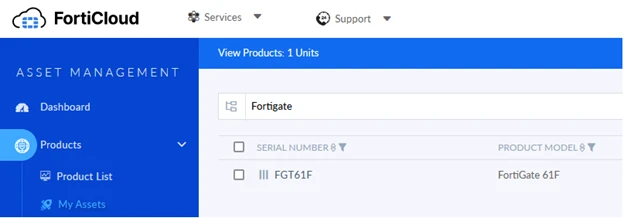
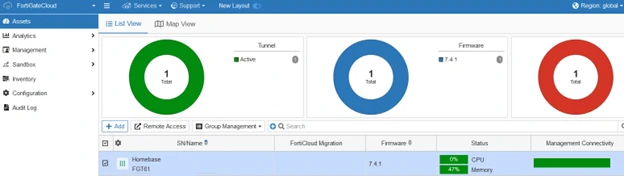
  1.  Log in to FortiCloud, which has the FortiGate registered. It is necessary to have the asset listed under ‘My Assets’.


Assets.png


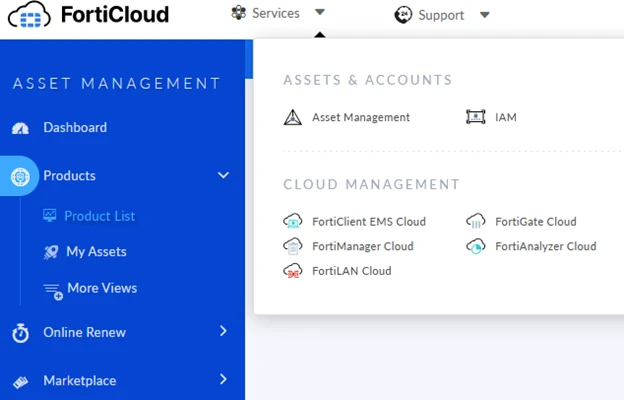
  1. Navigate to FortiGate Cloud.


FortiGate cloud.png


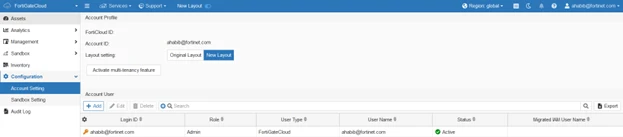
  1. Select Configuration -> Account Settings -> Add:


Account settings.png


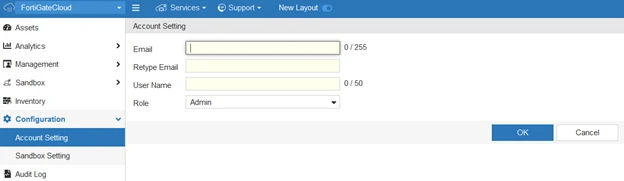
  1. Enter the user’s FortiCloud email address and the username can be anything, then select ‘OK’.


add user.png


  1. Log in using the FortiCloud account email, and a new window will appear to log in to the master account to access the FortiGate.


sign in.png


  1. Managing FortiGate remotely through FortiGate Cloud on the sub-account will now be possible.


remote access.png


    Risk and Resilience in the Age of AI. An OT Thought Leadership Summit for Houston's Critical Infrastructure Leaders. Date: Thursday, December 3, 2026. Time: 8:30 am - 1:30 pm (CT). Location: The Westin Houston, Memorial City | 945 Gessner Road, Houston, TX 77024