| Diagram: 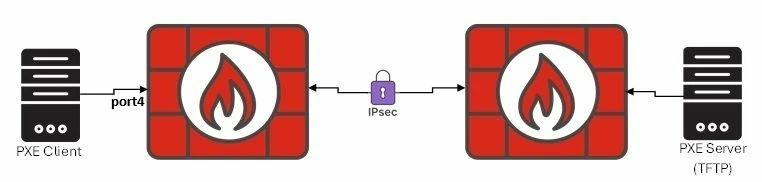
Ensure the following infrastructure is in place before configuring FortiGate - PXE Server (TFTP) has the installation file.
- The PXE Client must have enable the PXE feature on its NIC (Network Interface Card).
- Ensure that there is IP reachability from FortiGate to PXE Server (TFTP). In this scenario, PXE Server is behind IPSec VPN peer.
Context: When the PXE Client sends DHCPDISCOVERY packet, this should arrive at the DHCP Server to receive DHCPOFFER and also, should arrive at the PXE Server to receive DHCPOFFER option 60 as well. 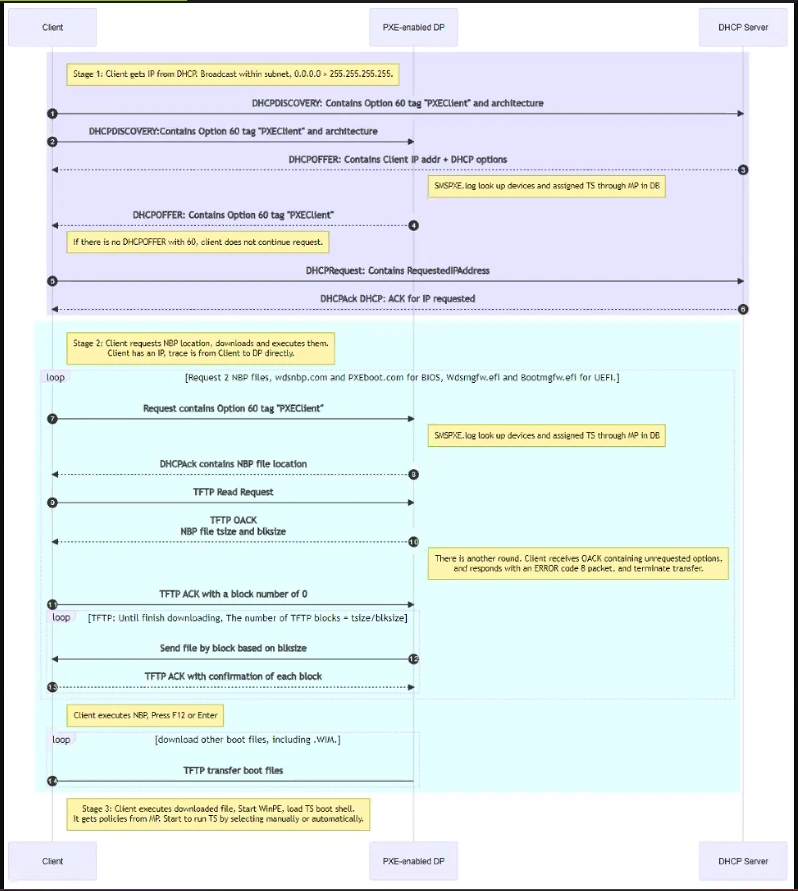 For the diagram environment, it is necessary to configure: config system interface
edit "port4"
set vdom "root"
set dhcp-relay-service enable
set ip 20.25.0.1 255.255.255.0
set type physical
set alias "from PXE Client"
set snmp-index 3
set dhcp-relay-ip "175.21.13.2"
set dhcp-relay-request-all-server enable
next
end Ensure to have: - dhcp-relay-service enabled: DHCPDISCOVERY is a broadcast packet and to reach the PXE Server, dhcp-relay-service transforms this packet from broadcast to unicast packet.
- Be defined dhcp-relay-ip with the PXE Server IP.
- IPSec established routing and policies to allow the above unicast packet from FGT that acts as DHCP Server to PXE Server.
Related articles: Configuring FortiGate for PXE Client booting |