Technical Tip: Packet processing with flow rule
| Description | This article describes how packets are processed when they match a flow rule. |
| Scope | FortiGate-6000F, 7000E and 7000F series. |
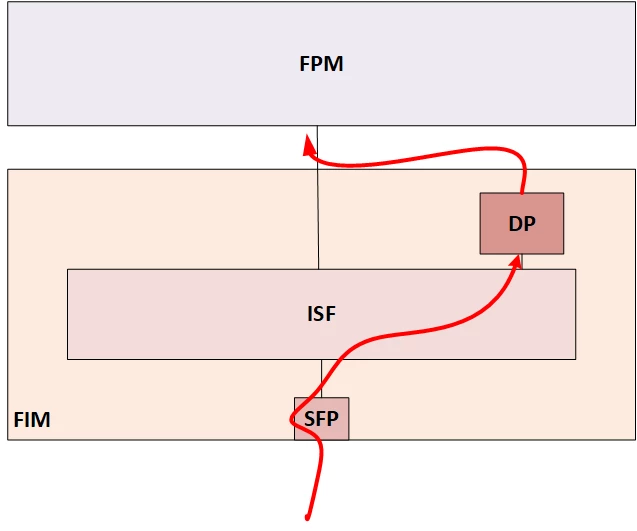
| Solution | On chassis-based FortiGate, a packet eligible for load-balancing goes through to the FPM in this order:
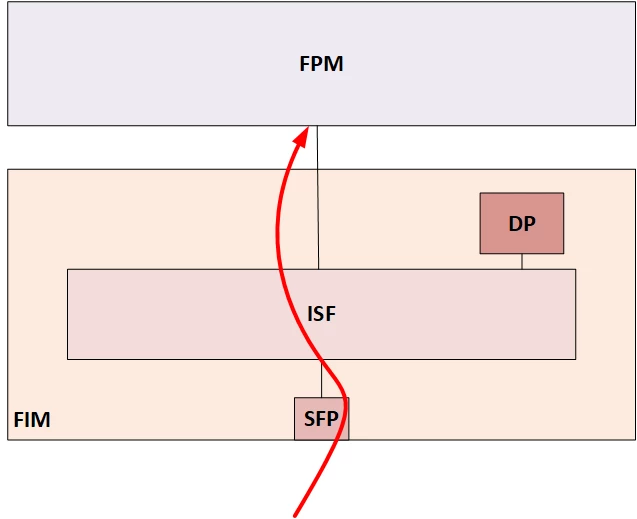
The packet goes straight to the FPM when the corresponding traffic pattern is caught by a flow rule.
This behavior could be useful during a troubleshooting session when a load balancing problem is suspected. Once the flow rule matches the problematic traffic, the chassis will act as a regular FortiGate. It means that no more load-balancing features will be involved.
The sample configuration below directs the packet to be processed by FPC4 or FPM4. The configuration "edit 0" adds a new flow-rule by appending it to the end of the sequence.
6000F config load-balance flow-rule edit 0
7000E/7000F config load-balance flow-rule
Related document: |