



Technical Tip: Offset Lists with RIP
| Description | This article describes how an offset list is used to alter the metric of the routing protocols. RIP uses hop-count as the metric and an offset list can increase the hop count (metric). |
| Scope | FortiGate, RIP. |
| Solution |
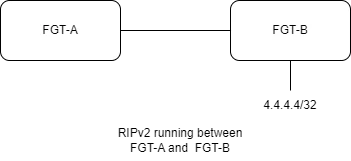
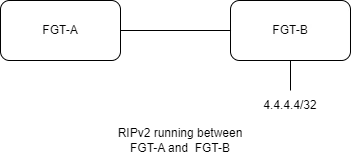
By default, the FGT-A learns the route for 4.4.4.4/32 with a metric of 2 as the destination is 2 hops away.
FGT-A # get router info routing-table all
Routing table for VRF=0 S* 0.0.0.0/0 [10/0] via 10.5.191.254, port1, [1/0] R 4.4.4.4/32 [120/2] via 10.156.18.30, port5, 00:01:22, [1/0] R 5.5.5.5/32 [120/2] via 10.156.18.30, port5, 00:09:20, [1/0]
On FGT-B, the offset value for the metric is set to 8. As a result, the FGT-A gets the route with the metric value of 10 (8+2).
FGT-B # show router rip config router rip config network edit 1 set prefix 10.156.0.0 255.255.192.0 next end config offset-list edit 1 set access-list "4.4.4.4/32" set offset 8 next end config redistribute "connected" set status enable end
FGT-A # get router info routing-table all
Routing table for VRF=0 S* 0.0.0.0/0 [10/0] via 10.5.191.254, port1, [1/0] R 4.4.4.4/32 [120/10] via 10.156.18.30, port5, 00:00:10, [1/0] R 5.5.5.5/32 [120/2] via 10.156.18.30, port5, 00:32:54, [1/0]
An offset list can purge the route by setting the offset value that makes the metric greater than 15. The maximum hop count is 15, therefore route to 4.4.4.4/32 becomes inaccessible.
FGT-B (1) # show config offset-list edit 1 set access-list "4.4.4.4/32" set offset 15 next end
Routing table for VRF=0 S* 0.0.0.0/0 [10/0] via 10.5.191.254, port1, [1/0] R 5.5.5.5/32 [120/2] via 10.156.18.30, port5, 07:50:31, [1/0]
Distribute List vs Offset List.
|

