




Technical Tip: Manually assign outgoing interface In SD-WAN setup
Description
This article describes how to force the traffic to take specific WAN link in SD-WAN configuration.
In FortiGate 6.2 and above firmware, it is possible to force the traffic for specific source or destination to take specific WAN link.
Scope
FortiGate.
Solution
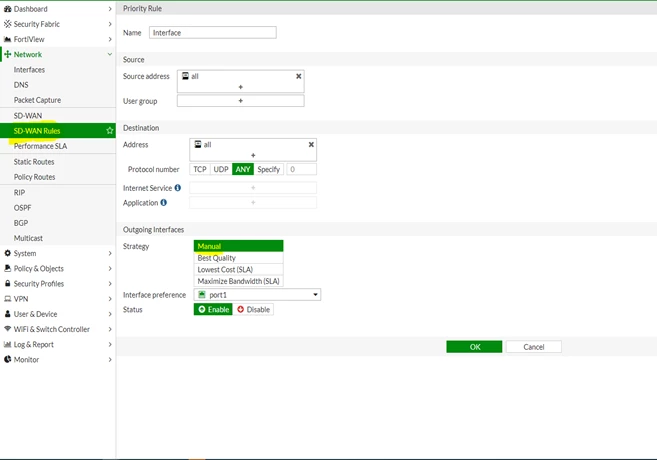
To configure the manual mode from the FortiGate GUI on v6.2.x:
Go to FortiGate -> Network -> SD-WAN rules.
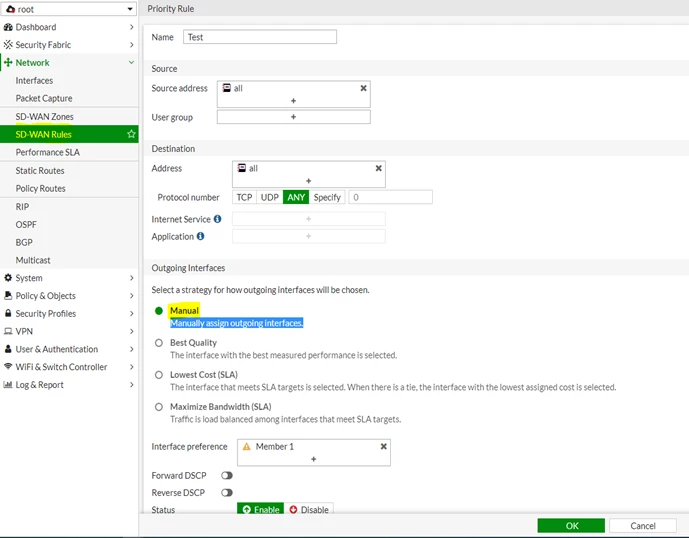
To configure the manual mode from the FortiGate GUI on v6.4.x, 7.x:
To configure the manual mode from the FortiGate CLI, run the following commands:
config system sdwan
config service
edit <RULE-ID>
set name <CUSTOM-NAME>
set load-balance enable
set mode manual <---------------
set hash-mode <PREFERRED-HASH-MODE>
set priority-members <MEMBER-ID> <MEMBER-ID> <MEMBER-ID>
...
set priority-members <MEMBER-ID> <MEMBER-ID> <MEMBER-ID>
...
next
end
end
Other strategy modes are listed below:
FortiGate (1) # set mode ?
auto It assigns interfaces a priority based on quality.
manual It assigns interfaces a priority manually (this is the default mode).
priority It assigns interfaces a priority based on the link-cost-factor quality of the interface.
sla It assigns interfaces a priority based on selected SLA settings.
auto It assigns interfaces a priority based on quality.
manual It assigns interfaces a priority manually (this is the default mode).
priority It assigns interfaces a priority based on the link-cost-factor quality of the interface.
sla It assigns interfaces a priority based on selected SLA settings.
Note:
If the defined interface is down or the WAN link is down, then traffic will take the secondary link.
If the defined interface is down or the WAN link is down, then traffic will take the secondary link.
Related articles:
