| Here to use an example, a Linux machine has been used.
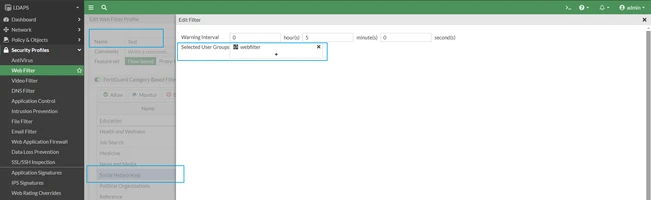
Below is the policy configured on FortiGate that has web-filter enabled and is using the custom-deep-packet inspection. Also, the 'Social Networking' category in the web-filter has an action set to Authenticate. config firewall policy
edit 5
set name "Internet"
set uuid f4c67036-2d75-51ef-54e1-255cc5e90cf1
set srcintf "port4"
set dstintf "port2"
set action accept
set srcaddr "all"
set dstaddr "all"
set schedule "always"
set service "ALL"
set utm-status enable
set inspection-mode proxy
set ssl-ssh-profile "custom-deep-inspection"
set webfilter-profile "Test"
set logtraffic all
set nat enable
next
end Web-filter profile (Test):
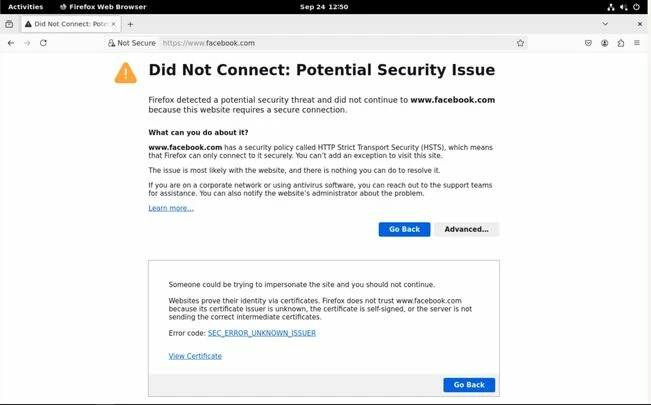
Below is the error on the end-machine:
Solution:
- Navigate to SSL/SSH Inspection -> Select the profile -> Download the certificate being used for inspection.
- Import the certificate in the browser in a Linux machine Importing SSL Certificate in Mozilla Firefox.
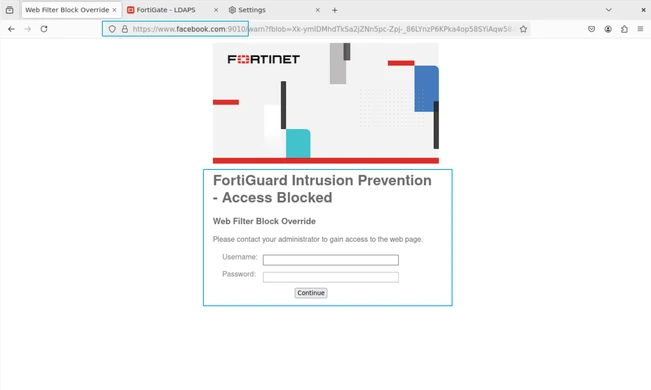
- Once the certificate is imported, websites can be accessed successfully and will ask to authenticate as per the action set on the category:
Note: If having the same issue on other platform such as Windows or macOS, try installing the certificate either in machine's Trusted Root CA folder or by importing and trusting the certificate in the browser itself.
|