| The following is a step-by-step guide on how to limit bandwidth usage for specific users: - Create address objects under Policy & Objects -> Addresses.

Example in the CLI: config firewall address
edit "Normal User"
set subnet 10.119.0.2 255.255.255.255
next
edit "Priority User"
set subnet 10.119.0.3 255.255.255.255
next
end - Create Per-IP Traffic Shapers. Go to Policy & Objects -> Traffic Shaping -> Traffic Shaper -> Create New.
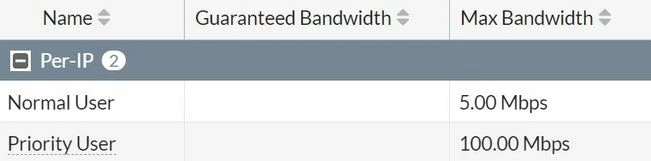
Example in the CLI: config firewall shaper per-ip-shaper
edit "Normal User"
set max-bandwidth 5
set bandwidth-unit mbps
next
edit "Priority User"
set max-bandwidth 100
set bandwidth-unit mbps
next
end
For FortiOS 7.0 and above, change the view to 'Per-IP' and Create a New traffic shaper.
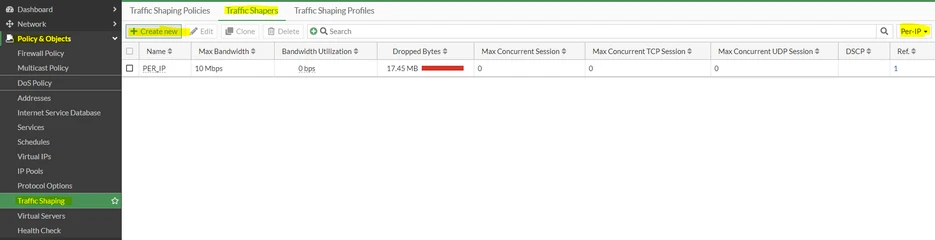 - Create Shaping Policies. Go to Policy & Objects -> Traffic Shaping -> Traffic Shaping Policy -> Create New.

Example in the CLI: config firewall shaping-policy
edit 1
set name "Normal User"
set service "ALL"
set dstintf "port1"
set per-ip-shaper "Normal User"
set srcaddr "Normal User"
set dstaddr "all"
next
edit 2
set name "Priority User"
set service "ALL"
set dstintf "port1"
set per-ip-shaper "Priority User"
set srcaddr "Priority User"
set dstaddr "all"
next
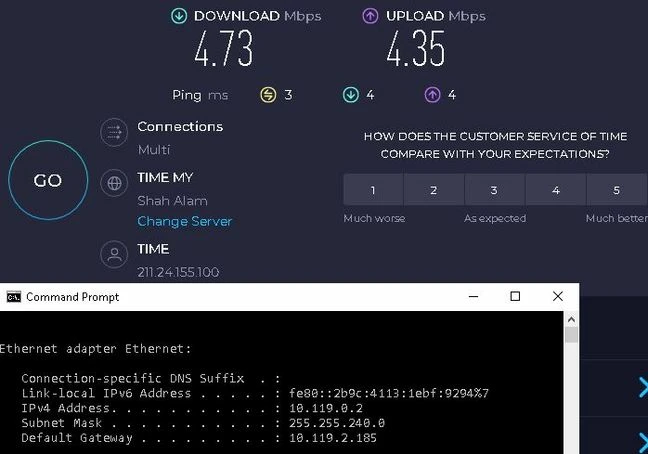
end - Based on this configuration, a normal user should be limited to 5Mbps and a priority user should be limited to 100Mbps.
Normal user test results:
Priority user test results: 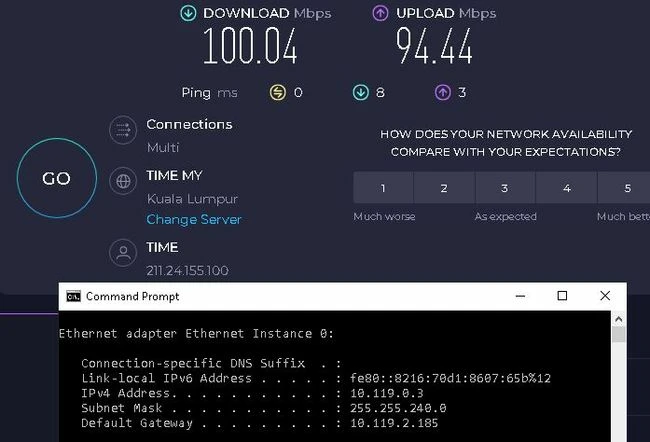
| 


