



Technical Tip: Inspection Mode Changes
Description
This article describes the changes made to the Inspection Mode in version 6.2. In earlier firmware versions, the Inspection Mode was configured globally to all the policies to either Proxy-based or Flow-based.
Solution
In version 6.2 the Inspection Mode has been moved per policy and cannot be set globally enabling more flexible setup for different policies.
When a policy is configured, it is possible to select either Flow-based or proxy-based Inspection mode.
Default is Flow-based Inspection.
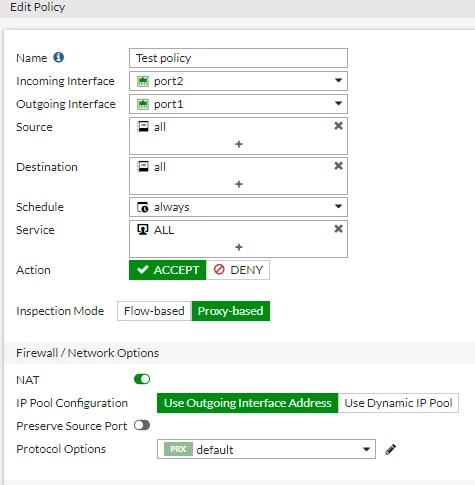
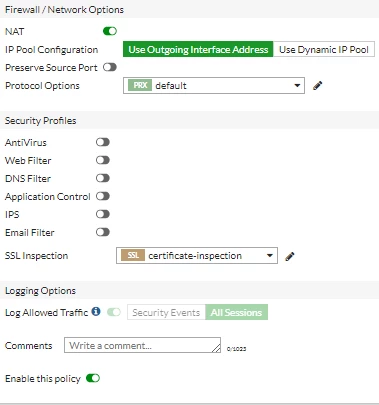
To view inspection mode changes in the CLI:
This article describes the changes made to the Inspection Mode in version 6.2. In earlier firmware versions, the Inspection Mode was configured globally to all the policies to either Proxy-based or Flow-based.
Solution
In version 6.2 the Inspection Mode has been moved per policy and cannot be set globally enabling more flexible setup for different policies.
When a policy is configured, it is possible to select either Flow-based or proxy-based Inspection mode.
Default is Flow-based Inspection.
# config firewall policy
edit 1
set inspection-mode
proxy <--- Proxy based inspection.
flow <--- Flow based inspection.
set inspection-mode proxy
end
# config firewall policy
edit 1
set name "Test policy"
set uuid 79d80fb4-bfe9-51e9-38a2-86aefe9dea5e
set srcintf "port2"
set dstintf "port1"
set srcaddr "all"
set dstaddr "all"
set schedule "always"
set schedule-timeout disable
set service "ALL"
set inspection-mode proxy
set nat enable
next
end

