Technical Tip: Importing address objects and creating groups using scripts
Description
This article describes how to create a script file to import the address objects in FortiGate and create groups.
Scope
FortiGate.
Solution
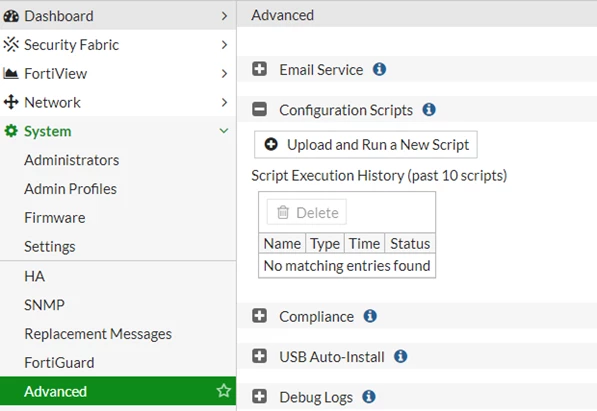
By using the bulk command option, the address objects can be imported to a group; the same can be done under System -> Config -> Advanced -> Scripts -> Execute Script from.
The imported file should have a correct syntax when uploading.
When a script file is imported, the configuration should match the correct syntax, for example, by importing a firewall address object as below:
config firewall address
edit 1.1.1.1
set subnet 1.1.1.1/32
next
edit 1.1.1.2
set subnet 1.1.1.2/32
next
end
config firewall addrgrp
edit test-grp
set member 1.1.1.1 1.1.1.2
next
end
Save the file with the extension .txt and import it under System -> Advanced -> Configuration Scripts -> Upload and run a new script -> Browse, then select the file.