



Technical Tip: HSTS enforcement
Description
This article describes how to enable HSTS for the admin login page.
The remote HTTPS server is not enforcing HTTP Strict Transport Security (HSTS).
The lack of HSTS allows downgrade attacks, SSL-stripping man-in-the-middle attacks, and weakens cookie-hijacking protections.
Scope
From version 6.2.6.
Solution
From CLI.
config system global
set admin-hsts-max-age <value> <----- Range 0-2147483647.
end
Note: If the command is not available, it is necessary to enable the following command to get it to work.
config sys global
set admin-https-redirect enable <---------- By default, it is disabled.
end
- The HTTPS Strict-Transport-Security header max-age value is in seconds. This is the number of seconds the client should honor the HSTS setting.
- A value of 0 will reset any HSTS records in the browser. When admin-https-redirect is disabled, the header max-age will be 0.
Verification.
- When the browser initiates the connection to the FortiGate, the unit will respond with the HSTS header for internal redirection.
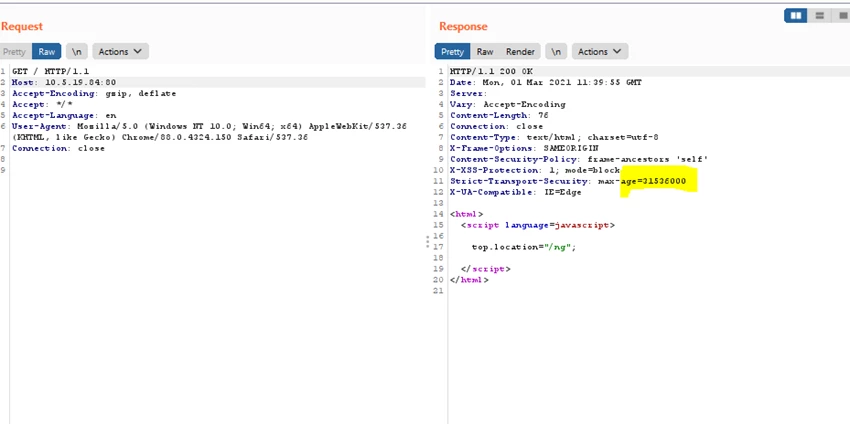
Additionally, use the SSL Server Test to verify the HSTS enforcement.
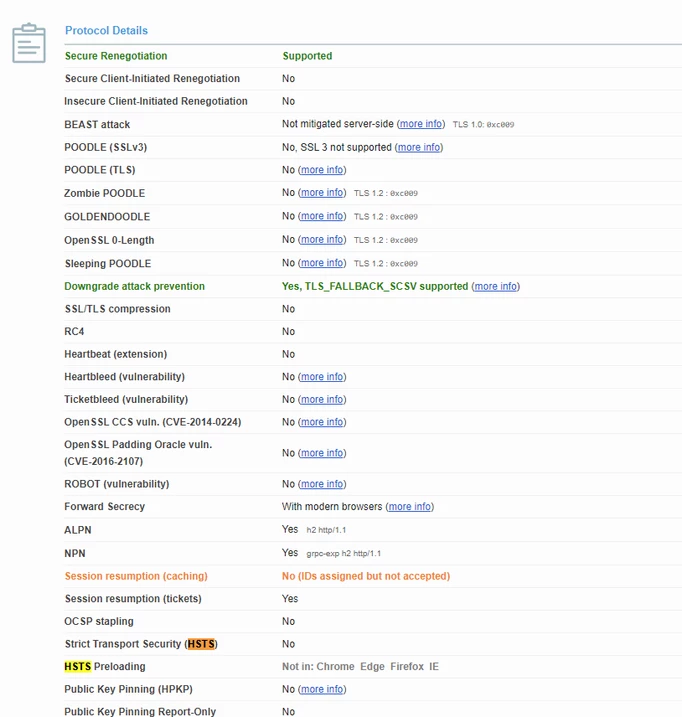
Enable HSTS for the VIP object.
Enabling it will add an HSTS header to each HTTP response.
Enabling it will add an HSTS header to each HTTP response.
Note: This is only available when the VIP operates as a Load Balance server object and is set to listen on port 443.
config firewall vip
edit <name>
set ssl-hsts enable
set ssl-hsts-age <value> <--- Range 60-157680000.
set ssl-hsts-include-subdomains enable
When performing a Security Scan, the results of the scan might show that the HSTS setting is not being honored, and the scan will fail.
With the below changes to the configuration, the HSTS should be enforced, and the security scan should pass.
config vpn ssl settings
set hsts-include-subdomains enable
end
If all the configurations are verified, check if the ACME protocol for certificate provisioning and the Let's Encrypt certificate are configured on FortiGate, which might cause the security scan to fail.
Additional information:
HSTS Enforcement will also work on non-standard HTTPS ports (ports other than 443). Enforcement will occur based on the port configured in the VIP.
HSTS Enforcement will also work on non-standard HTTPS ports (ports other than 443). Enforcement will occur based on the port configured in the VIP.

