
Technical Tip: How to remove an interface from SD-WAN zone via CLI
| Description | This article describes how to delete the interface member from the SD-WAN zone. |
| Scope | FortiGate. |
| Solution | The delete option is available via the command line interface under SD-WAN - Config members.
FortiGate# config system sdwan FortiGate(sdwan) # show config system sdwan set status enable config zone edit "virtual-wan-link" end config members edit 1 set interface "wan1" set zone "virtual-wan-link" next edit 2 set interface "wan2" set zone "virtual-wan-link" next edit 3 set interface "port1" set zone "virtual-wan-link" next end
show system sdwan
To ensure SD-WAN is functioning correctly after the change, use the following command:
diagnose sys sdwan health-check
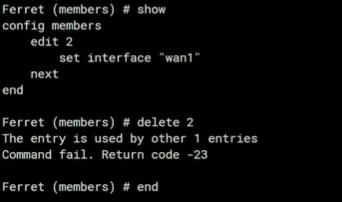
In these cases, the following error is seen. Make sure to remove any items where the SD-WAN zone is being referenced first, such as static routes, policies, etc:
To verify a reference object with an SD-WAN interface in the CLI, use the following steps:
Or:
Example:
diagnose sys cmdb refcnt show system.interface.name wan1
Related articles: |