




Technical Tip: How to redirect admin login to HTTPS from HTTP
Description
This article describes how to redirect admin login to HTTPS from HTTP.
When browsing the FortiGate using http://fortigate.ip, it will redirect to https://fortigate.ip.
For security reasons, this redirect is enabled by default in newer FortiOS versions:

Solution
This setting can be enabled/disabled in the following way:
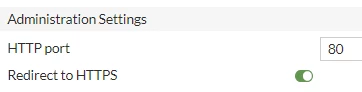
From the GUI go to System -> Settings -> Administrator Settings and select check box 'Redirect to HTTPS' to make sure that all attempted HTTP login connections are redirected to HTTPS:
From the CLI:
# config system global
set admin-https-redirect enable
end
With VDOMs enabled:
# config global
# config system global
set admin-https-redirect enable
end
