Solution | FortiGate has an SDN OpenStack connector configured like this:
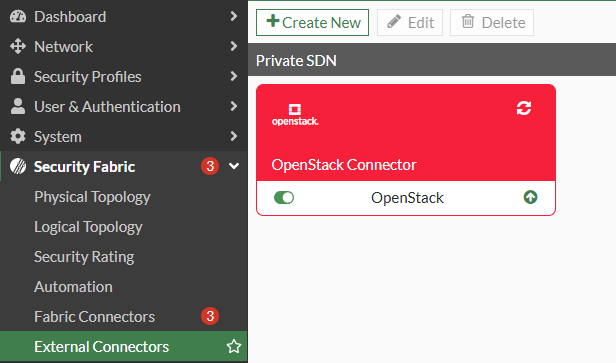
In the GUI:
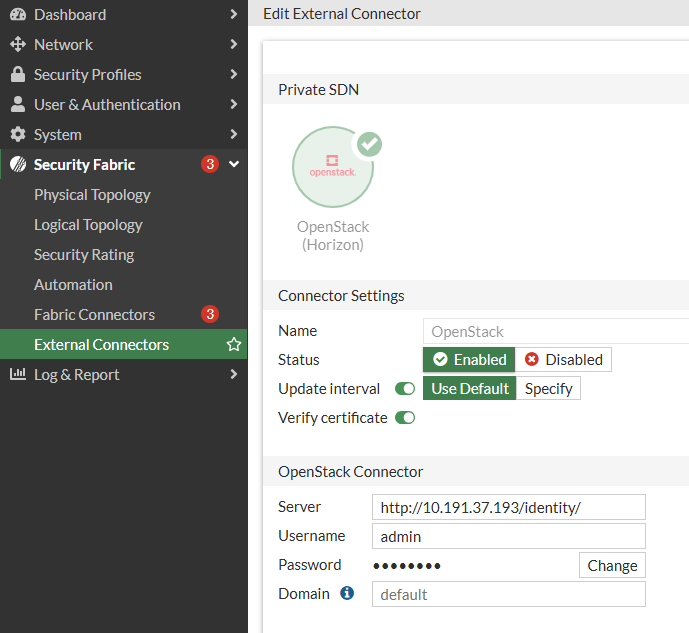
In the CLI:
config system sdn-connector
    edit "OpenStack"
        set type openstack
        set server "http://10.191.37.193/identity/"
        set username "admin"
        set password ENC -1NhX2mD7+yX
    next
end
In the OpenStack, there is a project called FGT_LAB with the following objects:
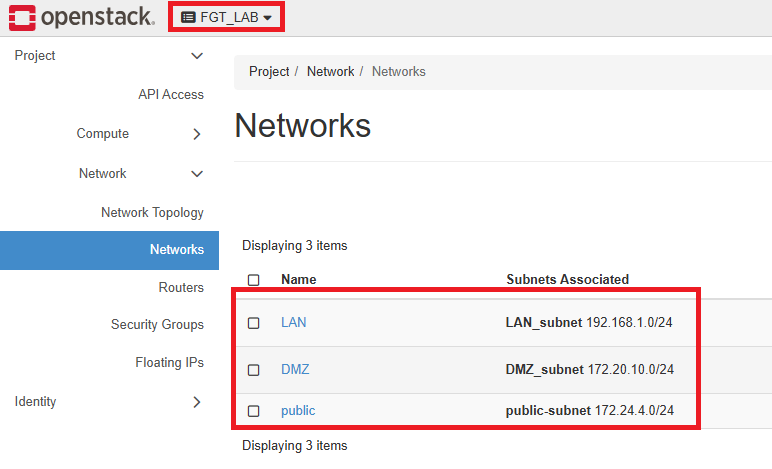
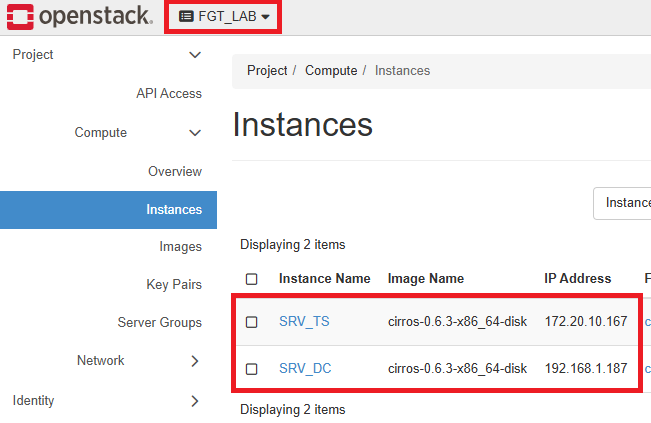
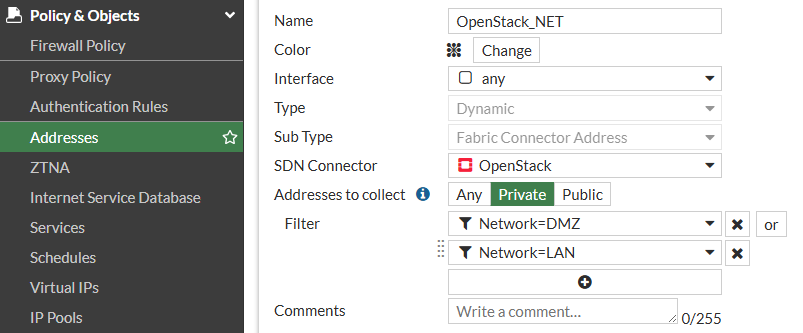
The dynamic object OpenStack_NET is created in FortiGate with the following options:
Type: 'Dynamic' Sub Type: 'Fabric Connector Address' SDN Connector: 'OpenStack' (SDN Connector name). Addresses to collect: Private (in this case). Filter: <Only instances IP addresses for DMZ and LAN subnets will be retrieved based on the filter>
With the object created, hovering over the object and selecting 'View Matched Addresses' will show the instances' IP addresses pulled from the SDN connector.
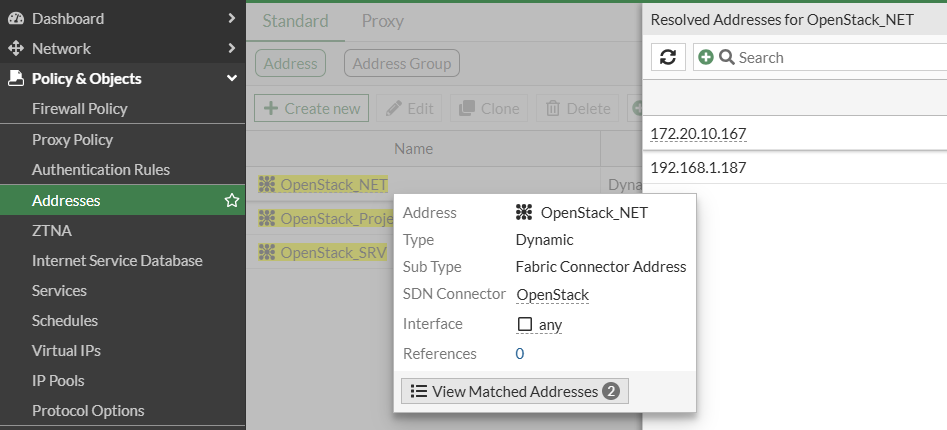
Note: If a new instance is created and added to one of the following networks (DMZ or LAN) in the OpenStack platform, the FortiGate dynamic object will be updated automatically.
To retrieve the SDN dynamic addresses from an SDN OpenStack connector, use the following methods:
Using the CLI, run the command 'show firewall address <openstack_dynamic_object>'.
FGT (DMZ) # show firewall address OpenStack_NET
config firewall address
    edit "OpenStack_NET"
        set type dynamic
        set sdn "OpenStack"
        set filter "Network=DMZ | Network=LAN"
            config list
                edit "172.20.10.167"
                next
                edit "192.168.1.187"
                next
            end
        next
    end
Using the API, send a GET request to: https://<FortiGate_IP_Address>/api/v2/cmdb/firewall/address/?filter=sdn==OpenStack <-- filter by SDN Connector name.
Example in JSON:
{
    "http_method": "GET",
    "size": 1393,
    "limit_reached": false,
    "matched_count": 3,
    "next_idx": 1109,
    "revision": "a3c032eaa3fac3957375aa8a1a1a8d4f",
    "results": [
        {
            "name": "OpenStack_NET",
            "q_origin_key": "OpenStack_NET",
            "uuid": "d41ce554-4f88-51f1-a59e-56408ba0487b",
            "type": "dynamic",
            "route-tag": 0,
            "sub-type": "sdn",
            "clearpass-spt": "unknown",
            "macaddr": [],
            "country": "",
            "cache-ttl": 0,
            "sdn": "OpenStack",
            "fsso-group": [],
            "interface": "",
            "obj-type": "ip",
            "tag-detection-level": "",
            "tag-type": "",
            "dirty": "dirty",
            "hw-vendor": "",
            "hw-model": "",
            "os": "",
            "sw-version": "",
            "comment": "",
            "associated-interface": "",
            "color": 0,
            "filter": "Network=DMZ | Network=LAN",
            "sdn-addr-type": "private",
            "node-ip-only": "disable",
            "obj-id": "",
            "list": [
                {
                    "ip": "172.20.10.167",
                    "q_origin_key": "172.20.10.167",
                    "obj-id": "b777f775-614d-47a1-b67f-d22cb600b6fa",
                    "net-id": "DMZ"
                },
                {
                    "ip": "192.168.1.187",
                    "q_origin_key": "192.168.1.187",
                    "obj-id": "b15fe124-0598-45a6-b467-0ef6c47cc977",
                    "net-id": "LAN"
                }
            ],
            "tagging": [],
            "allow-routing": "disable",
            "fabric-object": "disable"
        },
        {
            "name": "OpenStack_Project",
            "q_origin_key": "OpenStack_Project",
            "uuid": "af02e93a-52c6-51f1-daa9-841b2b32072f",
            "type": "dynamic",
            "route-tag": 0,
            "sub-type": "sdn",
            "clearpass-spt": "unknown",
            "macaddr": [],
            "country": "",
            "cache-ttl": 0,
            "sdn": "OpenStack",
            "fsso-group": [],
            "interface": "",
            "obj-type": "ip",
            "tag-detection-level": "",
            "tag-type": "",
            "dirty": "dirty",
            "hw-vendor": "",
            "hw-model": "",
            "os": "",
            "sw-version": "",
            "comment": "",
            "associated-interface": "",
            "color": 0,
            "filter": "Project=FGT_LAB",
            "sdn-addr-type": "private",
            "node-ip-only": "disable",
            "obj-id": "",
            "list": [
                {
                    "ip": "172.20.10.167",
                    "q_origin_key": "172.20.10.167",
                    "obj-id": "b777f775-614d-47a1-b67f-d22cb600b6fa",
                    "net-id": "DMZ"
                },
                {
                    "ip": "192.168.1.187",
                    "q_origin_key": "192.168.1.187",
                    "obj-id": "b15fe124-0598-45a6-b467-0ef6c47cc977",
                    "net-id": "LAN"
                }
            ],
            "tagging": [],
            "allow-routing": "disable",
            "fabric-object": "disable"
        },
        {
            "name": "OpenStack_SRV",
            "q_origin_key": "OpenStack_SRV",
            "uuid": "b2c6baf6-4f88-51f1-6e29-f671bf31184d",
            "type": "dynamic",
            "route-tag": 0,
            "sub-type": "sdn",
            "clearpass-spt": "unknown",
            "macaddr": [],
            "country": "",
            "cache-ttl": 0,
            "sdn": "OpenStack",
            "fsso-group": [],
            "interface": "",
            "obj-type": "ip",
            "tag-detection-level": "",
            "tag-type": "",
            "dirty": "dirty",
            "hw-vendor": "",
            "hw-model": "",
            "os": "",
            "sw-version": "",
            "comment": "",
            "associated-interface": "",
            "color": 0,
            "filter": "Name=SRV_DC | Name=SRV_TS",
            "sdn-addr-type": "private",
            "node-ip-only": "disable",
            "obj-id": "",
            "list": [
                {
                    "ip": "172.20.10.167",
                    "q_origin_key": "172.20.10.167",
                    "obj-id": "b777f775-614d-47a1-b67f-d22cb600b6fa",
                    "net-id": "DMZ"
                },
                {
                    "ip": "192.168.1.187",
                    "q_origin_key": "192.168.1.187",
                    "obj-id": "b15fe124-0598-45a6-b467-0ef6c47cc977",
                    "net-id": "LAN"
                }
            ],
            "tagging": [],
            "allow-routing": "disable",
            "fabric-object": "disable"
        }
    ],
    "path": "firewall",
    "name": "address",
    "action": "",
    "status": "success",
    "http_status": 200,
    "serial": "FG4H0",
    "version": "v7.4.11",
    "build": 2878
}
Alternatively, use the API to filter by all dynamic objects: https://<FortiGate_IP_Address>/api/v2/monitor/firewall/address-dynamic
Example in JSON:
{
    "http_method": "GET",
    "results": {
        "OpenStack_NET": {
            "addrs": [
                "172.20.10.167",
                "192.168.1.187"
            ],
            "addrs_count": 2,
            "subtype": "sdn"
        },
        "OpenStack_Project": {
            "addrs": [
                "172.20.10.167",
                "192.168.1.187"
            ],
            "addrs_count": 2,
            "subtype": "sdn"
        },
        "OpenStack_SRV": {
            "addrs": [
                "172.20.10.167",
                "192.168.1.187"
            ],
            "addrs_count": 2,
            "subtype": "sdn"
        }
    },
    "path": "firewall",
    "name": "address-dynamic",
    "status": "success",
    "serial": "FG4H0",
    "version": "v7.4.11",
    "build": 2878
}
Or, filter by SDN OpenStack object named: OpenStack_Project: https://<FortiGate_IP_Address>/api/v2/monitor/firewall/address-dynamic?mkey=OpenStack_Project.
Example in JSON:
{
    "http_method": "GET",
    "results": {
        "OpenStack_Project": {
            "addrs": [
                "172.20.10.167",
                "192.168.1.187"
            ],
            "addrs_count": 2,
            "subtype": "sdn"
        }
    },
    "path": "firewall",
    "name": "address-dynamic",
    "status": "success",
    "serial": "FG4H0",
    "version": "v7.4.11",
    "build": 2878
}
|




