| Solution | Generate CSR and import admin SSL/TLS/HTTPS certificate using CLI. - Connect to the FortiGate CLI via SSH.
- Generate the CSR in the CLI:
execute vpn certificate [store] generate [encryption_method] [certificate_name] [key_size] [Host IP/Domain Name/E-Mail] [Country Name or Code] [State/Province] [City] [Organization] [Organization Unit] [Email] [SANs - optional] [URL of the CA server for signing via SCEP (optional)] Command Options: - store: ca, crl, local, remote.
- encryption_method: rsa, elliptic curve
- cert_name: Name of the Certificate, purely meant as an identifier.
- key_Size: Key Encyrption Size, Options are 1024, 1536, 2048, 4096.
- Host IP/Domain Name/E-Mail: Common Name, the name the certificate is signed for.
- Country: Country name or Country Code such as CA (Canada).
- State/Province: State or Province Name such as BC (British Columbia)
- City: City Name
- Organization: Organization Name.
- Organization Unit: Organizational Unit, similar to Directories in a Directory Service.
- Email: Email address for IT Contact.
- SANS: Other accepted names, should include certificate name if the certificate name is to be accepted.
- SAN Syntax.
- Email: email:admin@companyname.com.
- IP Address: IP:1.1.1.1.
- URL: URI:http://companyname.com.
- DNS Name: DNS:www.companyname.com.
Note: Multiple SANs should be separated by comma (,) and without a space, such as: DNS:www.companyname.com,DNS:www.companyname1.com,DNS:www.companyname2.com - SCEP: URL of the certificate authority server for signing via SCEP.
Example: execute vpn certificate local generate rsa mycertificate 4096 firewall.example.com US Example-State "Example City" "Example Ltd." IT info@example.com firewall.example.com Field Values: - Certificate Name: mycertificate.
- Key Size: 4096.
- CN: firewall.example.com.
- Country: US.
- State/Province: Example-State.
- City: Example City.
- Organization: Fortinet.
- OU: Example Ltd.
- Email: IT info@example.com.
- SANS: firewall.example.com.
- Download the CSR visible under the local certificate.
After the CSR is created, it will be visible in the 'Local Certificate' category.
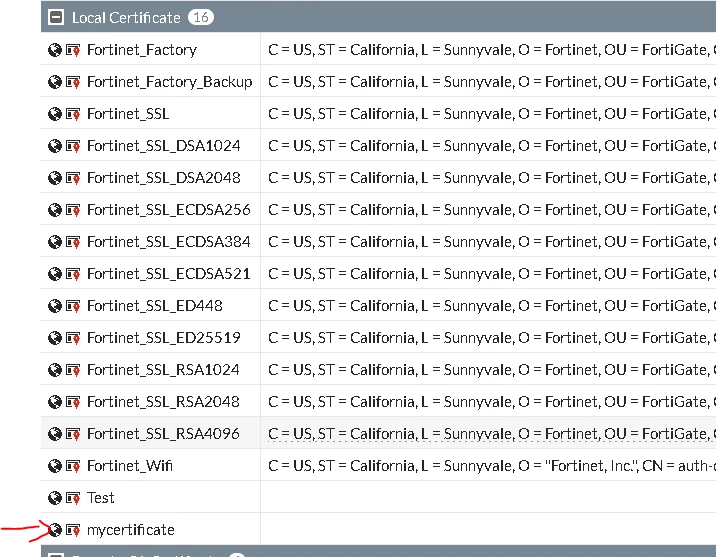 - Setup a TFTP server: Download and install the TFTP server on the computer.
- Ensure the certificate authority is trusted. If these steps are being taken just to renew a certificate, this step can normally be skipped.
Otherwise:
Obtain the certificate authority's root certificate as a base64 file (crt/cer/pem) and drop it in the TFTP directory:
execute vpn certificate ca import tftp <CAfilename> <tftp_IP> - Import Certificate:
execute vpn certificate local import tftp <File name on the TFTP server.> <IP address of TFTP server.> Certi file type ('cer'|'p12') - Once the certificate is imported, assign it to the GUI admin portal.
config system global set admin-server-cert "mycertificate" end |



