


Technical Tip: How to enable interface pair view
Description
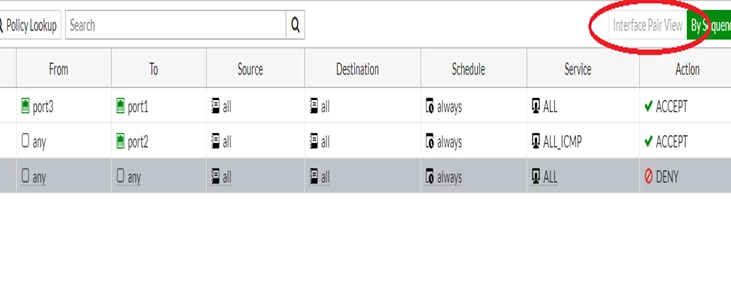
This article describes how to enable interface pair view when it is greyed out.
Scope
FortiGate.
Solution
Before v7.4, if Policies with 'any' or 'multiple interfaces' are selected in the incoming or outgoing interface, 'Interface pair view' will be disabled. Starting from v7.4.0, 'Interface Pair View' will not be greyed out.
Remove 'Any' or 'multiple interfaces' from the policy to select 'Interface Pair View'.
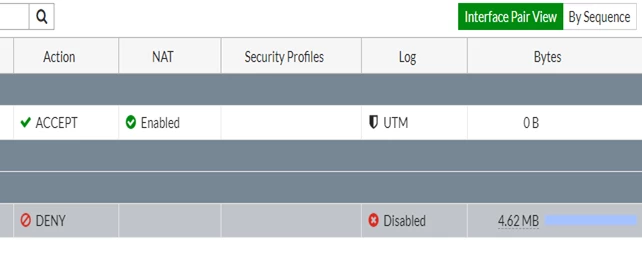
There are also specific cases when the Interface Pair View it is shown as greyed out.
One of these cases is the usage of SD-WAN and zones. When different zones are created on the SD-WAN and apply 2 or more of them as sources or destinations on the firewall policies, the Interface Pair View will be grayed out, as it is expected.

Below the three zones, part of the SD-WAN is configured as dstintf on the Test_Policy, and as seen, the Interface Pair View it is grayed out:

In the case mentioned above, to be able to enable Interface Pair View again, the solution is to create separate firewall policies for each zone set as dstintf (destination interface):
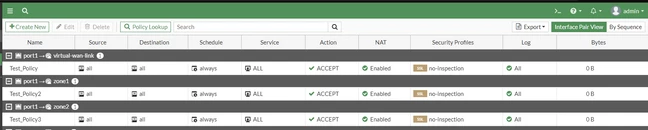
As seen, the Interface Pair View has not grayed out anymore and can be selected.
Note:
Interface Pair View does not support explicit web proxy policy since v7.4.4 and v7.6.0. Implicit Deny policy is exempted from this behavior.
Related article:


