
Technical Tip: How to enable DNS over HTTPS on Windows
| Description | This article describes the way to enable DNS queries over HTTPS on Windows. |
| Scope | Windows 10, 11. |
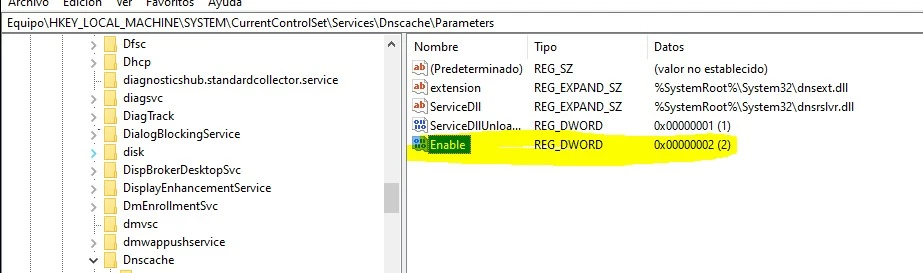
| Solution | Go to REGEDIT and choose HKEY_LOCAL_MACHINE -> SYSTEM -> Current Control Set -> Services -> Dndcache -> Parameters Create a new value (DWORD 32bits) and name it 'enable' then 'right click', choose modify, and change the value from 0 to 2 on Value Information.
After that, it is possible to configure the network adapter with DNS IP addresses that manage DNS traffic over HTTPS like Cloudflare (1.1.1.1). This configuration will send DNS queries auto over UDP and HTTPS. |