



Technical Tip: How to configure web proxy forwarding server (proxy chaining)
Description
This article describes how to configure web proxy forwarding servers to use proxy chaining.
For the explicit web proxy, it is possible to configure web proxy forwarding servers to use proxy chaining to redirect web proxy sessions to other proxy servers.
Proxy chaining can be used to forward web proxy sessions from the FortiGate to one or more other proxy servers on the network or on a remote network.
It is possible to use proxy chaining to integrate the FortiGate explicit web proxy with a web proxy solution that is already in place.
A FortiGate can forward sessions to most web proxy servers, including a remote FortiGate with the explicit web proxy enabled.
No special configuration of the explicit web proxy on the remote FortiGate is required.
It is possible to deploy the explicit web proxy with proxy chaining in an enterprise environment consisting of small satellite offices and a main office.
If each office has a FortiGate, users at each of the satellite offices can use their local FortiGate as an explicit web proxy server.
The satellite office FortiGate can forward explicit web proxy sessions to an explicit web proxy server at the central office.
From here, the sessions can connect to web servers on the Internet.
FortiGate proxy chaining does not support web proxies in the proxy chain authenticating each other.
Related document:
Getting started
Scope
FortiGate, FortiProxy.
Solution
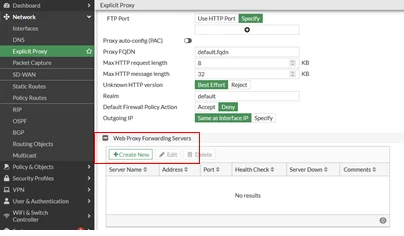
To add a forwarding server, select 'Create New' in the Web Proxy Forwarding Servers section of the Explicit Proxy page by going to Network -> Explicit Proxy.
Example configuration of a web proxy forwarding server named fwd-srv at address proxy.example.com and port 8080.
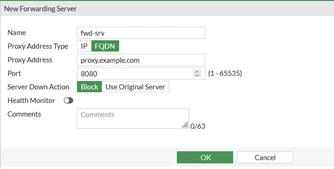
To configure the web proxy forwarding server via CLI:
 config web-proxy forward-server
    edit fwd-srv
        set addr-type fqdn
        set fqdn proxy.example.com
        set port 8080
    next
end
To configure a web proxy forwarding server with health check / monitoring the remote web proxy server in CLI:
 config web-proxy forward-server
    edit fwd-srv
        set healthcheck enable
        set monitor <remote proxy server url> <----- Health-check monitor.
        set server-down-option pass <----- Allow the proxy forwarding server to stop forwarding to the web proxy server when considered down.
    next
end
Then add an explicit web proxy forwarding server in the proxy policy:
This security policy allows all users on the internal subnet to use the explicit web proxy for connections through the PORT1 interface to the Internet.
The policy forwards web proxy sessions to a remote forwarding server named fwd-srv.
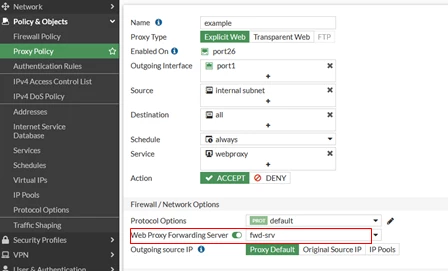
To add the explicit web proxy forwarding server via CLI:
 config firewall proxy-policy
    edit 1
        set name "example"
        set proxy explicit-web
        set dstintf "port1"
        set srcaddr "internal subnet"
        set dstaddr "all"
        set service "webproxy"
        set action accept
        set schedule "always"
        set logtraffic all
        set webproxy-forward-server "fwd-srv"
    next
end
Note 1:
By default, in an explicit proxy-chain setup, FortiGate as child-proxy will perform DNS lookup for the intercepted client HTTP requests. If, for any reason, DNS resolution is not possible, there is the option to configure the FortiGate to exempt the URL from DNS lookup.
This is done under the Explicit Proxy configuration using URL Match:
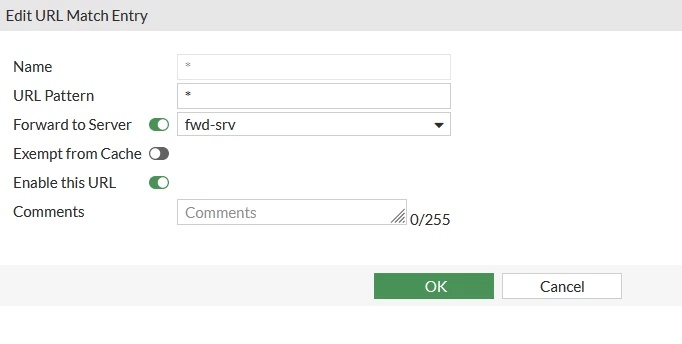
The configuration should look like this:
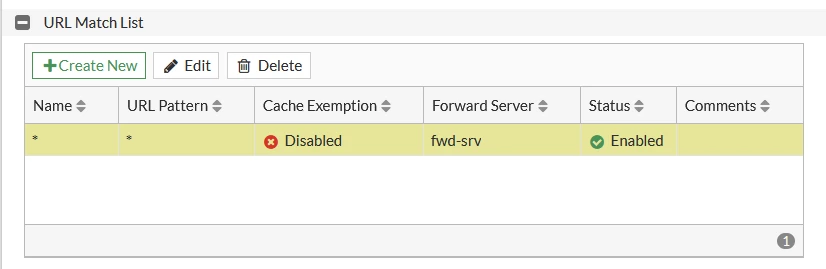
In this example, all traffic will be exempted. If more granularity is needed, specific URLs can be added.
In the newer version (v7.6.1), the following command can be enabled if web proxy forwarding server traffic needs to be sent via a specific VRF or interface.
 config web-proxy forward-server
    edit < name >
        set interface-select-method specify
        set interface < port >
        set vrf-select < vrf-id >
    next
end
Note 2:
In FortiOS v7.6.3, isolator servers can be configured for explicit and transparent proxy policies in the GUI of the FortiGate.
Web proxy isolator servers, such as FortiIsolator, are supported in proxy policies. Isolators are fundamentally the same as web proxy forward servers because both will redirect HTTP and HTTPS requests to an HTTP or HTTPS proxy server. However, isolators have the specific function of isolating potentially unsafe traffic from a user environment.
For more information, refer to this document: GUI support of isolator servers for proxy policies 7.6.3.
Note 3:
In FortiOS v7.4.4, the default behaviour was changed, which affects setups with IP pool usage and high session load.
Since this release, Masquerade is enabled by default in forward-proxy, hence the IP pool will be ignored.
To let the proxy use IP pools for forwarding servers, 'masquerade' must be disabled:
 config web-proxy forward-server
    edit < name >
        set interface-select-method specify
        set interface < port >
        set vrf-select < vrf-id >
        set masquerade disable
    next
end
Note 4:
When health check is enabled, since FortiOS v7.4.8, FortiGate considers a parent proxy server operational as long as it receives any HTTP response from it. The system only verifies connectivity and basic responsiveness, and it does not evaluate or validate the returned HTTP status code, regardless of whether it is HTTP 200 or any other response code.


