bmedikonda
Staff
Staff
Sep 10, 2024 7:24 AM UTC

Technical Tip: How to block web-based emails

  • Apr 16, 2026 12:06 PM UTC
  • 0 replies
  • 3410 views
  • Translate All
Description This article describes the process to block the users from accessing web browser-based emails such as Gmail, Yahoo, and outlook.com.
Scope FortiGate.
Solution
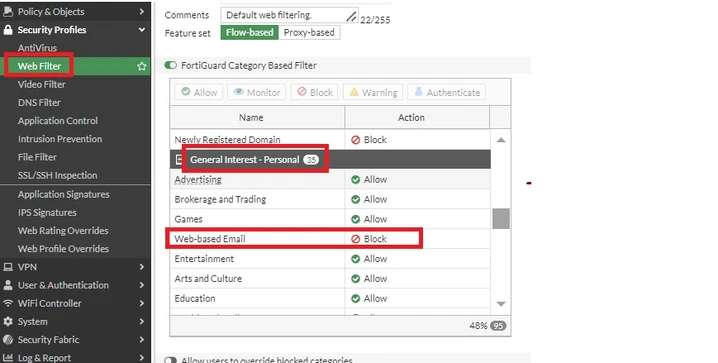
  1. Go to Security Profiles -> Web Filter and select 'Create New' or edit the existing web filter profile. Navigate to the option called 'FortiGuard category-based filter', expand the 'General Interest - Personal' category, and then find the sub-category 'Web-based Email', select it, and select the action as 'Block'.


                                          image (6).png


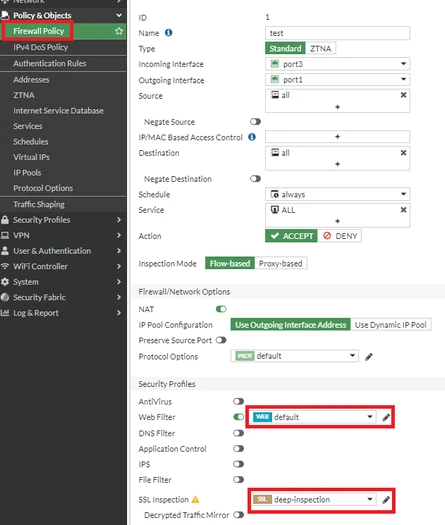
  1. Map this Web filter profile to the security policies. Go to Policy and Object -> IPv4 Policy and select 'Create New', select respective incoming, and outgoing interfaces, and source and destination subnets. Make sure to select the SSL certificate inspection as the SSL 'deep-inspection' profile to inspect the HTTPS header properly.

Refer to the following as an example:

                                     image (7).png


Test from accessing any Web-based emails from the users' browser.

Risk and Resilience in the Age of AI. An OT Thought Leadership Summit for Houston's Critical Infrastructure Leaders. Date: Thursday, December 3, 2026. Time: 8:30 am - 1:30 pm (CT). Location: The Westin Houston, Memorial City | 945 Gessner Road, Houston, TX 77024