mattchow_FTNT
Staff
Staff
Feb 29, 2024 6:28 AM UTC

Technical Tip: High memory on SMB client daemon

Description This article describes what to do if the SMB client daemon (SMBCD) memory increases gradually.
Scope FortiOS v7.0.x, v7.2.x (earlier builds may be affected).
Solution

To check the memory of SMBCD memory utilization, use the command below:


diagnose sys top
Run Time: 0 days, 0 hours and 5 minutes
1U, 0N, 0S, 99I, 0WA, 0HI, 0SI, 0ST; 1866T, 707F
smbcd 304 S 5.4 7.8 3  <----- 7.8%.
forticron 159 S 0.4 1.1 2
newcli 361 R < 0.4 0.4 0


diagnose sys top
Run Time: 0 days, 0 hours and 7 minutes
1U, 0N, 0S, 99I, 0WA, 0HI, 0SI, 0ST; 1866T, 615F
smbcd 304 S 4.9 12.6 0 <----- 12.6%.
node 152 S 2.9 1.9 1
ipshelper 211 S < 0.1 1.7 0


diagnose sys top

Run Time: 0 days, 0 hours and 9 minutes
2U, 0N, 0S, 98I, 0WA, 0HI, 0SI, 0ST; 1866T, 519F
smbcd 304 S 5.3 17.2 0 <----- 17.2%.
node 152 S 2.9 1.9 0


If observing the smb client daemon increases gradually as shown above, it is possible to check the fsso-polling and find multiple fail counters as shown below,


MFM-FGT-SRR-81E-001 # diagnose debug fsso-polling detail 1
AD Server Status(connected):
ID=1, name(172.16.0.1),ip=172.16.0.1,source(security),users(IPv4:0, IPv6:0)
port=auto username=s-FortinetLDAP
read log eof=1, latest logon timestamp: Wed Feb 28 15:06:03 2024

polling frequency: every 10 second(s) success(6), fail(0)
LDAP query: success(0), fail(31)  <-----
LDAP max group query period(seconds): 1
LDAP status: connected


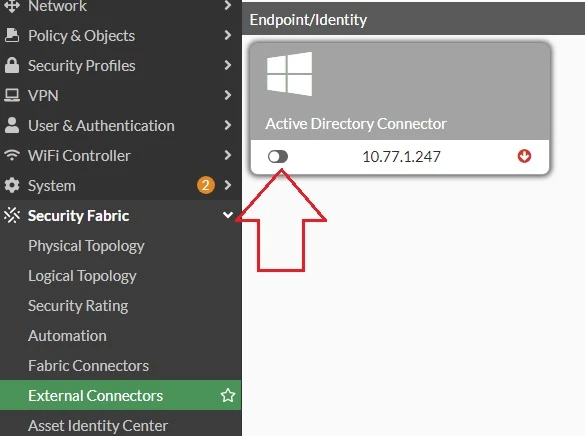
Restart the connection by going to Security Fabric -> External Connectors -> Active Directory Connector, disabling it by swiping to the left, and re-enabling it by swiping to the right to restart the connection.


polling.jpg


If the restart connection does not help and smbcd memory continues to increase gradually, restart the daemon gracefully using a specific SMBCD process ID as shown below:


diagnose sys top

Run Time: 0 days, 0 hours and 12 minutes
1U, 0N, 0S, 99I, 0WA, 0HI, 0SI, 0ST; 1866T, 243F
smbcd 304 S 5.1 25.6 0  <----- Process ID 304.

MFM-FGT-SRR-81E-001 # diagnose sys kill 11 304


Best practices:

  • Use FortiAnalyzer or FortiCloud for large log volumes; reserve SMB for archival/low-frequency uploads.
  • If SMB must be used, schedule periodic uploads instead of real-time to prevent memory buildup.
  • Ensure the target SMB server is stable and performant, as retries can increase memory usage.


    Risk and Resilience in the Age of AI. An OT Thought Leadership Summit for Houston's Critical Infrastructure Leaders. Date: Thursday, December 3, 2026. Time: 8:30 am - 1:30 pm (CT). Location: The Westin Houston, Memorial City | 945 Gessner Road, Houston, TX 77024