



Technical Tip: Grouping ISDB objects
| Description | This article describes that it when trying to add Internet Services to a group to use them in a policy, it may fail with an 'Entry not found in datasource' error. |
| Scope | FortiGate v6.2, v6.4, v7.0, v7.2, v7.4, v7.6. |
| Solution | The most common cause of this is a typo or non-matching capitalization when configuring members for the internet-service-group.
Another common cause is the built-in 'direction' attribute of the Internet Service may not be compatible with the 'direction' configured in the Internet Service Group.
set direction both next end
set direction ?
Or:
diagnose internet-service id-summary 327903
Internet Services with directions 'both' can be added to groups with directions 'destination' and 'source'. For example, if the group direction is 'both', it is possible to add only Microsoft-Office365.Published.Allow ('both'), but not Microsoft-Web ('dst') to it. However, if changing the type to 'destination', it is possible to add both services.
This configuration can be done only from the CLI.
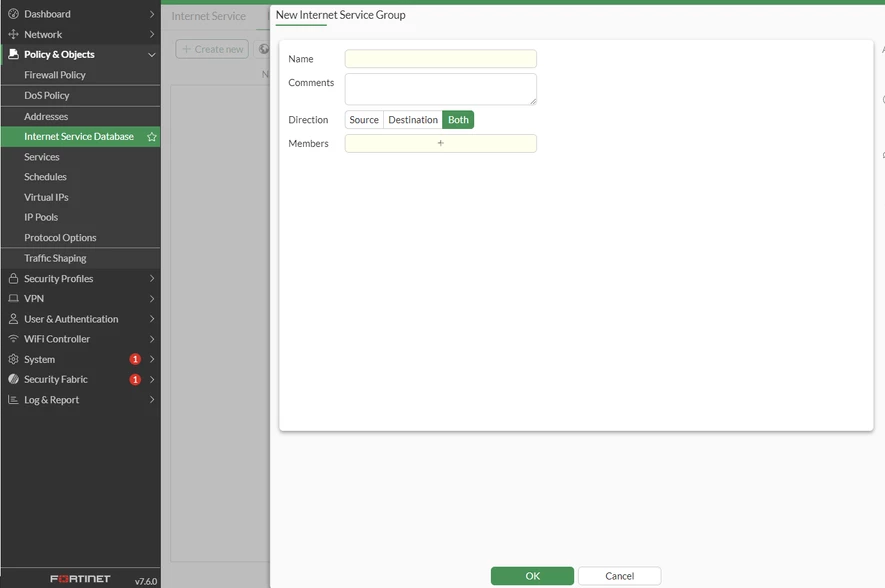
Note: Starting from FortiOS v7.6.0, direction can be configured using the GUI as well. Go to Policy & Objects -> Internet Service Database -> Select Internet Service Group -> Create new.
 Related article: Technical Tip: Internet Service Grouping in relation to direction |

