


Technical Tip: FSSO group filtering based upon OU
Description
The article describes how to filter the FSSO froup based on OU.
Scope
FortiGate, Collector Agent
Solution
There are two ways of mapping user groups in terms of FSSO policy, which are Standard mode and Advanced mode. This KB article explains the details of these two modes: Technical Tip: How to switch FSSO operation mode from Standard Mode to Advanced Mode
Note:
Collector Agent only detects nested groups in advanced mode. This KB article clarifies how nested groups can be used in a Fortinet Single-Sign-On context: Technical Tip: Fortinet Single-Sign-On and nested groups
Here is a sample of the FSSO group filter configuration using OUs and AD security groups. The following example is based upon FortiOS v7.4.7 and collector agent v5.0.0312
Approach 1:
In the first approach, Collector Agent is being used as User Group, and Standard mode is being selected as a Set Directory Access Information.
Step 1: On the collector agent (CA) and under 'Set group filter', select and add OU container(s), then select OK to save the changes.
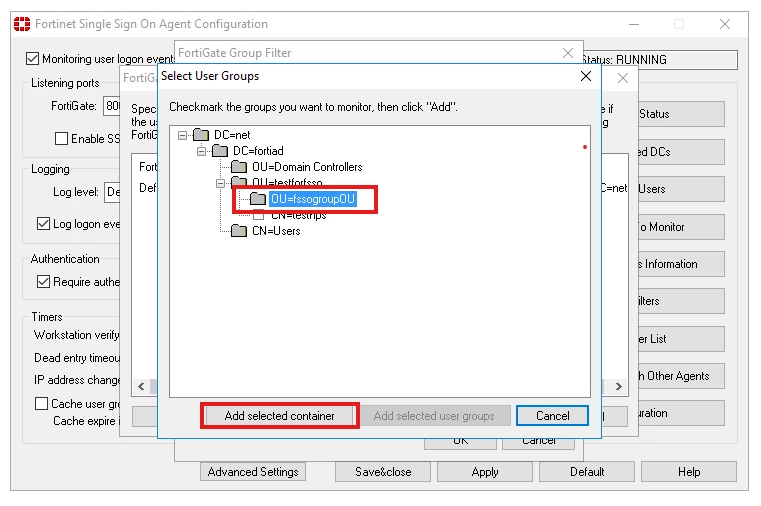
The following screenshot shows a Group Filter that contains both security groups and OUs: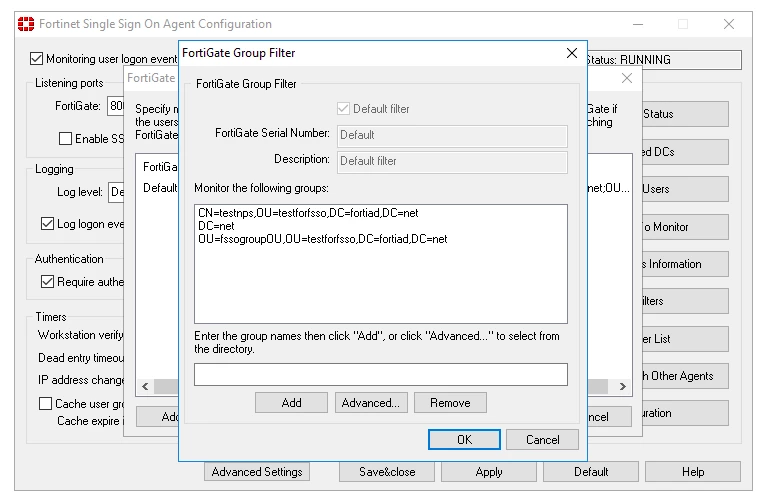
Step 2: Configure External Connectors on the FortiGate. 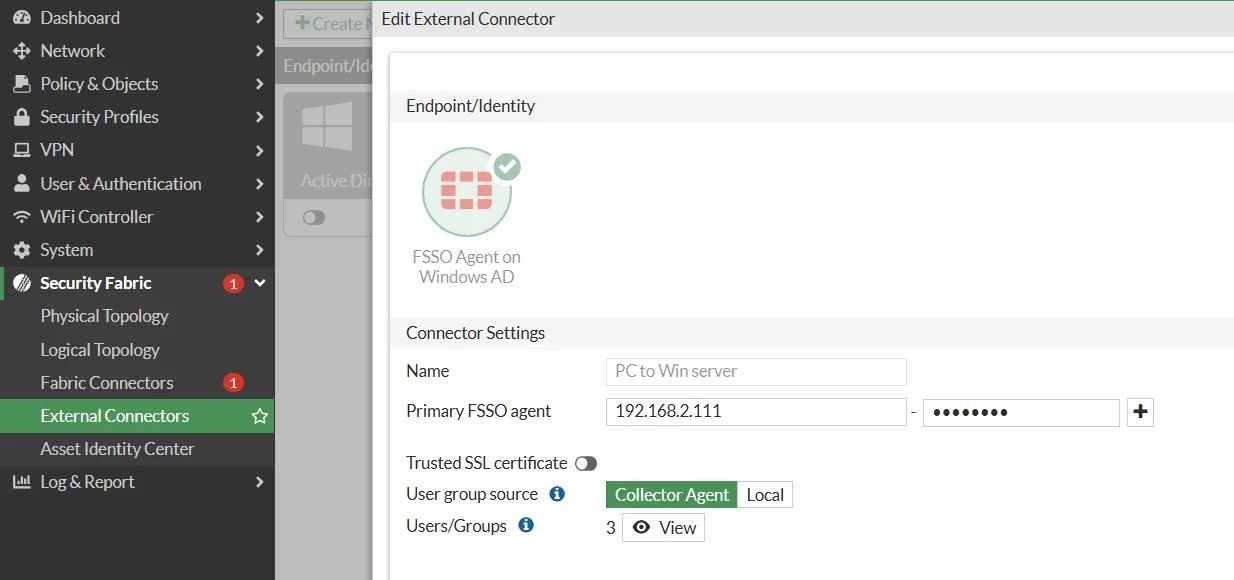
Step 3: Configure FortiGate groups and map AD security groups and OUs to them: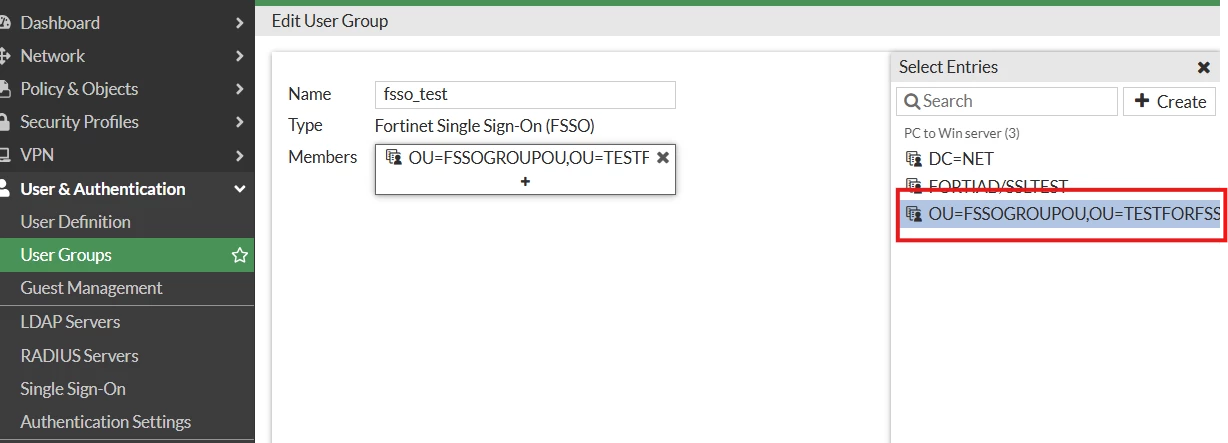
Step 4: Configure a firewall policy to use the FortiGate groups.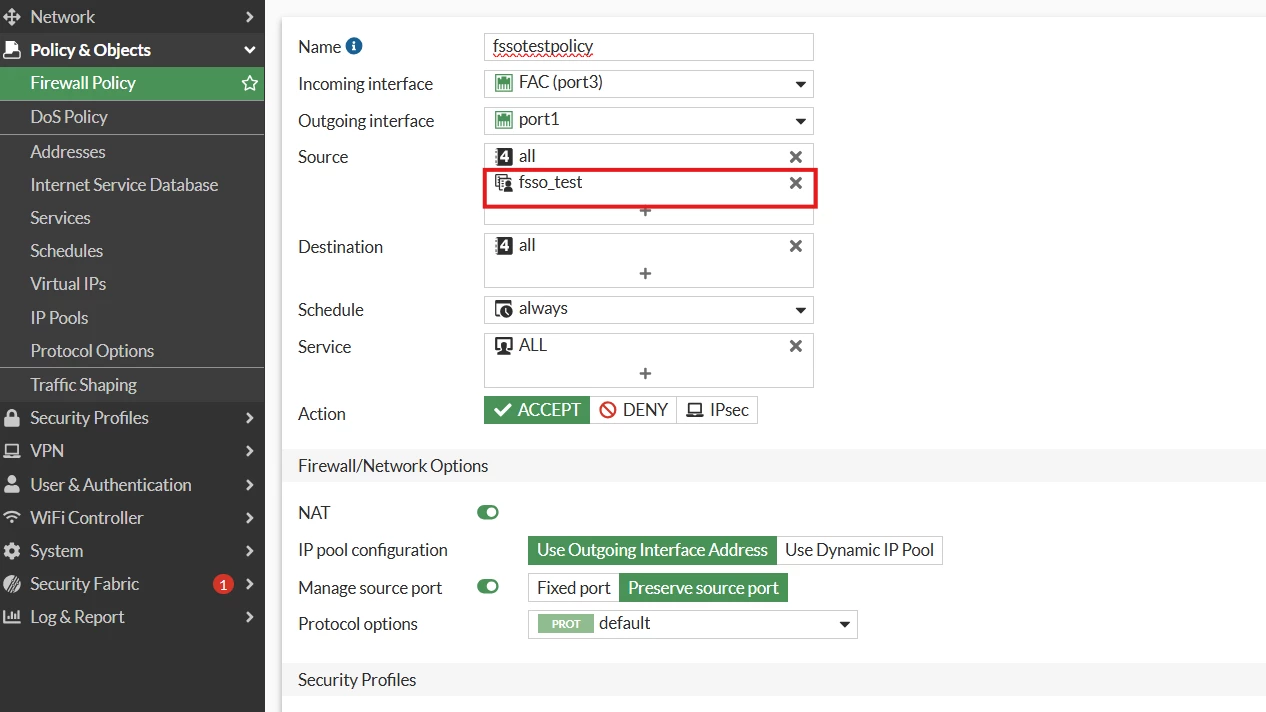
Step 5: Verification:
- Login to a test workstation.
- Verify that the FortiGate received the login event.
diag debug en
diag debug auth fsso list
----FSSO logons----
bentley-kvm15 (root) # diagnose debug auth fsso list
----FSSO logons----
IP: 192.168.2.20 User: FSSO1 Groups: OU=FSSOGROUPOU,OU=TESTFORFSSO,DC=FORTIAD,DC=NET Workstation: DELOREAN-KVM43 MemberOf: fsso_test OU=FSSOGROUPOU,OU=TESTFORFSSO,DC=FORTIAD,DC=NET
Total number of logons listed: 1, filtered: 0
----end of FSSO logons-----
- Send traffic from the test workstation:
diag sys session filter list
diag sys session filter src 192.168.2.20
diagnose sys session list
session info: proto=6 proto_state=01 duration=7892 expire=3500 timeout=3600 refresh_dir=both flags=00000000 socktype=0 sockport=0 av_idx=0 use=3
origin-shaper=
reply-shaper=
per_ip_shaper=
class_id=0 ha_id=0 policy_dir=0 tunnel=/ vlan_cos=0/255
user=FSSO1 auth_server=PC to Win server state=log may_dirty f00 acct-ext
statistic(bytes/packets/allow_err): org=7674/68/1 reply=10903/51/1 tuples=2
tx speed(Bps/kbps): 0/0 rx speed(Bps/kbps): 0/0
orgin->sink: org pre->post, reply pre->post dev=5->3/3->5 gwy=10.191.31.254/0.0.0.0
hook=post dir=org act=snat 192.168.2.20:49840->40.113.110.67:443(10.191.19.15:49840)
hook=pre dir=reply act=dnat 40.113.110.67:443->10.141.20.18:49840(192.168.2.20:49840)
pos/(before,after) 0/(0,0), 0/(0,0)
misc=0 policy_id=2 pol_uuid_idx=15908 auth_info=0 chk_client_info=0 vd=0
serial=00008d0f tos=ff/ff app_list=0 app=0 url_cat=0
rpdb_link_id=00000000 ngfwid=n/a
npu_state=0x000100
no_ofld_reason: npu-flag-off
total session: 1
Approach 2:
In the second approach, a group filter can be configured on the FortiGate and then pushed to the collector agent using the LDAP server.
Note that it is not recommended to combine both methods. Only one filter method should be used per FortiGate.
Step 1: Configure an LDAP server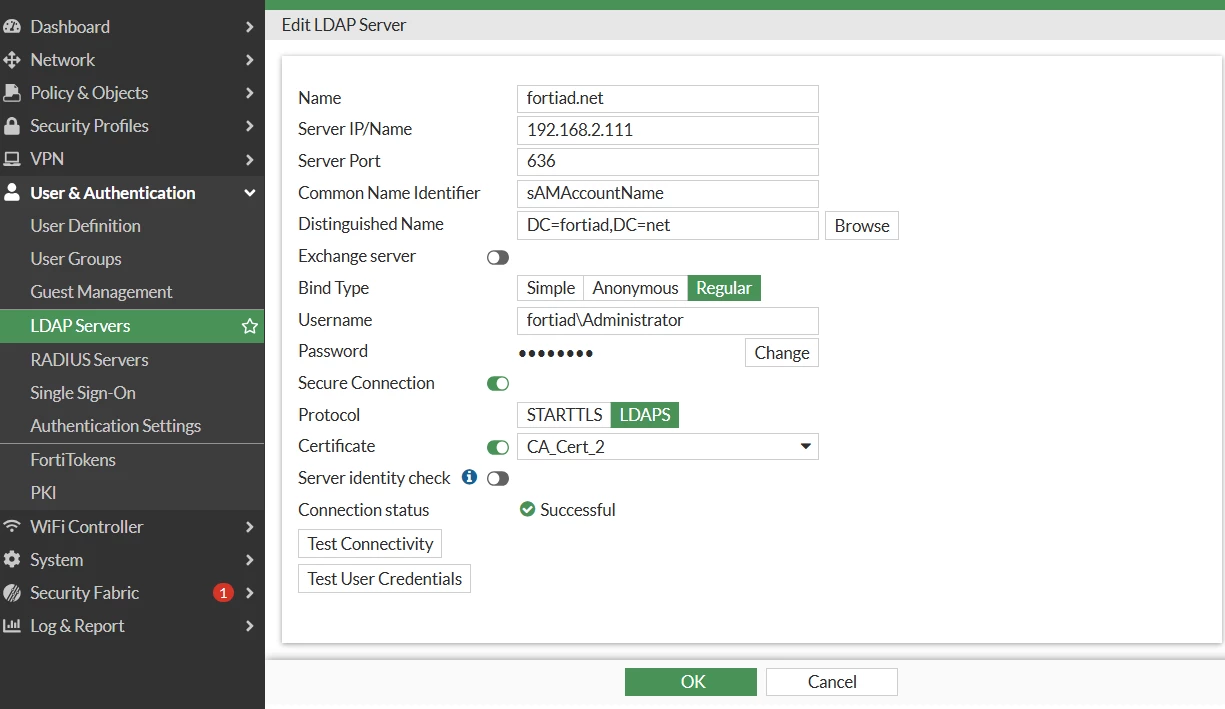
Step 2: Configure FSSO group filter under external connectors and select User group source as Local: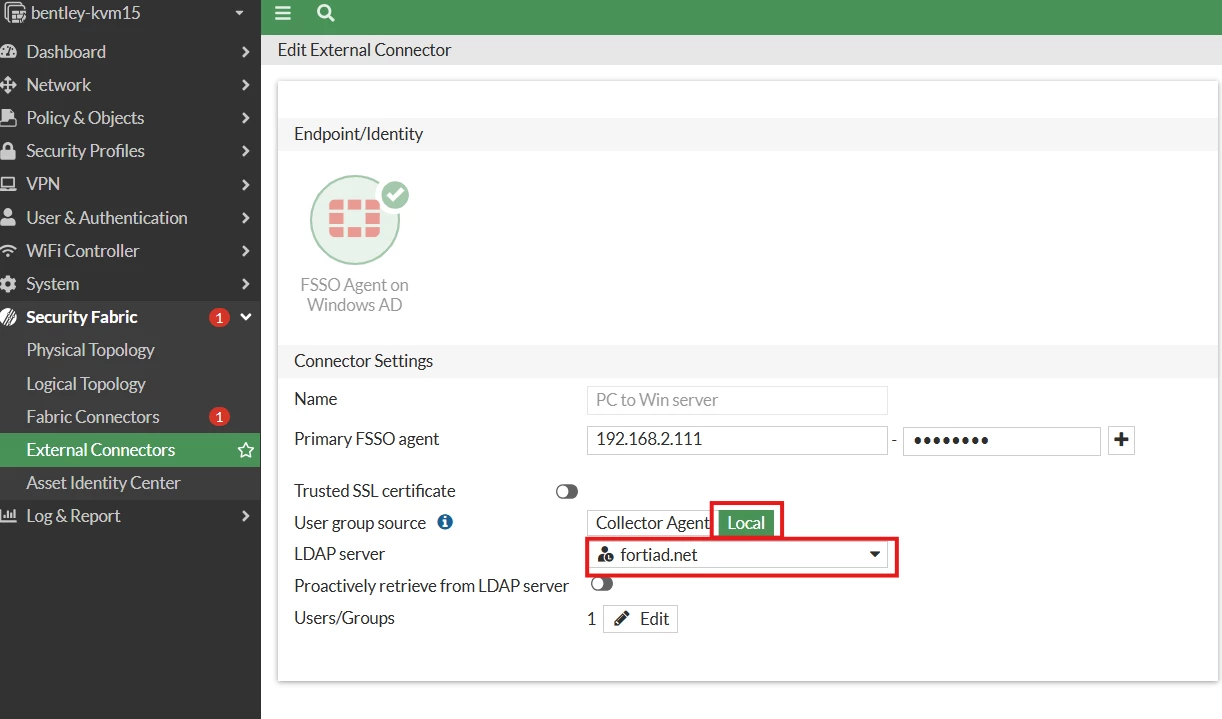
Select the specific OU:
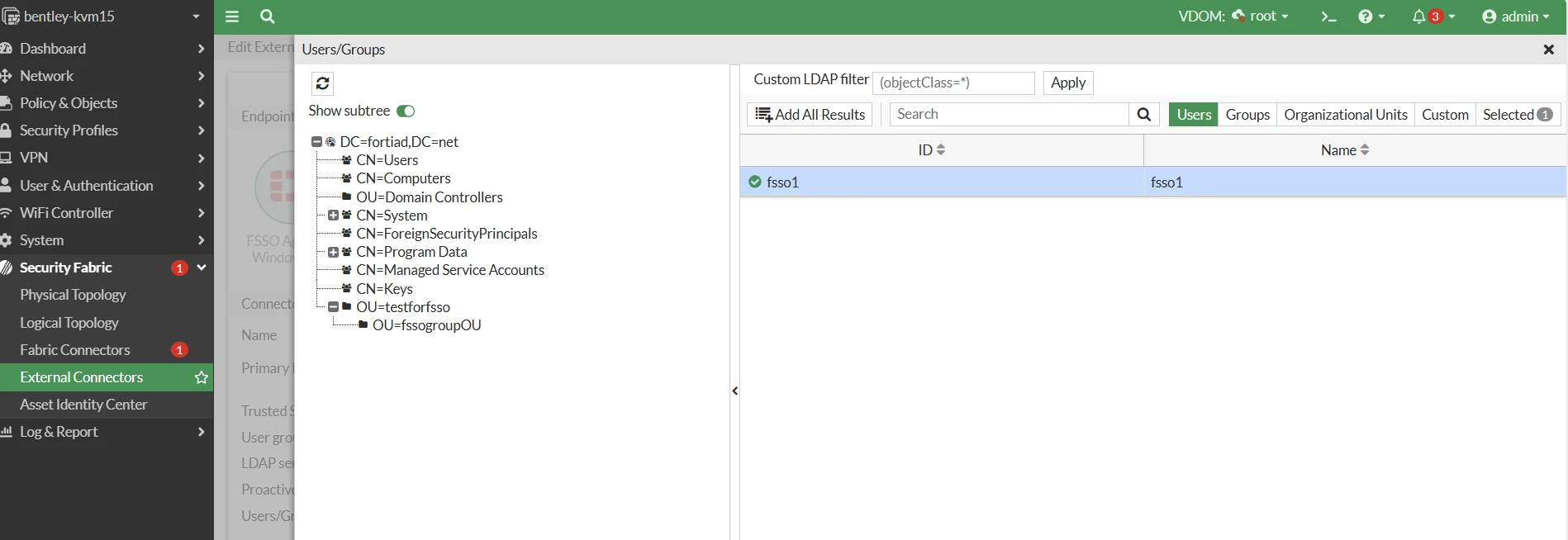
Step 3: Add the group to the FSSO policy, as mentioned in approach 1 > step 4.

