


Technical Tip: Framed-IP to SSL VPN users using Radius Server (Microsoft)
Description
This article describes how to configure FortiGate to assign IP(Framed-IP) to SSLVPN users from the Microsoft Radius server
Scope
FortiGate, Server used: Microsoft Server 2016 standard.
Solution
In the Microsoft Server, it can be necessary to ensure that the user is assigned a personal IP:
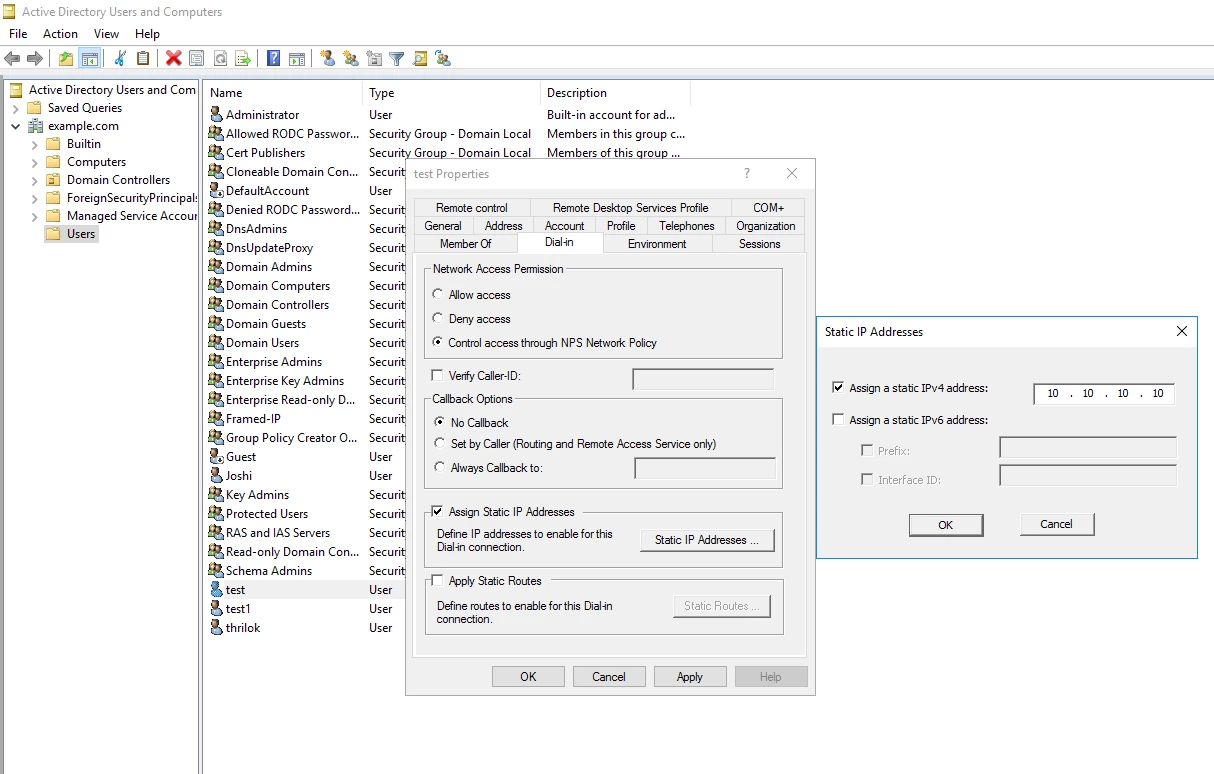
In the Microsoft server, Server Manager -> Tools -> 'Active Directory Users and Computers', go to the path where the user is.
Open the user properties and under Dial-In, check 'Assign Static IP addresses' and then select 'Static IP Addresses -> Assign the IP.
In this scenario, I am assigned the user 'test' with IP: 10.10.10.10.
Create an NPS policy for Radius authentication and assign the IP on the server:
Make sure the firewall IP is added as a client in the Radius Server. Go to Server Manager -> Tools -> 'Network Policy Server'.
Under the 'RADIUS Clients and Servers', 'right-click' on RADIUS Clients and select 'New'.
Add the firewall IP and shared secret (should be common on the firewall and the server).
Under the Policies, 'right-click' on Network Policies -> New.
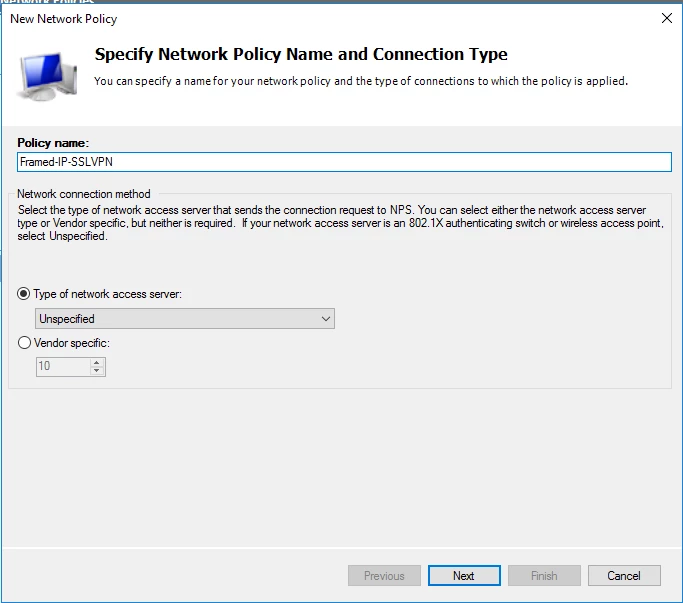
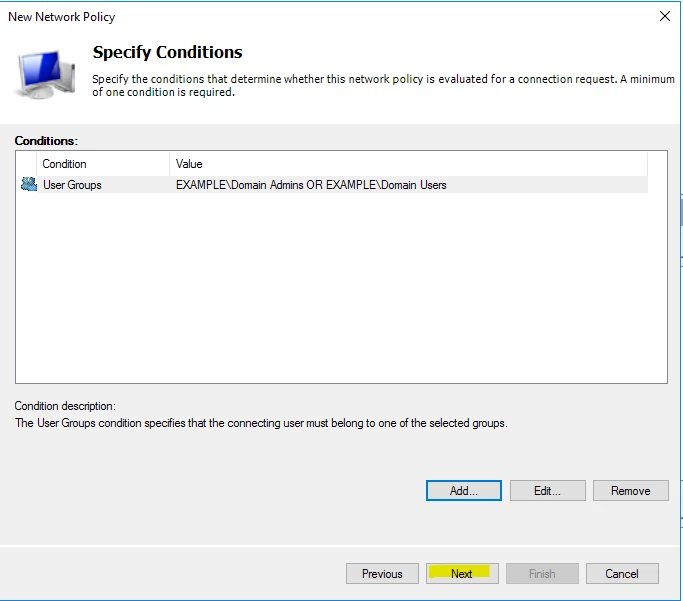
Select 'Add 'in the next window, where it is possible to add the conditions.
In this case, the User Groups are selected:
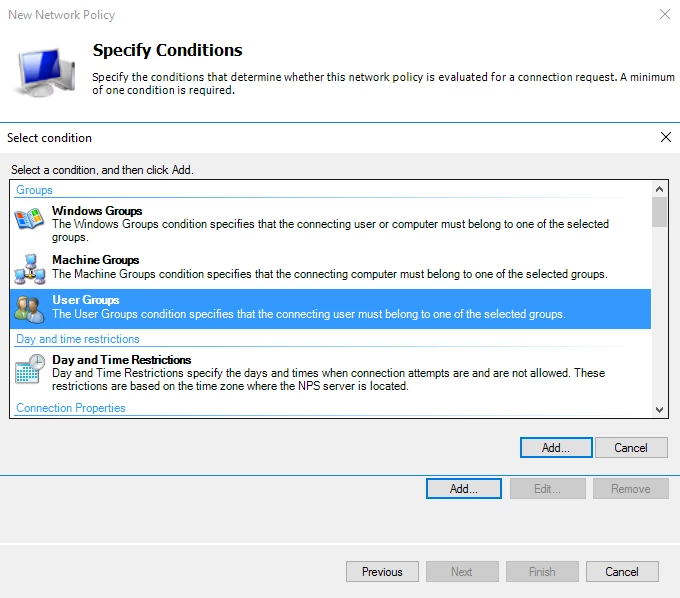
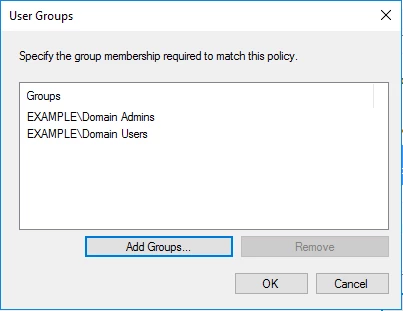
Select 'Add', Add Groups, the option to search for the group will be visible, select the group and select 'OK'.
Select 'Next'.
Select Access granted, and select 'Next'.
Select the authentication method to use, in this case, PAP.
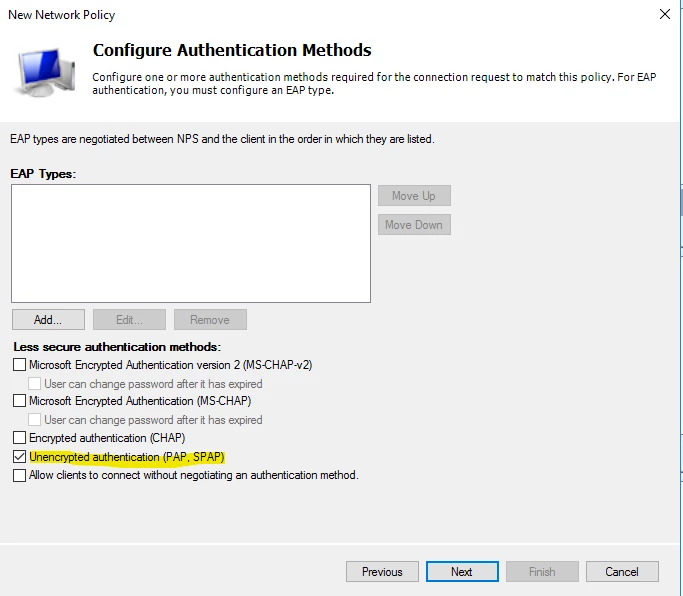
Select 'Next'.
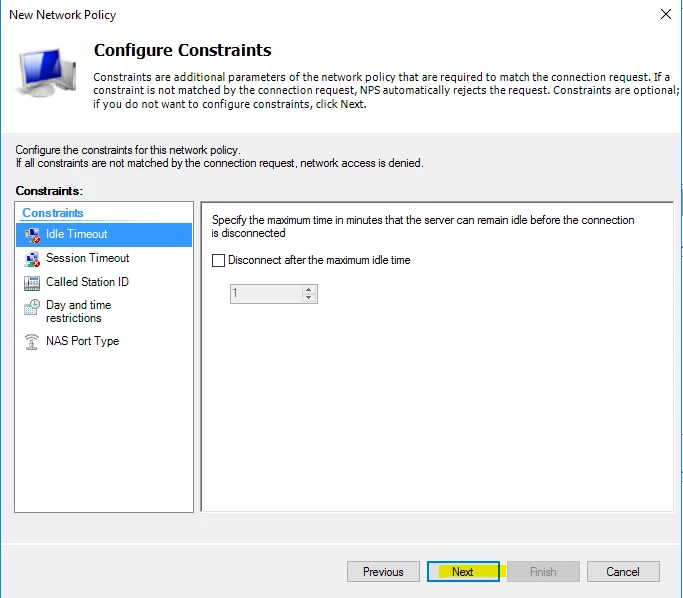
Select 'Next'.
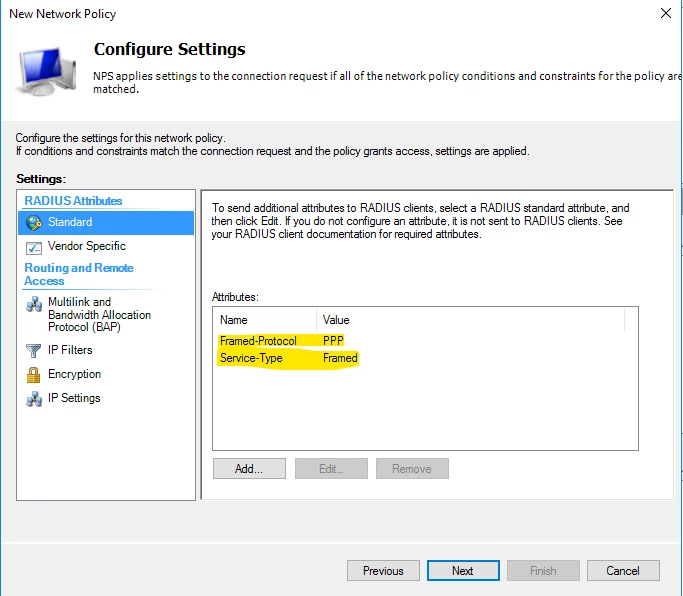
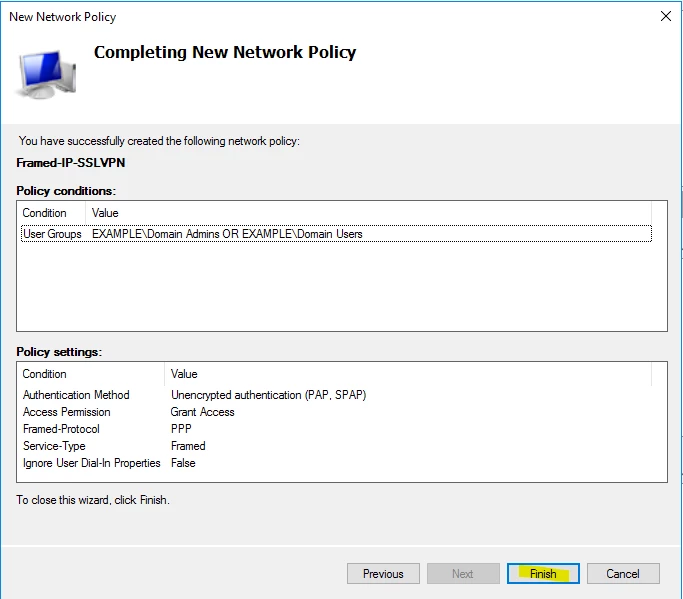
Select 'Finish'.
Note:
Be informed that the above created NPS policy is a generic one, configure one as per the organization's requirements.
Firewall configuration:
On the firewall, make sure the Radius server is added, and a group is created from User & Authentication -> RADIUS Servers and select 'Create New'.
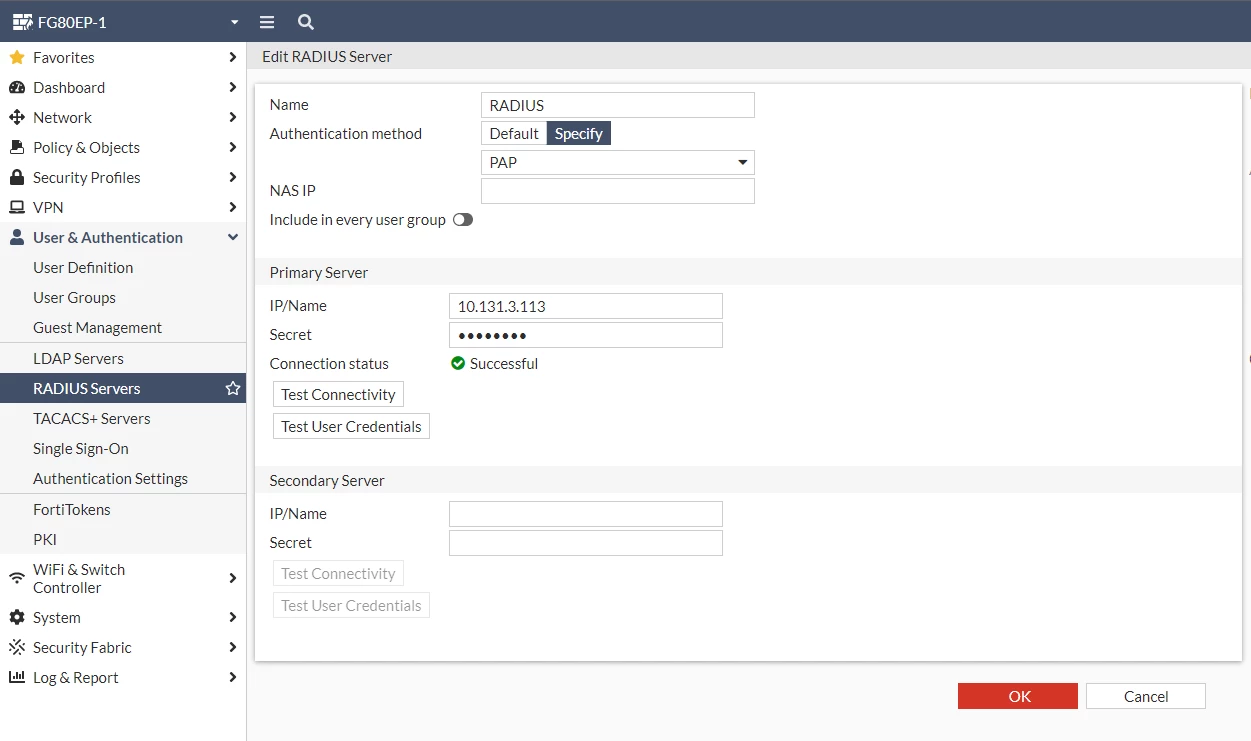
The same can be configured using CLI:
FG80EP-1 # config user radius
FG80EP-1 (radius) # edit "RADIUS"
FG80EP-1 (RADIUS) # show
config user radius
edit "RADIUS"
set server "10.131.3.113"
set secret XYZ <----- XYZ is the shared secret configured in the server.
set auth-type pap
next
end
FG80EP-1 (RADIUS) #
To configure the group, go to User & Authentication -> User Groups and select 'Create New'.
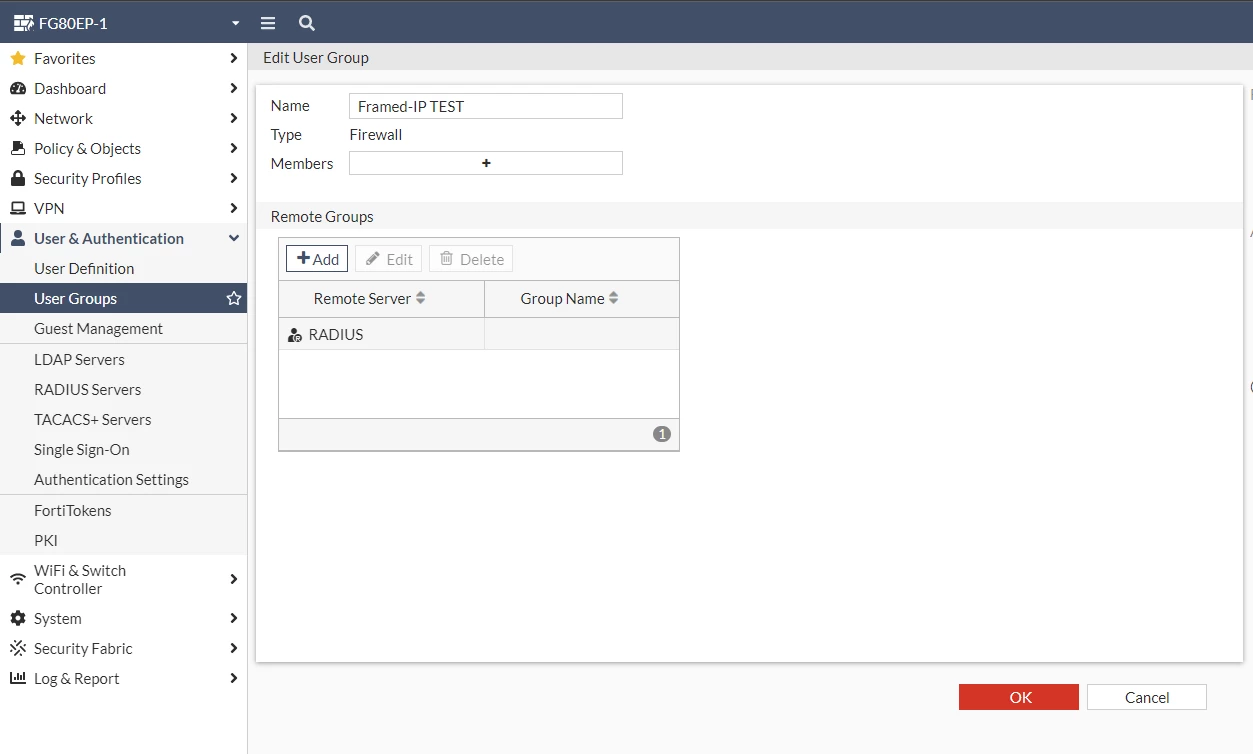
Under Remote Groups, select 'Add', and select the server.
CLI configuration for the group:
FG80EP-1 # config user group
FG80EP-1 (group) # edit "Framed-IP TEST"
FG80EP-1 (Framed-IP TEST) # show
config user group
edit "Framed-IP TEST"
set member "RADIUS"
next
end
FG80EP-1 (Framed-IP TEST) #
Now configure the Authentication rule in the SSL VPN under VPN -> SSL VPN Settings -> Authentication/Portal Mapping, select 'Create New', select the group and portal.
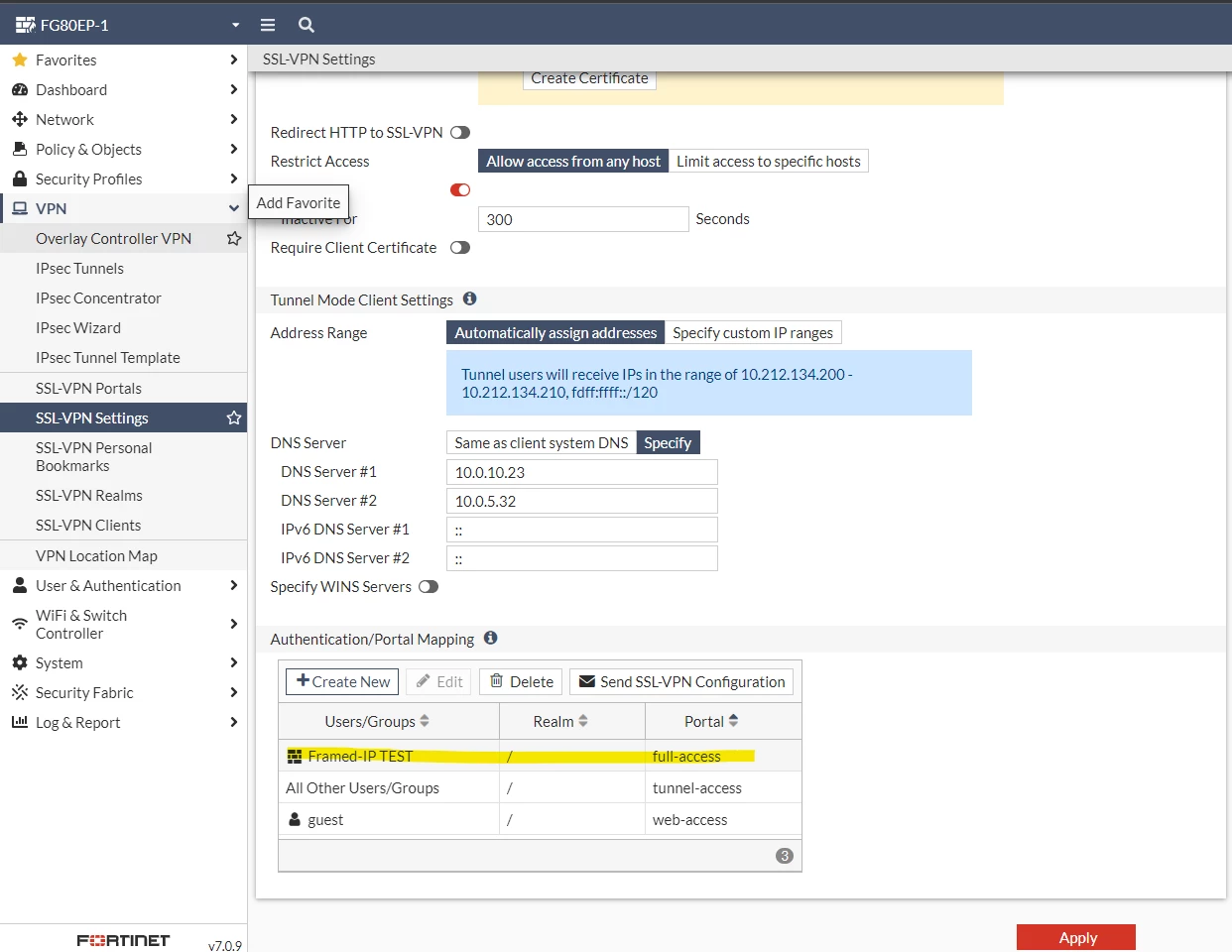
CLI configuration:
FG80EP-1 # config vpn ssl settings
FG80EP-1 (settings) # show
config vpn ssl settings
set ssl-min-proto-ver tls1-1
set banned-cipher RSA DHE DSS CAMELLIA 3DES SHA1 STATIC
set ssl-insert-empty-fragment disable
set servercert "Fortinet_Factory"
set algorithm low
set tunnel-ip-pools "SSLVPN_TUNNEL_ADDR1"
set tunnel-ipv6-pools "SSLVPN_TUNNEL_IPv6_ADDR1"
set dns-server1 10.0.10.23
set dns-server2 10.0.5.32
set source-interface "lan"
set source-address "all"
set source-address6 "all"
set default-portal "tunnel-access"
config authentication-rule
edit 2
set users "guest"
set portal "web-access"
next
edit 3
set groups "Framed-IP TEST" <----- Group.
set portal "full-access" <<<<<<<<<< portal
next
end
end
FG80EP-1 (settings) #
In the portal, for the firewall to assign an IP from the Radius server, set the ip-mode to user-group (this can only be set using CLI):
FG80EP-1 # config vpn ssl web portal
FG80EP-1 (portal) # edit full-access
FG80EP-1 (full-access) # set ip-mode user-group <-----
FG80EP-1 (full-access) # end
FG80EP-1 #
Make sure the policy is in place with this group for SSL VPN connectivity:
FG80EP-1 # show firewall policy 2
config firewall policy
edit 2
set name "SSLVPN"
set uuid 379fb146-2518-51ed-97c5-bd679fc54691
set srcintf "ssl.root"
set dstintf "dmz" "wan1" "wan2"
set action accept
set srcaddr "SSLVPN_TUNNEL_ADDR1"
set dstaddr "10.131.7.174" "VPN_remote_subnet_1"
set schedule "always"
set service "ALL"
set utm-status enable
set inspection-mode proxy
set ssl-ssh-profile "deep-inspection"
set icap-profile "ICAP"
set logtraffic all
set nat enable
set groups "Framed-IP TEST"
next
end
FG80EP-1 #
Now let's test the IP assigned to the user when connecting to the SSL VPN:
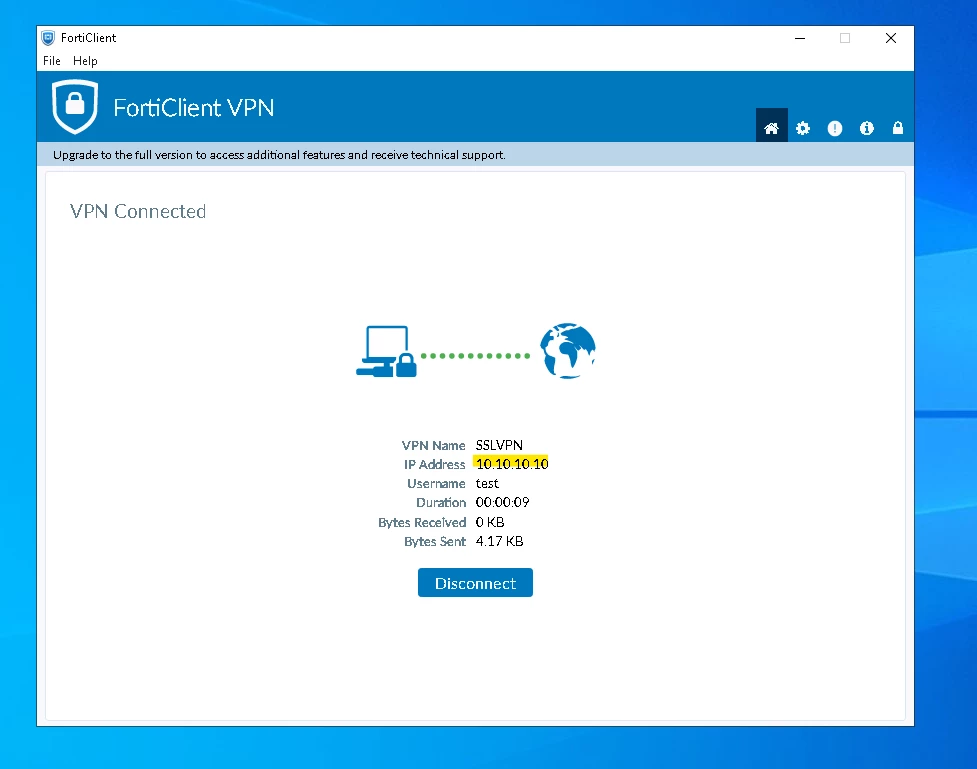
From the firewall:
FG80EP-1 # get vpn ssl monitor
SSL-VPN Login Users:
Index User Group Auth Type Timeout Auth-Timeout From HTTP in/out HTTPS in/out Two-factor Auth
0 test Framed-IP TEST 2(1) 289 28763 10.5.23.138 0/0 0/0 0
SSL-VPN sessions:
Index User Group Source IP Duration I/O Bytes Tunnel/Dest IP
0 test Framed-IP TEST 10.5.23.138 37 0/0 10.10.10.10 <----- Assigned IP 10.10.10.10 which is configured in the RADIUS server.
Firewall debugs:
[12426:root:3c]sslvpn_update_user_group_list:1793 got user (0:0), group (1:0), peer group (0) after update.
[12426:root:3c]two factor check for test: off
[12426:root:3c]sslvpn_authenticate_user:183 authenticate user: [test]
[12426:root:3c]sslvpn_authenticate_user:197 create fam state
[12426:root:3c][fam_auth_send_req_internal:426] Groups sent to FNBAM:
[12426:root:3c]group_desc[0].grpname = Framed-IP TEST
[12426:root:3c][fam_auth_send_req_internal:438] FNBAM opt = 0X200420
[12426:root:3c]fam_auth_send_req_internal:514 fnbam_auth return: 4
[12426:root:3c]fam_auth_proc_resp:1352 fnbam_auth_update_result return: 0 (success)
[12426:root:3c][fam_auth_proc_resp:1451] Authenticated groups (1) by FNBAM with auth_type (2):
[12426:root:3c]Received: auth_rsp_data.grp_list[0] = 8
[12426:root:3c]fam_auth_proc_resp:1476 found node Framed-IP TEST:0:, valid:1, auth:0
[12426:root:3c]Validated: auth_rsp_data.grp_list[0] = Framed-IP TEST
[12426:root:3c]Auth successful for user test in group Framed-IP TEST
[12426:root:3c]user test got framed IP 10.10.10.10
[12426:root:3c]fam_do_cb:665 fnbamd return auth success.
[12426:root:3c]SSL VPN login matched rule (3).
[12426:root:3c]got public IP address: 90.83.10.129
[12426:root:3c]User Agent: FortiSSLVPN (Windows NT; SV1 [SV{v=02.01; f=07;}])
[12426:root:3c]rmt_web_session_create:1209 create web session, idx[0]
[12426:root:3c]login_succeeded:536 redirect to hostcheck
[12426:root:3c]User Agent: FortiSSLVPN (Windows NT; SV1 [SV{v=02.01; f=07;}])
++ Output Omitted ++
[12427:root:3c]SSL state:SSLv3/TLS write session ticket (10.5.23.138)
[12427:root:3c]SSL state:SSLv3/TLS write session ticket (10.5.23.138)
[12427:root:3c]SSL established: TLSv1.3 TLS_AES_256_GCM_SHA384
[12427:root:3c]req: /remote/sslvpn-tunnel2?dns0=8.8.8.8&uuid
[12427:root:3c]sslvpn_tunnel2_handler,59, Calling rmt_conn_access_ex.
[12427:root:3c]deconstruct_session_id:709 decode session id ok, user=[test], group=[Framed-IP TEST],authserver=[RADIUS],portal=[full-access],host[10.5.23.138],realm=[],csrf_token=[E4C9E8499FF6632CCC42389EB57C74B],idx=0,auth=2,sid=2e4d65b7,login=1676204670,access=1676204670,saml_logout_url=no,pip=90.83.10.129,grp_info=[WuKhBN],rmt_grp_info=[YJMfeP]
[12427:root:3c]normal tunnel2 request received.
[12427:root:3c]sslvpn_tunnel2_handler,166, fct_uuid = 80F9900CC3AC4A5C8046E9AF3A32D1A1
[12427:root:3c]sslvpn_tunnel2_handler,173, Calling tunnel2.
[12427:root:3c]tunnel2_enter:1284 0x54830e00:0x54faa000 sslvpn user[test],type 2,logintime 0 vd 0 vrf 0
[12427:root:3c]tun dev (ssl.root) opened (31)
[12427:root:3c]fsv_associate_fd_to_ipaddr:2018 associate 10.10.10.10 to tun (ssl.root:31)
[12427:root:3c]proxy arp: scanning 21 interfaces for IP 10.10.10.10
[12427:root:3c]Cannot determine ethernet address for proxy ARP
[12427:root:3c]Add auth logon for user test:Framed-IP TEST, matched group number 0
FG80EP-1 # [12426:root:3c]sslvpn_read_request_common,679, ret=-1 error=-1, sconn=0x54830e00.
[12426:root:3c]Destroy sconn 0x54830e00, connSize=0. (root)
[12426:root:3c]SSL state:warning close notify (10.5.23.138)
Troubleshooting:
In case of having an issue with receiving the IP from the RADIUS server, do the auth test for the user from the firewall GUI:
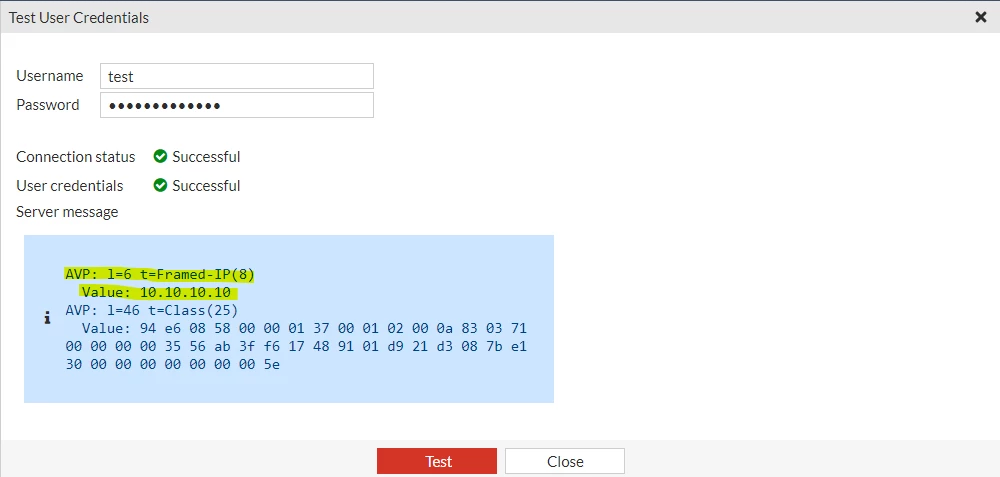
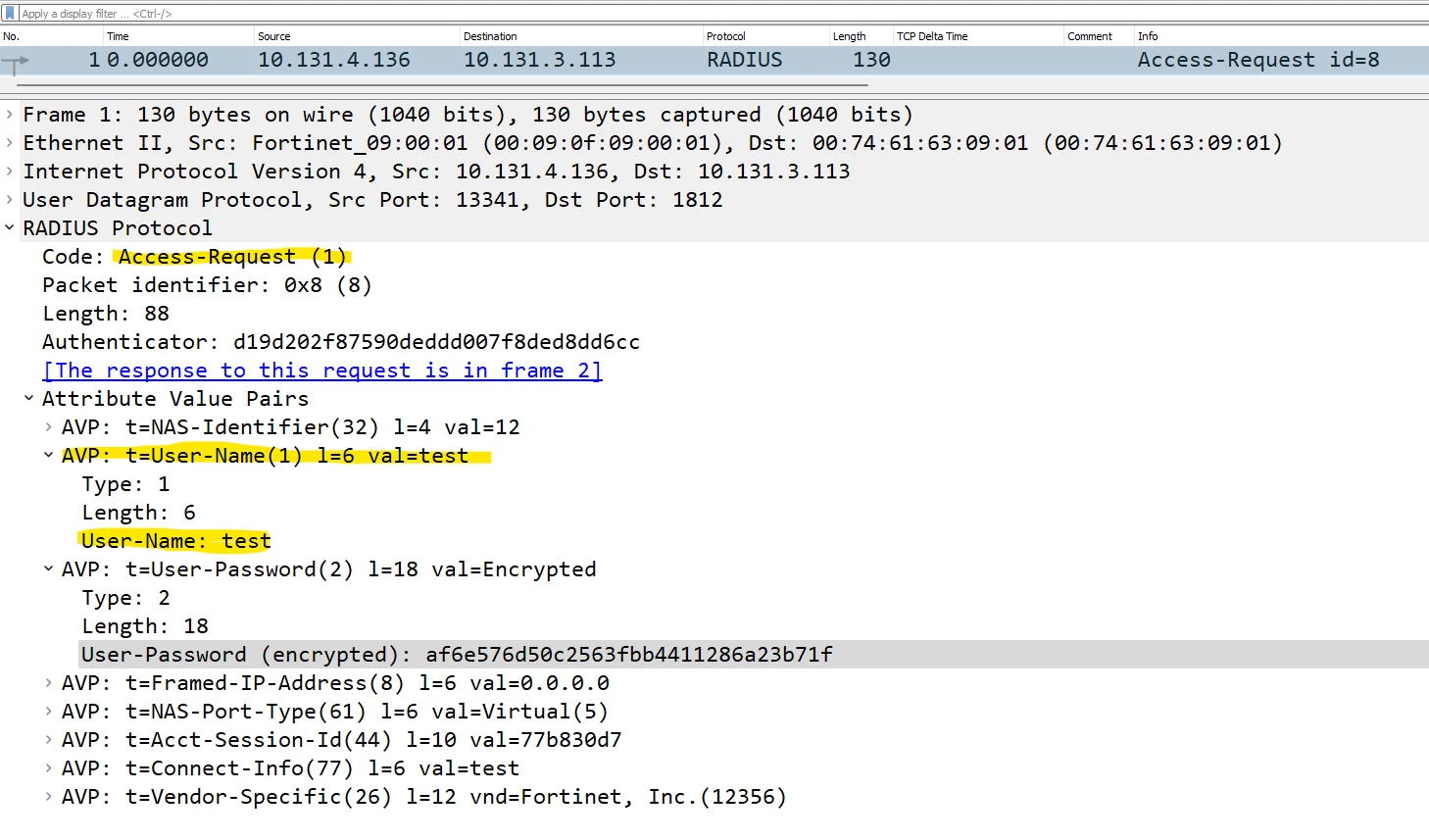
Use a sniffer v6.0 from the firewall to the RADIUS server and check in the PCAP what response is server gives when authenticating the user:
An access Request message from the firewall to the RADIUS server:
Access Response from the server:
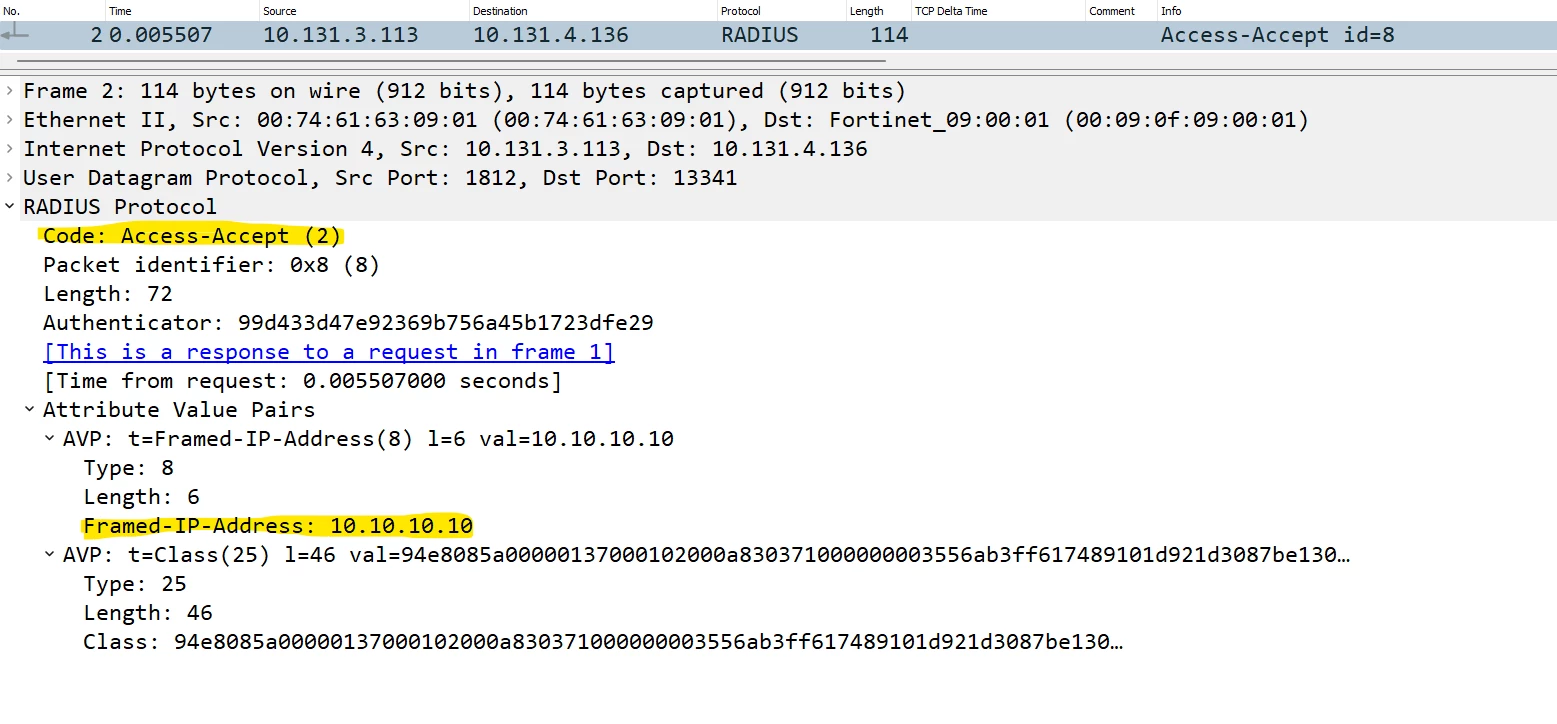
Use the below debugs:
diagnose debug reset
diagnose debug application fnbamd -1
diagnose debug application sslvpn -1
diagnose debug enable
Once the issue is reproduced, stop the debug using:
diagnose debug disable
diagnose debug reset

