


Technical Tip: 'Failed getting WAN IP' message from debugging
Description
This article describes how to fix the issue when FortiGate cannot get the proper license.
When the debugging is run, it shows the message 'Failed getting WAN IP'.
Scope
FortiGate.
Solution
- When a FortiGate with VDOM settings cannot get the proper license, run the debugging with CLI commands as below to investigate the issue.
From the CLI.
diagnose debug reset
diagnose debug disable
diagnose debug application update -1
diagnose debug console timestamp enable
diagnose debug enable
After that, it can show the debugging message as below, including 'Failed getting WAN IP'.
Once the logs are generated, ensure debugging Is fully turned off by running the command 'diagnose debug disable'.
Debugging log.
upd_daemon[1669]-Received update now request
upd_daemon[1455]-Found cached action=00000002
do_update[473]-Starting now UPDATE (final try)
upd_fds_load_default_server[935]-Resolve fds ip address failed.
upd_fds_load_default_server6[4554]-Resolve fds ipv6 address failed.
upd_fds_create_list[1234]-No server found for update[00000002]
do_update[495]-UPDATE failed
do_check_wanip[631]-Starting getting wan ip
upd_fds_load_default_server[935]-Resolve fds ip address failed.
upd_fds_load_default_server6[4554]-Resolve fds ipv6 address failed.
upd_fds_create_list[6456]-No server found for update[00000040]
do_check_wanip[635]-Failed getting wan ip
The solution to fix the issue:
- In case the FortiGate has a VDOM setting, make sure that one VDOM that can access the internet properly is present.
- Go to System -> VDOM, select the VDOM that can access the internet, and select 'Switch Management'.
- Test and update the license again.
If this does not work:
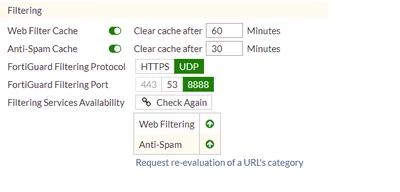
Try to change the anycast server: it is recommended to disable anycast and switch back to unicast servers.
config system fortiguard
set fortiguard-anycast disable
set protocol udp
set port 8888
set sdns-server-ip 208.91.112.220 173.243.140.53 210.7.96.53
end
Another possible cause can be that, in cases when the FortiGate is managed by a FortiManager, under config system central-management, the setting include-default-servers is set to disable.
| enable | Enable the inclusion of public FortiGuard servers in the override server list. |
| disable | Disable the inclusion of public FortiGuard servers in the override server list. |
config system central-management
set include-default-servers enable
Another possible cause of this issue is that the type is set to none under central-management as follows:
config system central-management
set type none ß-----------à
end
Change type to 'Fortiguard' as follows:
config system central-management
set type fortiguard
end
Note: Sometimes, while setting type to FortiGuard will give the following error:
(central-management) # set type Fortiguard
Cannot choose FortiGuard when cloud communication is disabled in system. Global.
node_check_object fail! for type fortiguard
value parse error before 'fortiguard'
Command fail. Return code -651
In this case, it is necessary to enable cloud communication under the global settings as follows:
config system global
set cloud-communication enable
end
In many cases, problems related to FortiGuard are caused by ISPs. Some ISPs block traffic on port 53 that is not DNS or that contains large packets. In those cases, the solution is to use port 8888.
Other ISPs block traffic to HTTPS port 8888. In those cases, the solution is to use UDP port 53.
Related port information:
- Encrypted Virus Samples auto-submitted to FortiGuard – 25.
- DNS lookups – 53 UDP.
- FortiGuard Server List requests to FortiGuard – 53 UDP.
- AntiSpam or Web Filtering rating lookup queries to FortiGuard – 53 UDP or 8888 UDP.
- URL/AS rating lookup queries to FortiGuard – 53 UDP.
- Real-time Black List (RBL) lookup requests to RBL services – 53 UDP.
- Fortinet Device Registration to FortiGuard – 80 HTTP.
- Firmware and Signature Downloads from FortiGuard – 443 HTTPS.
- FortiGuard Server List requests to FortiGuard – 1027 UDP / 1031 UDP.
- AntiSpam and Web Filtering rating lookup requests – 1027 UDP / 1031 UDP.
- AntiVirus/IPS Push / FortiGuard to FortiGate – 9443 UDP.
- Try to connect to FortiGuard Servers.

