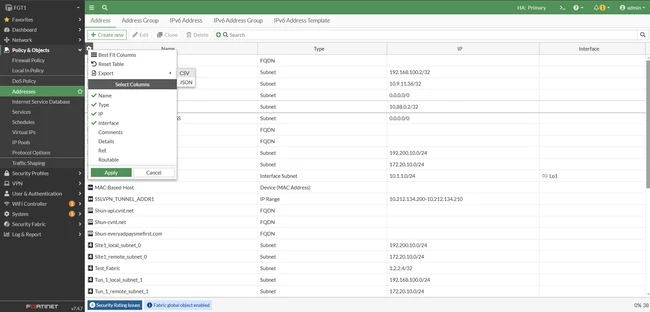
Technical Tip: Export firewall address objects to CSV or JSON
| Description | This article describes how to export firewall address objects from the FortiGate GUI to CSV or JSON format. |
| Scope | FortiGate v7.4.2+, v7.6+. |
| Solution | This is only applicable if FortiGate is operating with v7.4.2 or above.
Go to Policy & Objects -> Addresses -> Hover to the left side of the first column and select the gear icon, then navigate to (Configuration Table) -> Export -> CSV or JSON.
The following objects can be exported in the same manner:
Note: The application and IPS signature list can be exported in similar manner but only with FortiOS 7.6.x. See |