


Technical Tip: Explaining the 'honor-df' global setting
Description
This article describes the behavior of the 'honor-df' global setting:
config system global
set honor-df enable/disable <- Enabled by default.
set hostname "FGT1"
set timezone 04
end
DF stands for 'Don't Fragment' Flag.
- When enabled, it honors the Don't Fragment Flag.
- When disabled, it ignores the Don't Fragment Flag.
Scope
FortiGate.
Solution
FortiGate can ignore the 'do not defragment' portion of a packet.
As this is a global setting, this will only apply to the FortiGate and not to any other devices in the chain.
Regardless of the MTU settings on the interfaces, FortiGate will ignore or honor the bit before the packet is forwarded.
Note:
In FortiGate, there is no option for clearing a df bit with the passing traffic. FortiGate can ignore it.
Consider the following scenario:
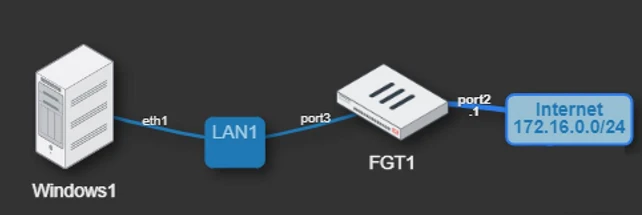
The Windows1 Machine has a default MTU of 1500, but port3 and port2 on the FortiGate have an MTU of 1000.
When the user tries to ping the simulated Provider Internet Gateway in this example (172.16.0.254) from the machine, the following will happen:
set honor-df disable
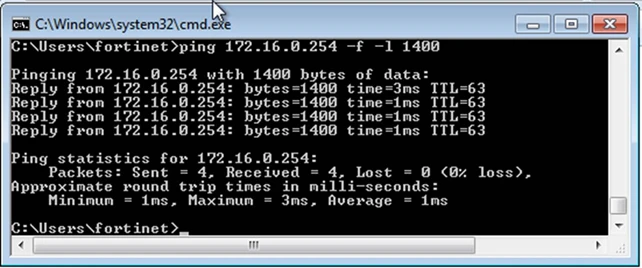
Although the MTU of the FortiGate interface is set to 1000 and the user is trying to use an MTU of 1400 without fragmentation (-f), the packets are still allowed to flow: 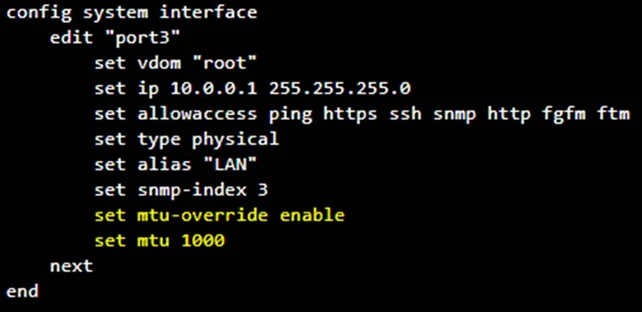
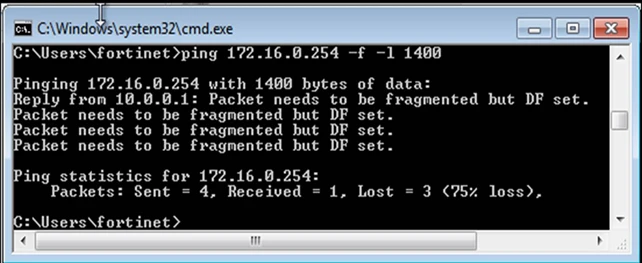
set honor-df enable
If the user sets the 'set honor-df enable' under global config, FortiGate will start honoring the 'do not fragment' bit, and the packets will be dropped:
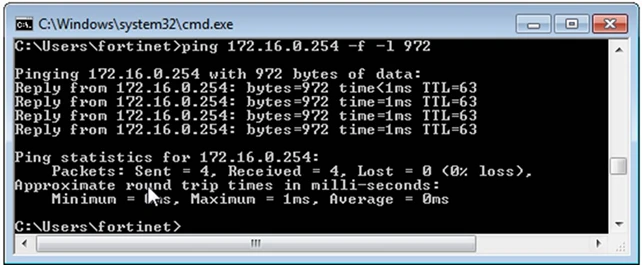
In this particular case, if the user wants to make sure a packet is forwarded correctly without being fragmented, the user has to adjust the ping MTU to 972:
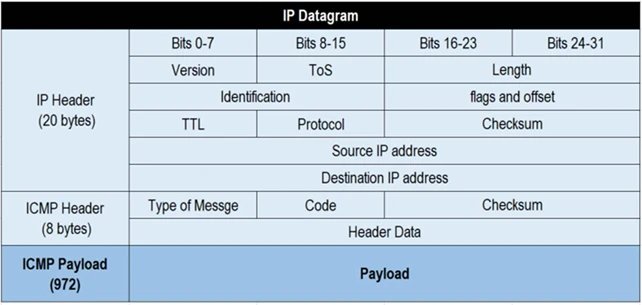
972 is the value chosen because the ICMP overhead consists of 28 bytes (972+28=1000 as the MTU is set):
For additional guidance on isolating the issue and implementing the solutions discussed above, refer to the following article:
Technical Tip: Destination unreachable (Fragmentation needed).
Technical Tip: Destination unreachable (Fragmentation needed).
Related articles
- Technical Tip: Destination unreachable (Fragmentation needed)
- Technical Tip: Finding the MTU of a FortiGate interface
- Technical Tip: MTU size on a Physical interface is displayed differently to the explicit MTU in PPPo...
- Technical Tip: IP Packet fragmentation over IPSec tunnel interface explained
- Disabling NP offloading for firewall policies
