Technical Tip: Explaining the 'diagnose hardware sys slab' command
| Description | This article describes how the 'diagnose hardware sys slab' command is usually used for memory troubleshooting, and elaborates on the meaning of the command's output. | ||||||||||||||||
| Scope | FortiGate. | ||||||||||||||||
| Solution | The memory slabs are a collection of objects used by the kernel to store information in memory.
Examples of slabs:
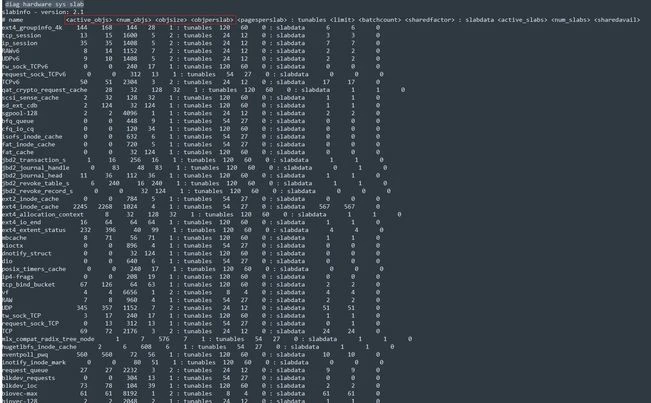
The command 'diagnose hardware sys slab' is often used to determine the memory status of a device during troubleshooting:
In the above:
active_objs <----- Number of objects that are currently in use. num_objs <----- Total number of allocated objects that are in use or not in use. objsize <----- Size of objects in this slab (in bytes). objperslab <----- Number of objects stored in each slab. pagesperslab <----- Number of pages allocated for each slab.
<active_objs> <num_objs> <objsize> tcp_session 2539 2700 1536 ip_session 3970374 3970374 1344 TCP session = 2700 (num_objs) x 1536 (objsize) = 4,147,200 bytes to Mb = 4.1Mb IP session = 3970374 (num_objs) x 1344 (objsize) = 5,336,182,656 bytes to GB = 5.33 GB
The slab value can be found with the following command:
get ha memory |