




Technical Tip: Enabling passive-interface when using OSPF
Description
This article describes how to enable passive-interface in the CLI.
Scope
FortiGate.
Solution
The OSPF 'network' command adds all interfaces with a subnet within the range of the network command to OSPF, and OSPF hello packets are sent on those interfaces.
Sometimes, it is necessary to advertise a subnet using OSPF but not send OSPF hello packets on this interface.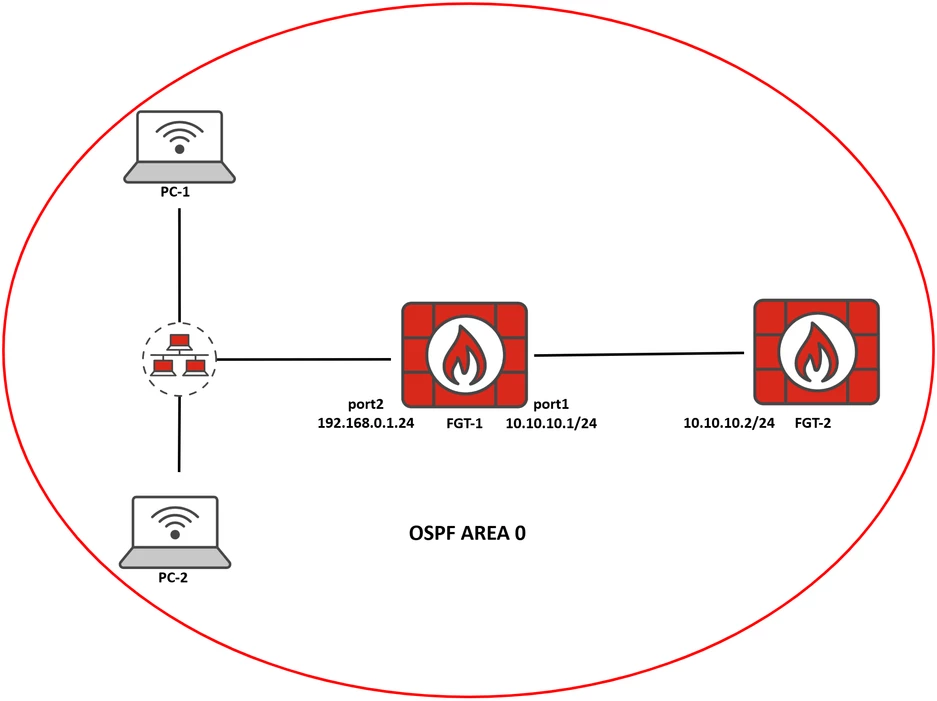
set router-id 8.8.8.8
config area
edit 0.0.0.0
next
end
config network
edit 1
set prefix 10.10.10.0 255.255.255.0
next
edit 2
set prefix 192.168.0.0 255.255.255.0
next
end
end
diagnose sniffer packet port2 'proto 89' 4 none l
interfaces=[port2]
filters=[proto 89]
2020-04-19 10:11:01.771921 port2 -- 192.168.0.1 -> 224.0.0.5: ip-proto-89 44
2020-04-19 10:11:11.393576 port2 -- 192.168.0.1 -> 224.0.0.5: ip-proto-89 44
2020-04-19 10:11:21.805370 port2 -- 192.168.0.1 -> 224.0.0.5: ip-proto-89 44
The debug shows the following output:
diagnose ip router ospf level info
diagnose ip router ospf packet hello enable<----- This command only filters OSPF hello packets.
diagnose debug enable
[root] OSPF: RECV[Hello]: From 192.168.0.1 via port2:x.x.x.x (x.x.x.x -> 224.0.0.5)
[root] OSPF: SEND[Hello]: To 224.0.0.5 via port2:x.x.x.x, length 48
[root] OSPF: RECV[Hello]: From 192.168.0.1 via port2:x.x.x.x (x.x.x.x -> 224.0.0.5)
[root] OSPF: SEND[Hello]: To 224.0.0.5 via port2:x.x.x.x, length 48
diagnose debug reset
To stop sending hello packets over 'port2', configure 'port2' as a passive-interface.
config router ospf
set passive-interface port2
end
interfaces=[port2]
filters=[proto 89]
diagnose ip router ospf level info
diagnose ip router ospf packet hello enable
diagnose debug enable
[root] OSPF: RECV[Hello]: From 10.10.10.2 via port1:x.x.x.x (x.x.x.x -> 224.0.0.5)
[root] OSPF: RECV[Hello]: From 10.10.10.2 via port1:x.x.x.x: Interface is passive
[root] OSPF: ospf_ipc_server_accept:1200:8f8 create ipc_handler=0x7fd0f718dac0 for sock=20
[root] OSPF: ospf_ih_on_read:1070:8f9 request type=18 len=24 vfid=0 start=0 count=8000 flags=0x1
[root] OSPF: ospf_ih_on_read:1166:8fa response type=18 len=24 vfid=0 start=0 count=0 flags=0x1 total=0 ret=32
[root] OSPF: ospf_ih_on_close:1180:8fb delete ipc_handler=0x7fd0f718dac0 for sock=20
diagnose debug reset