Technical Tip: Disable or decrease the frequency of security rating summary emails
| Description | This article describes how to disable the security rating summary emails or how to receive them only once per day. |
| Scope | FortiGate. |
| Solution | In some cases, users do not want to receive FortiGuard security rating service emails or want to receive only one per day (by default, the emails are sent every 4 hours).
Security rating checks by default are scheduled to run automatically every four hours.
To disable the checks using the CLI:
Consult the 'To disable automatic security checks using the CLI' section of the security rating administration guide page.
To disable emails from being received:
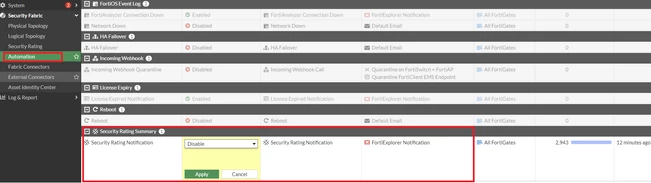
Go to the Security Fabric -> Automation -> Security rating Summary -> Edit and set the status to 'Disable'.
To receive emails only once per day:
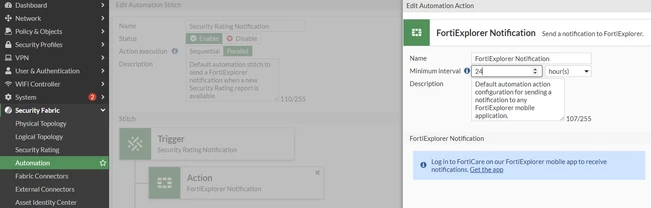
Go to the Security Fabric -> Automation -> Security rating summary -> Edit -> Stitch -> Action -> Edit FortiExplorer Notification and Increase the minimum interval to 24 hours.
|