Technical Tip: CrowdStrike Integration with FortiGate
| Description | This article describes how to configure CrowdStrike FortiGate data ingestion. |
| Scope | FortiGate v7.2 or later. |
| Solution | FortiGate supports the third-party log server via the syslog server. The Linux-based Syslog server can be configured in FortiGate to integrate with CrowdStrike.
config log syslogd setting set status enable set server "y.y.y.y" <----- Syslog server. set mode udp set port 514 set facility syslog set source-ip 'x.x.x.x' set format default set priority default set max-log-rate 0 set interface-select-method auto end
The source IP that appears in the configuration "set source-ip 'x.x.x.x'" refers to the source interface IP address that the FortiGate will use for sending logs to the Syslog server
Users can customize the Syslog severity level by CLI:
show full log syslogd filter
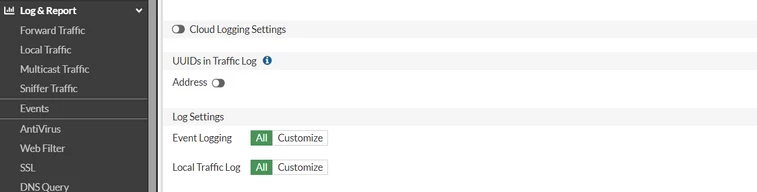
Users can choose to send all logs or customize logs by navigating under Log & Report -> Log Settings:
To troubleshoot this, run the following commands:
execute ping-options reset execute ping-options source "x.x.x.x" <------ source-ip configured on the Syslog setting. execute ping y.y.y.y <----- Syslog server IP.
If the ping works fine, run a sniffer to see if the FortiGate is sending information on port 514:
diagnose sniffer packet any 'host x.x.x.x and y.y.y.y and port 514' 4 0 l
Seeing traffic on this sniffer would mean that logs are being sent to the Syslog configured, and something on the other end needs to be checked.
Related article: Troubleshooting Tip: Syslog and log trouble shooting via CLI |