Technical Tip: CPU high when HTTPS is enabled on an interface in a multiple VDOM environment
| Description | This article describes an issue where after an upgrade, CPU usage spikes when HTTPS is enabled on an interface in a multiple VDOM environment, causing FortiGate to reboot. |
| Scope | FortiGate. |
| Solution | After performing a firmware upgrade, access to the Web GUI may be lost. When attempting to recover access and re‑enable HTTPS on the interface, instability can occur, potentially leading to service disruption or even an unexpected FortiGate reboot.
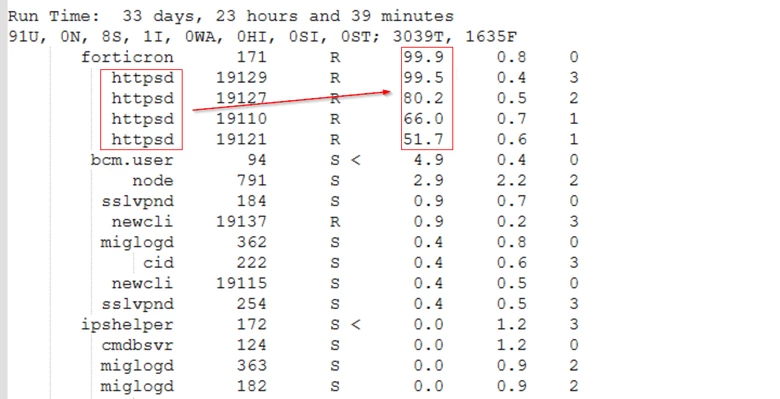
To confirm whether the issue is related to HTTPS access, connect to the FortiGate via SSH and verify the top CPU‑consuming processes using the appropriate diagnostic commands:
diagnose sys top-all 1 100
In the image above, it is evident that the HTTPS process is consuming an excessive amount of CPU resources:
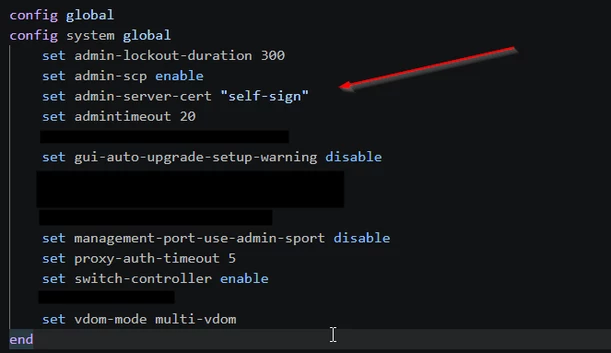
During the upgrade process, it is possible that the administrator server certificate was modified:
As a result, the HTTPS process may fail to operate correctly, leading to abnormal resource consumption. This excessive CPU usage can cause system instability and, in severe cases, service interruption or FortiGate reboots.
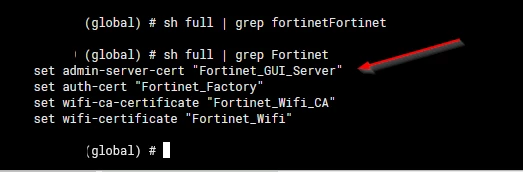
To solve this problem, select the correct certificate under admin-server-cert:
config system global end
Related article: Troubleshooting Tip: The FortiGate login GUI page is unresponsive |