



Technical Tip: Copper transceiver will cause status problem
Description
This article explains that Copper transceiver will cause a status problem and how to fix this issue.
Scope
FortiGate
Solution
When using an old copper transceiver with SKU: FG-TRAN-GC with FortiGate, sometimes the user will experience the wrong status when the speed and duplex is set manually.
For example:
When the speed and duplex is set manually if the connected switch has a port down, on FortiGate the interface status is up.
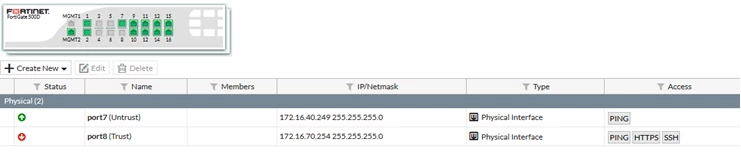
In the above case, port7 is manually set as 1000F and the connected switch has port down however, the FortiGate sill detects it as up.
The reason is that this copper transceiver does not support the link indication feature.
A new copper transceiver with SKU FN-TRAN-GC has been released for this.
As a workaround, it is possible to set the speed as auto-negotiation.
The reason is that this copper transceiver does not support the link indication feature.
A new copper transceiver with SKU FN-TRAN-GC has been released for this.
As a workaround, it is possible to set the speed as auto-negotiation.