


Technical Tip: Configure admin certificate authentication
Description
This article describes how to configure administrator certificate-based authentication on the FortiGate.
The following certificates are required to configure Admin certificate authentication:
- User certificate.
- CA root, signed by the user certificate.
Scope
FortiGate.
Solution
To configure Admin certificate-based authentication, follow the steps below:
On the FortiGate:
- Enable the 'Certificate Feature' if not enabled (Go to System -> Feature Select).
- Import the CA certificate under external CA Certificates (Go to System -> Certificates -> Import -> CA Certificate).
Once imported, the certificate is shown as CA_Cert_1 (if a second CA certificate is imported then is shown as CA_Cert_2, etc.). - Create a PKI user:
config user peer
edit pki-admin
set ca CA_Cert_1
end - Add the PKI user to a firewall group:
config user group
edit PKI-group
set member pki-admin
end - Create an admin user, enable peer authentication, and select the created group:
config system admin
edit admin-username
set peer-auth enable
set accprofile super_admin
set peer-group PKI-group
end
On the user's PC:
Import the user certificate which must be signed by the CA_Cert_1, on the web browser. Verify that the certificate is in the 'Personal Store'.
Results:
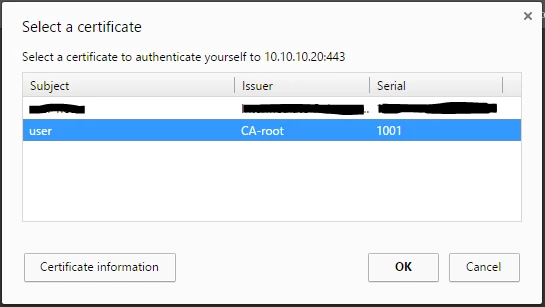
While debugging the 'fnbamd' application on the FortiGate, it is observed that the certificate provided by the user is checked against the CA imported on the FortiGate:
FGT-5_4 # diagnose debug enable
FGT-5_4 # [2197] handle_req-Rcvd auth_cert req id=1168321813
[1440] check_cert-Certificate chain depth 0, max chain depth 8
[1445] check_cert-Subject name 'C = US, ST = Florida, O = Fortinet, OU = Fortinet-TAC, CN = user, emailAddress = email@email.com'
[1446] check_cert-Issuer name 'C = US, ST = Florida, L = Sunrise, O = Fortinet, OU = Fortinet-TAC, CN = CA-root, emailAddress = email@email.com'
[1376] chain_verify-Trusted CA found: CA_Cert_1
[1922] fnbamd_auth_cert_start-Cert subject 'C = US, ST = Florida, O = Fortinet, OU = Fortinet-TAC, CN = user, emailAddress = email@email.com'
[1765] cert_check_group_list-checking group type 1 group name 'PKI-group'
[1658] check_add_peer-check peer user 'pki-admin' in group 'PKI-group', result is 0
[1783] cert_check_group_list-Matched group 'PKI-group'
[180] fnbamd_comm_send_result-Sending result 0 (error 0) for req 1168321813
Stop the above debugs using the following commands:
diagnose debug disable
diagnose debug reset
FGT-5_4 # get system admin list
username local device vdom profile remote started
admin ssh port9:10.10.10.20:22 root super_admin 192.168.200.100:51326 2016-12-19 12:50:13
admin-username https port9:10.10.10.20:443 root super_admin 192.168.200.100:51740 2016-12-19 13:02:59
Related document:

