Technical Tip: Block Google Gemini using Static Web Filter
| Description | This article describes how to block Google Gemini using a Static Web Filter. |
| Scope | FortiGate. |
| Solution | Sometimes organization may require blocking Google Gemini AI. This can be done by using the static URL filter on the Firewall.
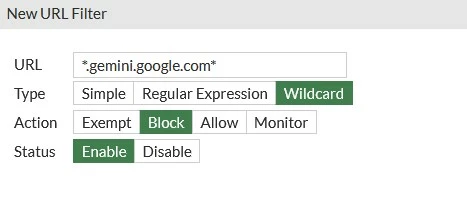
Go to Security Profiles -> Web Filter and edit the Web Filter profile that is assigned to the policy that the outgoing traffic towards the Google destination is matched with. From 'Static URL Filter', enable 'URL filter' (if it has not been enabled already) and select 'Create New'. Configure the URL filter as follows:
This will work with the certificate inspection. A deep inspection profile is not required.
The configuration on the CLI is as follows:
config webfilter urlfilter
Note: Blocking gemini.google.com will not block Google's AI overview, nor the AI mode within the search engine. This requires the use of SSL deep inspection. Additional information can be found in Technical Tip: Blocking Google Search AI mode via Web filter profile.
Related articles: Add FortiGuard web filter categories for AI and cryptocurrency 7.4.1 | Fortinet Document Library Technical Tip: Using a static URL filter feature to allow/block web sites |